This thread has been locked.

If you have a related question, please click the "Ask a related question" button in the top right corner. The newly created question will be automatically linked to this question.

CCS/MSP430F5529: simple empty TI RTOS example not running on CCS9

Part Number: MSP430F5529
Other Parts Discussed in Thread: MSP-EXP430F5529LP, MSP-FET, MSP-EXP430FR5994, MSP430WARE,

Tool/software: Code Composer Studio

I'm trying to get some of the TI-RTOS (v 2.20.0.06) examples running on the MSP-EXP430F5529LP Launchpad board.  I've tried several of the TI examples.  They used to work for me in previous years, but this year (running CCS Version: 9.0.1.00004 ) it's not working.

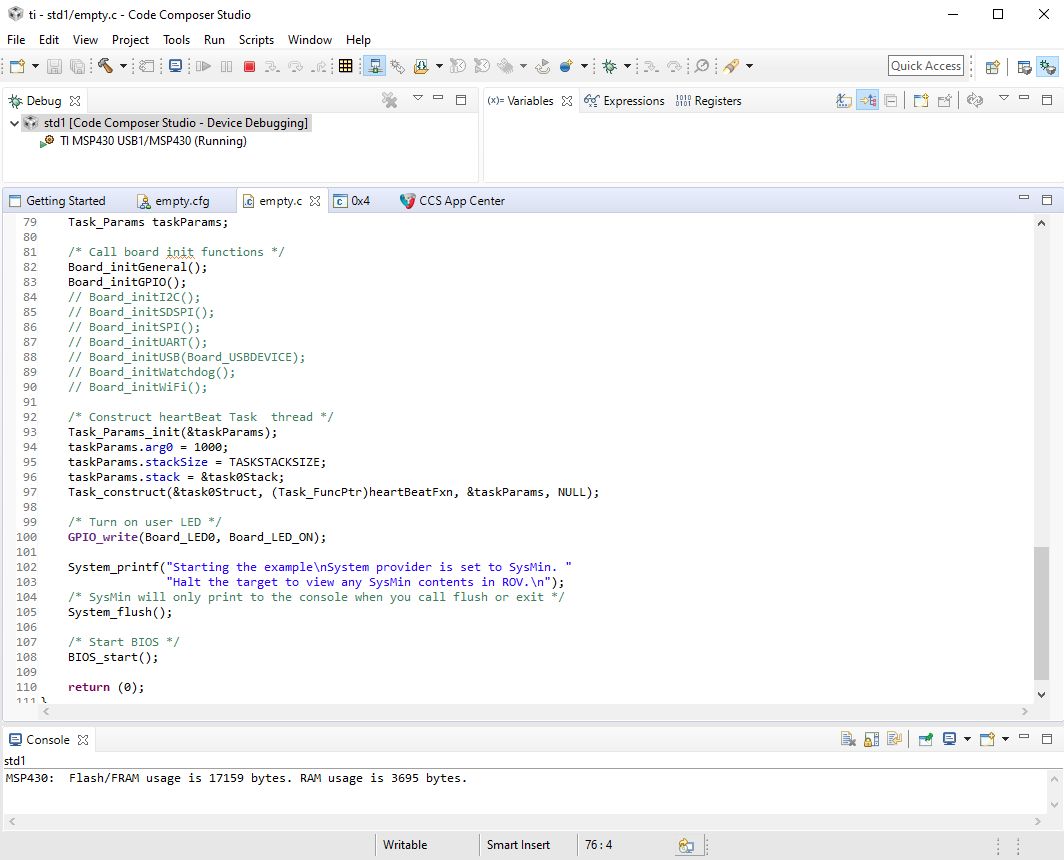
The examples such as "Empty" and "Empty-Minimal" will build with no errors, but when I go to debug them on my board, the LED1 heartbeat is not blinking.   

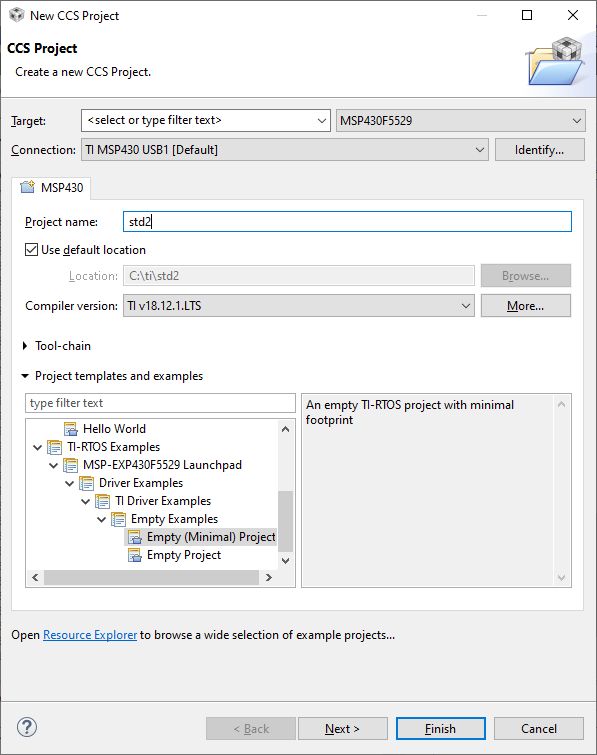
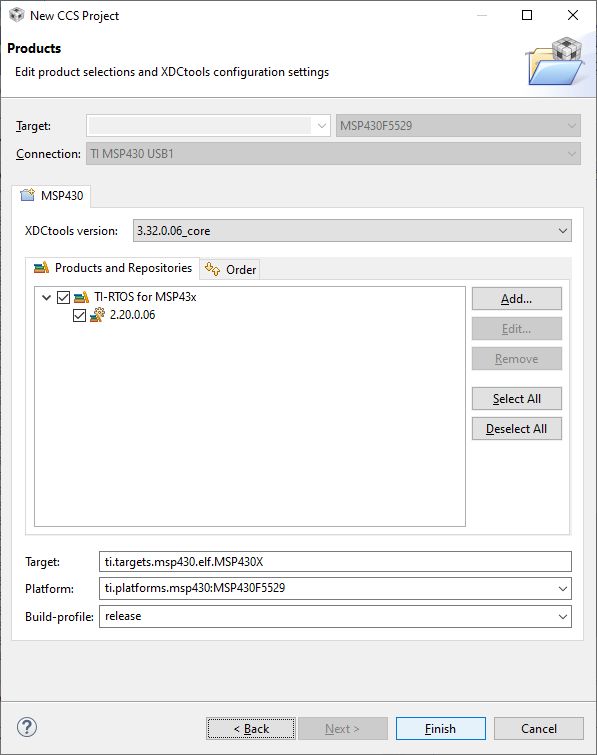
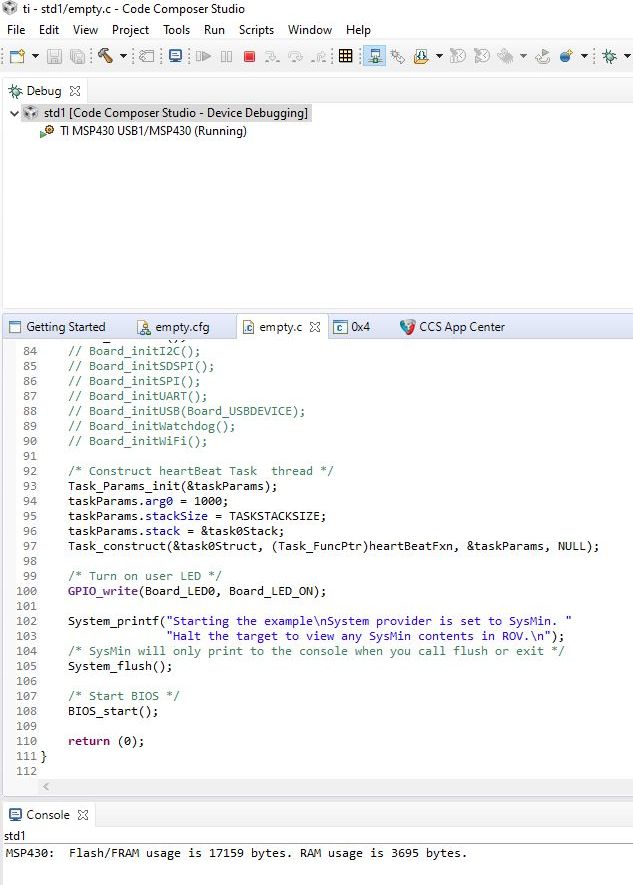
The red LED blinks at the top of the board during the programming in progress, but then it stays lit while the debugger says "running"... but the LED1 at the bottom which should be blinking is not blinking.  I'll attach photos of setting up the Empty project (empty.c) and also the Empty-Minimal project (empty_min.c).  Same result.

When I debugged for the first time, it popped up with a firmware-update request, which I confirmed and let it run to completion. 

(Exact message was: "MSP430: Error initializing emulator: A firmware update is required for the MSP430 Debug Interface (MSP-FET430UIF / MSP-FET / eZ-FET). Click the "Update" button to update the firmware and launch your debug session (this may require several update steps).  DO NOT UNPLUG THE INTERFACE DURING THE UPDATE.") 

After every other time, it did not give any firmware-update question, so I assume the bootloader firmware was succcessfully updated.

I have tried three different Launchpads.   They all give identical results.

Thanks for any help you could provide, or ideas on troubleshooting.
  • Hi Tim,

    Can you tell me where, the exact address, did you get the projects, such as "Empty" and "Empty-Minimal" ? 

    Did you mean that the very projects "Empty" and "Empty-Minimal" worked to blink the LED on MSP-EXP430FR5994 several years ago but now it didn't work well? Please confirm the same projects and same board.

  • Hi Wei,

    Thanks for your help.  The boards we have are the MSP-EXP430F5529 and the MSP-EXP430F5529LP (I tried both types, and three different copies of the LP board), not the MSP-EXP430FR5994.   I think the "Empty" and "Empty-Minimal" projects used to work in the past with older versions of CCS on the MSP-EXP430F5529LP board.   I teach the course every year and the IT department generally upgrades our CCS version in between each year's course.

    I think the web address that the code and project files are from is: http://software-dl.ti.com/dsps/dsps_public_sw/sdo_sb/targetcontent/tirtos/index.html  under the Windows download link, 2.20.00.06   22 Jun 2016 .  I tried two different computers that had CCSv9.  One of them already had the TI-RTOS files installed by the IT department, and the other computer I downloaded and unzipped the files myself from the link above.  But I think the files are identical, since the last time they were changed was 2016. 

    On my computer, I think the files were located here:  C:\ti\tirtos_msp43x_2_20_00_06\examples\MSP430\TI\MSP_EXP430F5529LP\empty   I say "I think" because I have tried making the CCS project several different ways.  I tried making it from the "New RTOS Project" template as shown in the screenshots, and also checked the files in the new "from-template" project and they seem to be identical to the ones in that folder.

    Thanks for any further thoughts.   Also, I am wondering if the board is actually running the project or not.  Usually when I start a Debug session by clicking the "bug" button, it pauses before starting to run main(), and then I click the green/yellow "play" button and it runs.  But in this case, after I click the "bug" button to start a Debug session, it goes straight to the "running" state (screenshot shown previously), without my clicking anything to start it running.  Then when I click pause, it goes to a tab labeled 0x4 , with text "Break at address "0x4" with no debug information available, or outside of program code."   Is there any other simple way to see if the code is actually running, besides blinking an LED or printing 'hello world' or stopping in the debugger?

  • Hi Tim,

    It seems the project you are using has some issue for the project configuration. I would suggest to delete the project and re-create a new one and try again. And please follow the getting start guide to configure your project and debug the function.

  • Hi Wei,

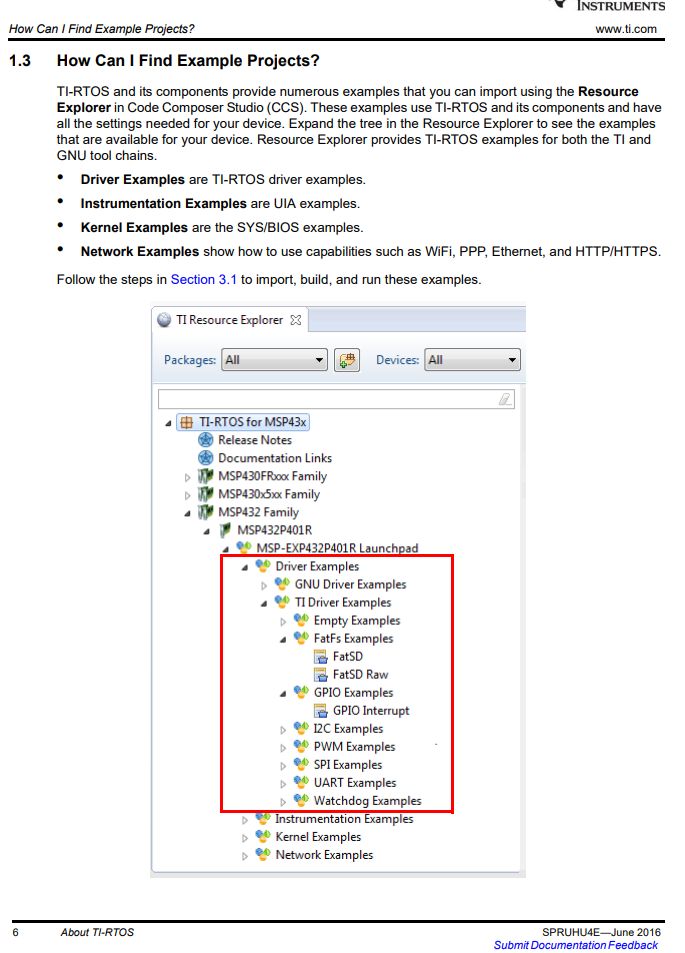
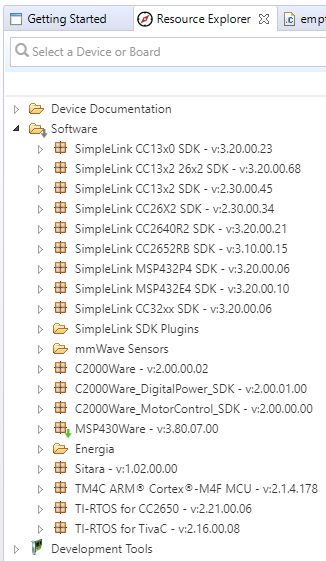
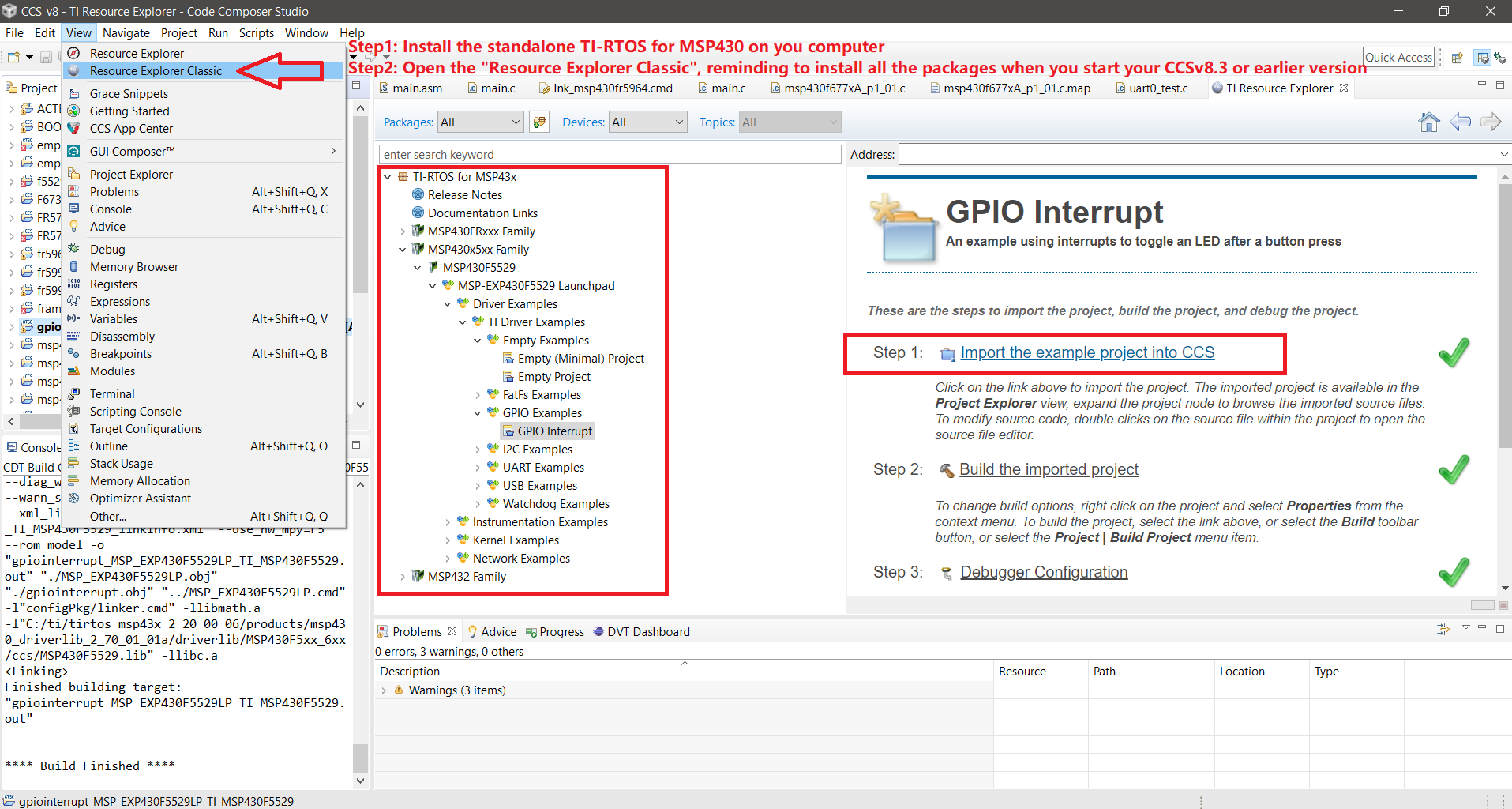
    Thank you for your suggestion.  Indeed, I tried to follow the Getting Started Guide, which suggests starting from the demo project in the Resource Explorer.  Unfortunately, it seems that TI has removed that demo project from the most recent Resource Explorer.   Here is a screenshot from the Getting Started Guide (2016), followed by a screenshot of what I see now in my Resource Explorer (in CCSv9).  There are RTOS resources in the SimpleLink sections for MSP432, but not for TI-RTOS for MSP43x or MSP430Ware (these example projects used to be there in previous years).

    Here is what I currently see in CCSv9 Resource Explorer:

    Please let me know if you have any more ideas on how to get this to work, as it used to!  Thanks!

  • Hello again,

    I made some progress, as follows.

    I followed the "Getting Started" guide ( http://www.ti.com/lit/ug/spruhu4e/spruhu4e.pdf ) section 3.1.2, "Creating Examples to Build via a Command Line", updating the compiler paths in this file to use the latest installed compiler, c:/ti/ccs901/ccs/tools/compiler/ti-cgt-msp430_18.12.3.LTS

    C:\ti\tirtos_msp43x_2_20_00_06\tirtos.mak

    I generated a new set of the example directories, putting them into the "TIMPATH" directory:

    c:\ti\tirtos_msp43x_2_20_00_06>..\xdctools_3_32_00_06_core\gmake.exe -f tirtos.mak examplesgen DEST=TIMPATH

    Then I updated the compiler paths, header paths, and include paths in this file to use the latest files from ccs901, 18.12.3.LTS compiler, etc:

    C:\ti\tirtos_msp43x_2_20_00_06\TIMPATH\examples\MSP430\TI\MSP_EXP430F5529LP\makedefs

    After this, I was able to build the "empty_min" example from the command line using gmake:

    C:\ti\tirtos_msp43x_2_20_00_06\TIMPATH\examples\MSP430\TI\MSP_EXP430F5529LP\empty_min>c:\ti\xdctools_3_32_00_06_core\gmake.exe

    This successfully built the example, creating a "empty_min.out" file.

    However, I was not sure how to actually program and run it on the board, other than using CCS9.  I tried importing it in CCS as a project using File / Open Projects From File System, which successfully loaded the "project", but when I clicked Build, nothing happened, because apparently the build settings were not specified.

    So I tried creating a new project in CCS9 called "emptymin_STD3" (based on the same "empty_min" template as before), then clicked the bug button to start Debugging (and as before, it would not debug).

    Next, I copied/pasted/overwrote as many of the files as I could find matches for, from the command-line generated/built example into the CCS generated/built example directory.  Now when I clicked Debug and it automatically tried to build, it gave me 31 errors.

    Next, the dialog window popped up and asked if I wanted to proceed with the debug launch despite the errors.  At this point I copied in the previously built .out file from the command-line build, which I had renamed to be the same as the name of the .out file in the CCS build, to ensure that it would overwrite that file.  (In fact, the CCS build .out file had been deleted in the build process anyway.)

    After copying the .out file from the command-line build into the CCS build, I clicked the "Proceed" button on the dialog to proceed with the launch despite the errors.  Then it programmed the Launchpad board with the .out file from the command-line build, and this time CCS paused in the Debug view with the green/yellow triangle "Resume" button enabled.  When I clicked that "Resume" button, it started running the program with the heartbeat LED successfully blinking on the Launchpad, meaning that the RTOS project was successfully running.

    So this long workaround kind-of works, but is there a way to get it to build and debug successfully directly from CCS9?

    I attached my two CCS project directories in a zip file.
    Thanks, Tim
    attempts.zip

  • Hi Tim,

    I checked you problem that the getting started steps for import the example projects on the guide can't work on the current TI Resource Explorer. I believe we merged most of the TI-RTOS resources to the new SDK for devices except MSP430 family, since the latest TI-RTOS standalone package is published on Year2016.

    We already had a folder of TI-RTOS for MSP430 - v2.20.00.06 in the home tree of TI Resource Explorer at beginning of this year. But I can't find it now and I will check with our SW team how users could get the TI-RTOS for MSP430 in TI Resource Explorer and get back to you.

    BTW, you could download the compiled .out file to your device using Uniflash tool, which could be much easier than the way you did.

  • Hi Tim,

    We removed TI-RTOS for MSP430 from Online Resource Explorer but it is still available at http://software-dl.ti.com/dsps/dsps_public_sw/sdo_sb/targetcontent/tirtos/index.html. Once installed on your machine (assuming in c:\ti), you can use “Resource Explorer Classic” to import the examples. Note, this requires you have CCS 8.3 or earlier.  We don’t support trying to import via the resources directory.

    Then you could compile and debug the example projects on CCS.

  • Thank you Wei.   It sounds like you are saying that there is no longer any way to run the TI-RTOS examples on MSP430F5529 from CCS9 and later. 

    This is extremely unfortunate.  Could you pass along my request for the team to reinstate TI-RTOS examples for MSP430F5529 in future versions of CCS, for those of us who have invested heavily in this processor for education?

    I will mark this as "resolved" for your sake, because I appreciate your help in diagnosing the problem.  But I do not really consider this problem resolved.  A key resource has been removed, causing major portions of my and others' university course hands-on materials to no longer work, and this represents a step backward for TI's support for educators.   I know this was not your decision, but please pass along my concern to the RTOS training leadership.

    Thanks again for your time and help.

**Attention** This is a public forum