Other Parts Discussed in Thread: UNIFLASH, MSP430F5529
Hello,
Our customer wants to verify, just verify, its flash contents of MSP430F5510 through USB.
Is there any good tool to do it?
Regards,
Oba
This thread has been locked.
If you have a related question, please click the "Ask a related question" button in the top right corner. The newly created question will be automatically linked to this question.
Hello,
Our customer wants to verify, just verify, its flash contents of MSP430F5510 through USB.
Is there any good tool to do it?
Regards,
Oba
Hi Oba,
The verification you describe is to read the program after downloading it, right? Or other information need to be verified?
Do you hane some details about this requirements?
Thanks!
Best Regards
Johnson
Hello,
Our customer uses 3rd party for flash writing.
Then they want to check the flash contents in the device that the 3rd party wrote.
Regards,
Oba
Hi Johnson,
Sorry to jump-in here. I am working on this w/ Obata (original poster)
It looks like UniFlash has the ability to load a file (bin / hex / text?), and run verification to check if the programmed firmware matches the loaded file.
The customer has downloaded the most recent version of UniFlash, but is having trouble connecting/detecting the device.
- They ran the detect-devices.bat file in the UniFlash directory, but it says no device is connected.
They are using the MSP430F5510 on their own board - not a BoosterPack or Launchpad.
The SLAU319AD - MSP430™ Flash Devices Bootloader (BSL) document talks about needing to have the device power up with the PUR pin tied to VUSB to enter USB BSL mode.
Does this need to be the case for UniFlash to detect the MSP430F5510?
Could you give some details on how to go about programming/verifying a bin/hex/txt file with UniFlash, and verifying it's contents...? What hardware concerns are there, and how to detect the MSP430...(There is also USB1, USB2, USB3...which one do we select?)
Regards,
Darren
Hi Darren,
What problems did the customer encounter when connecting to uniflash? Is it just not detectable?
To be honest, the detection function of uniflash is not very smart, so it is recommended that you directly select the device you used in the search box below, and the connection port is USB1, as shown in the figure below:
If there is no problem with the hardware and connection, you should be able to read the memory value and download the program normally after connected.
Best Regards
Johnson
Hi Johnson,
I have tried replicating the setup using the MSP430F5529 Launchpad. I adjusted the jumpers so as to completely bypass the eZ-FET Lite emulator.
This way, the USB cable connects directly to the MSP430.
But when plugging in the MSP430 Launchpad in this configuration to the PC, I can't get UniFlash to detect it. I tried selecting the device manually and everything, but the connection is never established.
So, I moved on to trying the BSL-Scripter, and was able to get this to work. I was able to upload the BlinkLED via USB BSL, and then run a CRC check and everything worked out. But this is extremely tedious.
What I don't understand, is why BSL-Scripter detects and communicates with the MSP430, while UniFlash cannot. Does this have something to do with HID vs CDC mode operation? (HID vs a regular COM port)
I would love for UniFlash to be able to detect the MSP430F5529 connected directly by USB to the PC; but I am having a heck of a time.
Thanks,
Darren
I guess that BSL interface is not supported by UniFlash.
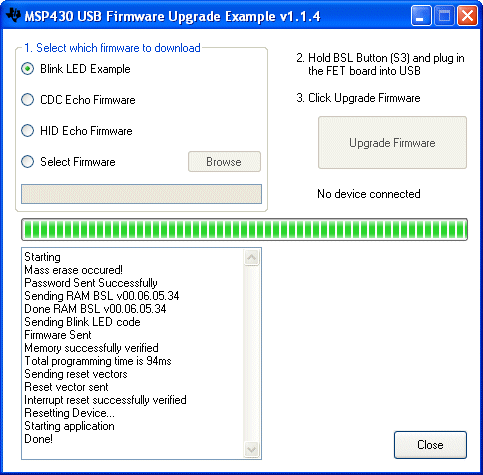
There is MSP430_USB_Firmware_Upgrade_Example (standalone Windows GUI) as part of TI USB stack with auto detection of connected BSL HID devices.
Thank you for the feedback.
[1]
From the MSPBSL Tool page, it states under the BSL-Scripter section "BSLScipter is available standalone and integrated within UniFlash v4.6.0 or greater."
Can we have confirmation on this - and if UniFlash supports MSP430F5xxx devices connected directly via USB cable to the USB peripheral? (No UART converter / etc)
[2]
The customer confirmed when BSL button is pressed (PUR pulled high) - The COM port selection disappears from Device Manager; and the HID option appears. (VID / PID match)
[3]
The customer has used BSL-Scripter successfully to write their program to the MSP430F5510. But they were looking for a way to do the CRC16 check on already-programmed devices. The tool you mention verifies the data, but there is no option to verify without re-writing the firmware. In another E2E post you mentioned a tool you wrote, that looks cool, but the CRC algorithm for BSL-Scripter appears to be different, and the results don't match. So on our (TI) side - do we have any software to calculate the CRC using the same algorithm as the BSL-Scripter? (see #4 below for a python alternative I found)
[4]
They were looking for a way to implement the CRC16 algorithm, and I see you responded to my other E2E Post; it looks like the BSL-Scripter CRC algorithm uses the CRC-16/IBM-3740 algorithm (aka CRC-16/AUTOSAR, CRC-16/CCITT-FALSE). This is based on the results of the CRC_CHECK command in BSL-Scripter.
The check result for the demo program "blinkLED_f5529.txt" came out to be 0xA74D for the 32-bytes after address 0x4400. This is the same as online tools for the CRC-16/CCITT-FALSE algorithm; but it is different from the result of the software you posted in the other E2E Post (I did think that software was really cool though).
Because of this, I found a python package "crccheck" that seems to have the CRC-16/IBM-3740 algorithm, and gives the same 0xA74D result that both the online tool, and BSL-Scripter give.
Is this the algorithm the BSL-Scripter uses?
I used CRC calculation on PC side based on MSP430 5xx/6xx CRC hardware module, for easily compare CRC values calculated by PC and value calculated by MSP430 device. Don't know about BSL CRC_CHECK command in BSL Scripter.
Hi Darren,
UniFlash does not support the F5510 BSL download now. Therefore, after you select the device, the SBW/JTAG mode is used by default, but it seems strange that connected failed with MSPf5529.
Have you tried to download programs to MSP430F5529 via CCS/IAR?
You use BSL (UART interface) to down firmware that is is another download mode, now it only supported on BSL-Scripter for F5xx.
Thanks!
Best Regards
Johnson
**Attention** This is a public forum