This thread has been locked.

If you have a related question, please click the "Ask a related question" button in the top right corner. The newly created question will be automatically linked to this question.

TM4C1294 error connecting to target and I have no idea why

I have no idea how i manage to spoil my Connected Launchpad. I was actually trying out the example code of USB_HOST_MSC, and was able to successfully read my pendrive text file. After that since the example code could not always detect my pendrive i tried to plug and unplug my pendrive, sometimes i did the same thing for the USB cable connected to USB Micro-A/-B. Then suddenly the whole board failed to be debug. The first error i get was 'Frequency out of range' then the following error was 'Error connecting to target'. However in 'Device Manager' Stellaris Virtual Serial Port is still connected, i already tried LM Flash Programmer Debug Port Unlock Utility but still CCS could not debug to my launchpad. LM FLash Programmer also show "Unable to initialize target - 0" in "Program" tab.

  • Hello Alex

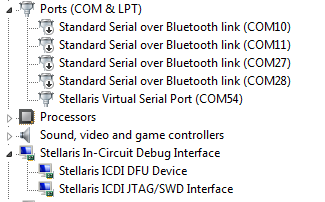
    Is the Stellaris ICDI showing up on the device manager. May be a snapshot would help.

    Regards
    Amit
  • Hello Amit,

    Is this the snapshot you requested?

  • Hello Alex,

    OK, so the ICDI is still working fine. Now we need to ascertain why the Main MCU is not. Can you first check w.r.t Schematics if VDDC=1.2V for the main MCU when the board is powered?

    Also please check if the Steps as per ISSUE#5 in the post e2e.ti.com/.../374640 are followed.

    Regards,
    Amit
  • Alex Lo said:
    i already tried LM Flash Programmer Debug Port Unlock Utility but still CCS could not debug to my launchpad

    After using LM Flash Programmer Debug Port Unlock Utility, was there a message that you have successfully unlocked your Connected Launchpad or failed unlock?

    Return your Tiva Connected Launchpad to its original configuration of jumpers and switches, and without any external devices connected to it, then try LM Flash Programmer Erase Entire Flash. If success Erase Entire Flash, using LM Flash Programmer, load a known working example program like "blinky". If the "blinky" example program works, you have already recovered your Tiva Connected launchpad.

    - kel

  • Hello kel,

    After flashing it in "Debug Port Utility" it shows "Unlock Complete"
  • To everyone,

    To be honest i have no idea why, but all of a sudden after i did the "Debug Port Utitlity" few minutes ago and my whole board is working fine. Thank you for helping me out to fix the problem, I am definitely not trolling because me and my friends have tried "Debug Port Utilit" several times and we even change PC to tried but to no avail. My last request to you guys is that, is there anyway to prevent this from happening again? Especially for the USB_HOST_MSC is there any safety precaution to unplug my external devices? Really miraculously the board have revive.....

    Regards,
    Alex
  • Hello Alex,

    The device can only be locked by application code out of intent. Hence, we do not prevent it as it is a feature. There are cases where a wrong programming of the system clock may render the device un-operable (locked) but making checks in the H/W to do so is more cost per device. So we try to keep it simple and provide an unlock mechanism.

    Regards
    Amit
  • To Amit,

    What about any safety precaution for using "USB HOST MSC" for my thumb drive connected to the micro USB A/B? Because i worry the same thing might happen again.

    Regards,
    Alex
  • Hello Alex,

    Without knowing how to reproduce the issue to lock the device for this example and the code that was being used it is almost not possible for us to comment. I don't think that would be a cause of lockout still, unless something on the device flash got corrupted.

    Regards
    Amit
  • To Amit,

    I would like to ask why my Connected Launchpad could not detect any more usb devices? i tried several USB already range from 2GB to 4GB and have formatted it to FAT32. Other function like Ethernet are working properly.

    Regards,
    Alex
  • Hello Alex,

    You may be referring to the bug in USB Library where you removing an external device on the fly and putting the same back may cause it not be recognized. I think there is a similar thread for TM4C123 which has been resolved and marked for the next TivaWare release.

    e2e.ti.com/.../1428486

    Regards
    Amit
  • Amit,

    Sorry but i don;t quite get what the tread suppose to mean and because i find no 'babble' exist. If i flash my Connected Launchpad again will it help to solve this USB problem? For now Connected keep tell me 'NODEV'.

    Regards,
    Alex
  • Hello Alex,

    The issue started with babble interrupt, but once we resolved that there was another issue of USB not able to start when the external device was disconnected and reconnected. This issue was due to a bug in the usblib. You may want to check that part of the post (I know it is awfully long post)

    Regards
    Amit