This thread has been locked.

If you have a related question, please click the "Ask a related question" button in the top right corner. The newly created question will be automatically linked to this question.

JTAG Daisy Chaining (XDS100v2 + Launchpad)

Other Parts Discussed in Thread: EK-TM4C123GXL

Hey guys,

I'm trying to set up a prototype of a system that will have two separate Tiva processors. Ideally, I'd like to be able to program/debug both of them at the same time using one JTAG connector. I don't have any experience daisy-chaining JTAG devices together so I'm pretty much flying blind here, but this is what I have so far.

I'm using two Tiva EK-TM4C123GXL Launchpad boards for my testing. I'm using a Blackhawk XDS100v2 JTAG emulator, and I've routed some of the pins from its 20-pin connector to one of the launchpad boards according to the following scheme:

Vdd -> +3.3V

GND -> GND

TCK -> TCK

TMS -> TMS

TDI -> TDI

nRST -> RESET

I've also jumped these connections over to the second launchpad board in the following way:

TCK -> TCK

TMS -> TMS

TDO -> TDI

RESET -> RESET

The TDO from the second Tiva then jumps back to the XDS100's TDO pin, and 5V power is applied to both boards from an external supply.

Is this setup reasonable? I'm able to debug the first Tiva from CCS, but I haven't figured out any way to communicate with the second one. I've tried adding two processors under the target configuration in CCS, but I can't find any examples of how to set this up for Tiva micros and I'm not really sure how it works in general since I'm new to JTAG for the most part. I really have no idea how the target configuration should be set up.

Any help would be greatly appreciated

  • I've made some progress, and I've now configured everything so that I am able to debug both Tiva processors at the same time, so my original question is more or less resolved.

    I'm pretty happy with this setup, but I was wondering if it was possible to load different code into each processor. I'm not really sure how you would go about this. Is it possible to do it using source files within CCS? I'm not really sure how this would work, but maybe building two binaries and passing each to the debugger separately?

  • Matthew,

    I've not worked with multiple devices in one scan chain on CCS but in theory, it should work like this:

    First you add multiple devices to the target configuration file.

    If you're daisy-chaining Tiva devices then make sure each device in the chain has an initialization script:

    Then, in your debug configuration:

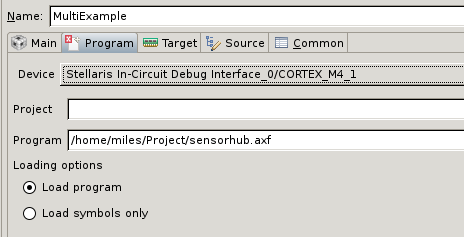
    Make a new debug configuration selecting the target configuration you just made.  You should see an entry for each core in your scan chain.

    Under the "Program" tab:

    The device drop-down now has multiple "dimensions" to the text fields.  ie.  You can enter a different program, one for each device.

    To answer/validate your previous questions, yes.  Daisy chaining TDI and TDO is the correct thing to do.  This wikipedia page is helpful:  http://en.wikipedia.org/wiki/Joint_Test_Action_Group#Daisy-chained_JTAG_.28IEEE_1149.1.29

     A few other points:

    1. The whole scan chain should run at the slowest speed of any device on the chain
    2. If you're mixing and matching devices that CCS doesn't know about you'd need to know the length of the JTAG "Instruction Register" so that you can bypass a TAP (by shifting in the "bypass" instruction which is usually all 1's and has the effect of making your DR width be... 0 or 1, I can't remember).  Knowing this allows you to skip over a device to get to the device you're interested in.   What you're telling the debugger is how many 1's to clock into the IR shift register on either side of your device.
    3.  If you repurpose TDI or TDO on any device in the chain then your scan chain will be broken. 

    Happy JTAG'ing!

    --Miles

  • Also, feel free to offer feedback on this experience.  There are other parts in TI that have multiple cores so, in theory, this functionality should be vetted in CCS.  But I wouldn't be surprised if you are blazing a trail on Tiva parts here so you may find some new, uhhh, "features" along the way.

    --Miles