This thread has been locked.

If you have a related question, please click the "Ask a related question" button in the top right corner. The newly created question will be automatically linked to this question.

DHCP failing in debug mode

Hi,

 I am working on TM4C129X development board. and not able to get ip address through DHCP in debug mode.(i.g. When i download  and run code  in CCS  5.5.0.00077.) but for same downloaded code when  i press reset button (on development board)  it works fine . For same downloaded code it works after next power on also.

 (Debug is not software option  it  is Stellaris in circuit debugger)

  Can anybody tell me why it is not working  in  debug mode.

Regards

Mital Pawar

  • Looks like same issue as here:

    http://e2e.ti.com/support/microcontrollers/tiva_arm/f/908/t/316420.aspx

    Cheers.

  • But i didn't get any answer to my question at above link. i only find following query at this link and it is

    ((((((((((((((((((((

    Setup: TM4C129X Eval kit; TivaWare, lwIP; CCS 5.5.0.00077; USB debugger interface.When running without the debugger, things work as expected.When running under the CCS Debugger, I can't even connect to lwIP. Messages don't appear on the serial port debugger log and breakpoints are never reached. Any suggestions?

    Thanks,

    Jeff

    }}}}}}}}}}}}}}}}}}}}}}}}}}}}}}}}}}}

    REgards

    Mital PAwar

  • I too, am working with TM4C129X eval kit and have an identical issue.  Started with the enet_io project.

    The example works fine as long as the CCS on-board debugger is NOT engaged.  If you try to run the example with the on-board debugger engaged, it will NOT work.  The debugger itself is very well behaved, i.e. able to single step, view variables, breakpoints, debug output to the serial port, etc but ethernet is NOT working.

    Digging in further, based on a user's contribution on this forum solving the error LWIP_PLATFORM_DIAG macro, I was able to get lwip diagnostics turned on.  If the on-board debugger is running via CCS, the stack does not show any UDP packets coming in.  I have not wiresharked to see if any packet are going out.

    I guess I was expecting this functionality to work out of the box.  Anybody find a work around for this yet?  A possible configuration issue on the development board?  TI?

  • I am seeing the exact same issue as James. 

    Can someone from TI please look into this?

    Thanks

  • I would like to add that I think the DHCP issue is one symptom of a bigger issue. In my app I use a static IP and it does not run correctly under the debugger either.

    Please help!

  • That is correct -- it is not DHCP and it is not necessarily the debugger either.

    After hacking the examples (removing DHCP in some) and instrumenting them, I can sometimes get it to consistently work with the debugger and not without the debugger, and then after a series of changes I can sometimes get it to consistently work without the debugger but not with the debugger.  Other times it is simply dependent on how many times I hit the reset button.

    In playing with their RTOS and understanding it better, and then correlating against wire-sniffing (wireshark), I have made a couple of observations.  When the system works, you can see the “EMAC” rtos component sending out thousands of packet and receiving tens of thousands of packets very consistent with the wireshark trace.  When the system does not come up, you can see the “EMAC” component reporting that it sent out *one* packet (presumably the initial “ARP” packet like below) but the wiretrace never sees it, and the component never sends anymore.

    I am going to start harassing the local FAE here, but TI's lack of engagement here is concerning.

  • I just wanted to add that I am also having problems with the ethernet sometimes working in my system.

    The TI-RTOS drivers enqueue packets but they never get transmitted out on the cable. As more packets get enqueued the others get "dropped". This happens regardless of DHCP or static IP and the debugger seems to have no impact either. If I do a system reset, restart, and run sometimes the ethernet it starts up properly and works other times it does not.

    Some support on this would be greatly appreciated.

  • I would add that the issues I am seeing are all WITHOUT TI-RTOS involved. Are we talking about two separate issues?

  • I suppose that depends on what the underlying issue is. To me it seems like we are having the same problem. It seems as though the packets are getting enqueued properly but the DMA from the internal memory to the MAC is not working properly. Although I suppose it could also be some software issue with the drivers that handle the descriptors the DMA uses.

    I can start a new post and investigate my issue through that if you'd like. I thought having more people report on the problem within the same post might give us more leverage.

  • The way in that we differ is that I have no issues when running without the debugger. I am able to send UDP data at ~70 MHz.

  • Very well, I will start my own post. The wording you used a few posts up is rather confusing and led me to believe that it did not work either way consistently.

    James Stephanick said:

    I can sometimes get it to consistently work with the debugger and not without the debugger, and then after a series of changes I can sometimes get it to consistently work without the debugger but not with the debugger.

  • That wasn't me - that was James.

  • Jeff McDevitt said:

    That wasn't me - that was James.

    I apologize, fixed my post. I will move on.

  • Regarding TI-RTOS and a dozen variations of the example code:  it looks to me to be the same problem using the TI-RTOS examples or using the examples WITHOUT TI-RTOS.  I have seen the problem with and without DHCP.  Initially, it was easily demonstrated by attaching the debugger.  But as I got deeper into experimentation, this was not consistent.  Sometimes it worked with the debugger and didn't work without it.

    From a 10,000 ft point-of-view, I would guess there is a porting issue to either this processor or to this dev board.

  • I've just started trying to do some development with the TM4C129 board and have hit this problem as well. Network doesn't work if I'm using the USB debug, seems fine if running normally on the board. It would be good to know why this is and to understand if this problem is limited to Ethernet or effects other peripherals.

    I'm using the CCS 6 Beta but is that likely to be important?

  • I am using CCS 5.5.0.00077

  • All,

    I'll try to take a stab at this. I believe I have seen this in my own development as well.

    What seemed to resolve this issue for me was to do a system reset (Ctl+Shift+S) followed by a core reset (Ctl+Shift+R) before I ran my project. I think the root cause is that CCS does not appear to do a full reset on connect by default.

    You could also take a look at the debug settings as seen below to make sure that CCS is doing a full reset on program load. This option can be found under the "Project Properties" after right clicking on the project name in the "Project Explorer" view.

  • Sir you are a gentleman :) I tried the settings you've shown but it didn't seem to help, however I found another reset option under the Flash Settings, I've now enabled

    Reset target during program load to Flash memory

    and the program has got an IP and is downloading weather data. Tried it 3 times now, all is well again.

    I would never have looked at these options if you hadn't suggested it

    Many thanks

  • I'd like to point out in my instance of this problem I did system reset, core reset, and finally restart each time and it was still intermittent. Sometimes it would work 50 times in a row other times it wouldn't work for 20 - 30 resets.

  • Dave,

    Your suggestion works - sort of. If I do a system reset after the debugger downloads the code but before I click on the green "go" arrow - the code runs as expected and I can use the debugger. If I check the two "Reset the target..." checkboxes as you have suggested then the code starts to run as soon as the download is compete. The Pause and Stop buttons are active but the Go arrow is not. The code does not execute as expected (I have a Timer 0 interrupt that flashes an LED and it does not flash).

    If I do what Peter suggested (only) and enable the "Reset the target during program load to Flash memory" (find it under Tiva Flash Settings) then everything behaves as I would expect it. Perhaps this needs to enabled by default.

    Thanks!

    Jeff

  • This issue sounds very similar to  the issue I faced when bringing up TI-RTOS with networking on the TM4C129x a few months back.  What I found was that networking was not stable, so I compared the settings to thouse in the TI-RTOS Concerto (Cortex-M3) settings.  What I found was that there was a significant difference as to the amount of memory allocated to the networking stack as well as the networking thread stacks.

    I increased the amount of memory in the TM4C129x version to match exactly what was in the Concerto verion.  After this change, the networking worked reliably.  I fed this feedback to the TI-RTOS team, however, I'm not sure if they have acted on it yet.

    If your project runs on a TM4C129x development board, or could be made to without much effort, I'd be interested in receiveing a copy of it to spend a few hours trouble shooting.  I suspect you may be facing the exact same issue.

    Thanks,

    Stuart

  • Stuart:  in my case the problem was easily demonstrated with the TI provided "enet_io" example provided by TI for the TM4C129X kit (see earlier in this thread).   I do not believe that the issue has anything to do with the debugger or its configuration as, after modifying the examples, I was able to demonstrate the problem without a debugger attached at all.  The randomness that I encountered would be somewhat consistent with timing and memory corruption; so please, if you could do a autopsy on that project, it would shed much light.

    Thanks,

    -james

  • I downloaded the latest public release of TI-RTOS (1.21.00.09) from the public web site:

    http://www.ti.com/tool/ti-rtos

    I ran the demo project "tcpEcho_TivaTM4C129XNCZAD" on a TM4C129X Development Board.  I noticed right away that the memory size issue has been corrected versus what I was working with last fall.  I also noticed righ away that the DHCP client is not enabled by default.  I enabled the DHCP client, rebuilt the project, and was able to debug the project getting a DHCP IP assigned every time.  As far as I can tell, the demo is not experiencing any of the instability issues I faced last fall in the "beta" release.

    Could whoever is having issues with this please verify that they are indeed following exactly the same procedure, and if they are not following exactly the same procedure, provide where there is a divergence so that I can debug from there?

    Thanks,

    Stuart

  • There is one more potential data point I would like to clarify.  I performed my test using the TI compiler version of the project and have not as of yet tested the GNU compiler version.  I will test the GNU version tomorrow.

    Thanks,

    Stuart

  • Stuart Baker said:

    I downloaded the latest public release of TI-RTOS (1.21.00.09) from the public web site:

    http://www.ti.com/tool/ti-rtos

    I ran the demo project "tcpEcho_TivaTM4C129XNCZAD" on a TM4C129X Development Board.  I noticed right away that the memory size issue has been corrected versus what I was working with last fall.  I also noticed righ away that the DHCP client is not enabled by default.  I enabled the DHCP client, rebuilt the project, and was able to debug the project getting a DHCP IP assigned every time.  As far as I can tell, the demo is not experiencing any of the instability issues I faced last fall in the "beta" release.

    Could whoever is having issues with this please verify that they are indeed following exactly the same procedure, and if they are not following exactly the same procedure, provide where there is a divergence so that I can debug from there?

    Thanks,

    Stuart

    Stuart,

    I used the exact steps that you stated above. Opened the configuration file and added DHCP Client (however this is not a necessary step, DHCP should run without this). I got an IP address 1 time out of 10. The other 9 times in the ROV view under EMAC -> Statistics the txSent goes up to 4 then stops there and the txDropped count goes up to 32 and stops. Using a managed switch I verified that no packets were sent out on the wire at all.

    Note that I did a System reset, core reset, and restart each time. I also took it a step further and cut power to the board and brought it back fresh and the problem still occurred. Let me know if you have any ideas, I am open to debugging the issue.

    Mike

  • Mike Volzer said:

    Stuart,

    I used the exact steps that you stated above. Opened the configuration file and added DHCP Client (however this is not a necessary step, DHCP should run without this). I got an IP address 1 time out of 10. The other 9 times in the ROV view under EMAC -> Statistics the txSent goes up to 4 then stops there and the txDropped count goes up to 32 and stops. Using a managed switch I verified that no packets were sent out on the wire at all.

    Note that I did a System reset, core reset, and restart each time. I also took it a step further and cut power to the board and brought it back fresh and the problem still occurred. Let me know if you have any ideas, I am open to debugging the issue.

    Mike

    Mike,

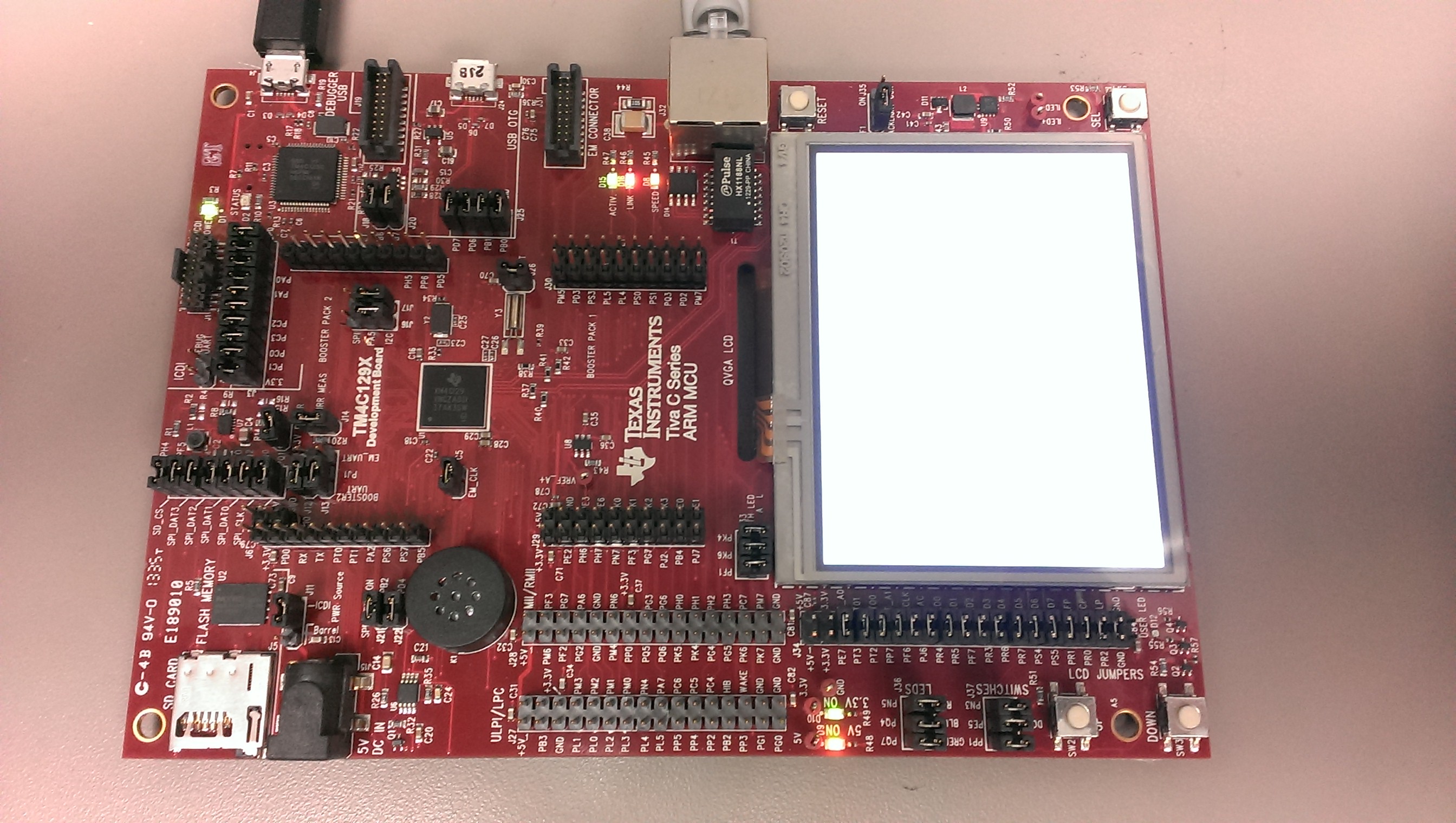
    Can you confirm for me the exact version of TI-RTOS you are using, and post a photo of your development board and a detailed photo of your Tiva chip (so that I can read the revision info).  Also, please confirm that you are using the TI Compiler version and not the GNU version.

    At the moment, it seams something must be different between our two setups because I just downloaded and debugged my target 10 times with 10 successful assignments of a dynamic IP address.

    On the DHCP client side, without adding in the DHCP client in the TI-RTOS config, I cannot get my board to be assigned an IP address.  So as far as I can tell, it does matter to have this included.  Again, something seams different about our setups.

    I've included a photo of my board and Tiva chip.


    Thanks,

    Stuart

  • Stuart,

    My compiler version is "TI v5.1.3" and TI-RTOS version is "1.21.0.09". I've attached photos of my board. The chip looks to be the same however there are noticeable differences in the hardware around the Ethernet jack.

  • My board looks like Mike's (re: the parts around the ethernet jack).  Installing the tcpEcho demo and running it *with* the debugger it works "most of the time", but not 100%.  Problem usually occurs on a cold-boot/fresh start -- once the board debugs once it continues to work.  

    That said, it rarely works without the debugger running it.  Using a power supply, disconnecting the USB debug port, and hitting the reset button *a lot* of times, it will occasionally come up.  Once it comes up, it will work for a couple resets, but then back to hitting the reset button a lot of times.

    This is using code composer 5.5.0.00077, TI-RTOS 1.21.0.09, and ARM Compiler Tools 5.1.3

  • As indicated in this other thread also tracking the issue, the TI-RTOS team has been able to reproduce the issue and is investigating.

    http://e2e.ti.com/support/embedded/tirtos/f/355/p/322514/1127292.aspx#1127292

    Thanks,

    Stuart

  • Hi, I reply to follow the thread since I'm facing these problems too developing on a TM4C129x Eva Board with an hardware configuration similar to Mike's one.

    My system configuration is:

    CCS 5.5.0.00077

    Compilet TI 5.1.5 (just updated today), until yesterday 5.1.1.

    TI RTOS 1.21.00.09

    NDK 2.22.03.20

    I found the same problem also realizing the "http_server" example, explained by Nick Lethaby in the tutorial video of TI-RTOS page: http://www.ti.com/tool/ti-rtos, whileI didn't met the problem running the "qs_wheater" example, which is non-RTOS.

  • I'm adding this to all threads regarding TM4C129 devices and Ethenet....

    Please refer to the following link: http://processors.wiki.ti.com/index.php/TI-RTOS_TM4C129_Emac_Issues

  • Thanks for the update. Is it possible that this issue can also happen it TI-RTOS is not used, meaning if only TivaWare is used?

    Thanks

  • We've focused the testing on TI-RTOS because it was the easiest to reproduce. The TivaWare examples use the ROM driverlib which bypasses the problem. We tried having the TivaWare examples call the functions in flash instead of ROM and could not reproduce the issue under a few conditions. However, the initialization procedure in the TI-RTOS driver is very similar to the process in TivaWare and the TI-RTOS driver calls the TivaWare EMAC functions.

    So, unfortunately, as of now, we are not sure.

    Have you seen any issues just using the TivaWare calls?

    Todd

  • Todd,

    Nope. Just checking.

    Thanks

  • Hi, I'm resuming working on ethernet communication on TM4C129X Eva Board after a long time after a colleague of mine worked on it, rebuilding drivers emac drivers but still having same unrelayability on net connection.

    I understood the reason why disabling and re-enabling prefetch on Emac initialization as posted by Todd, what I don't understand clearly is: in folder .../drivers/emac are present two couple of source files: EMACSnow and EMACTiva, why modifyng only the *Snow one? Functions NIMUInit and emacStart are present in both .c files.

    Reading about tirtos drivers structure these should be device-specific implementations of drivers, so, why on a Tiva microcontroller not updating libraries with that name? I know that Snowflake is the target type of the micro but it's not clear to me when it's called one and when the other.

    Thanks.