This thread has been locked.

If you have a related question, please click the "Ask a related question" button in the top right corner. The newly created question will be automatically linked to this question.

TIva C Series CCS "Unresolved symbols remain"


Hi, I've been getting a very weird error. I am trying to build a program on the Tiva C series with CCS6. I included all TivaWare libraries:
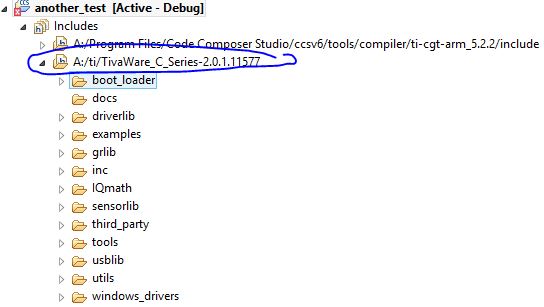
During build the libraries are found but I get the following error:
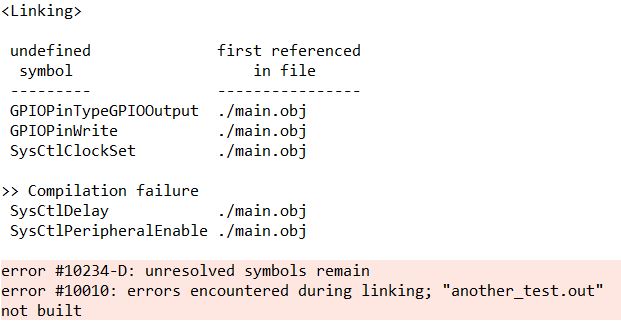
The worst is that I am copy-pasting the same project in which everthing works (the "project0" example) and have included the same directories as present in the "project0" example. Why might my exact same project not be working?

  • Sorry, here is the actual code:

    //*****************************************************************************
    //
    // project0.c - Example to demonstrate minimal TivaWare setup
    //
    // Copyright (c) 2012-2013 Texas Instruments Incorporated.  All rights reserved.
    // Software License Agreement
    //
    // Texas Instruments (TI) is supplying this software for use solely and
    // exclusively on TI's microcontroller products. The software is owned by
    // TI and/or its suppliers, and is protected under applicable copyright
    // laws. You may not combine this software with "viral" open-source
    // software in order to form a larger program.
    //
    // THIS SOFTWARE IS PROVIDED "AS IS" AND WITH ALL FAULTS.
    // NO WARRANTIES, WHETHER EXPRESS, IMPLIED OR STATUTORY, INCLUDING, BUT
    // NOT LIMITED TO, IMPLIED WARRANTIES OF MERCHANTABILITY AND FITNESS FOR
    // A PARTICULAR PURPOSE APPLY TO THIS SOFTWARE. TI SHALL NOT, UNDER ANY
    // CIRCUMSTANCES, BE LIABLE FOR SPECIAL, INCIDENTAL, OR CONSEQUENTIAL
    // DAMAGES, FOR ANY REASON WHATSOEVER.
    //
    // This is part of revision 2.0.1.11577 of the EK-TM4C123GXL Firmware Package.
    //
    //*****************************************************************************
    
    #include <stdint.h>
    #include <stdbool.h>
    #include "inc/hw_types.h"
    #include "inc/hw_memmap.h"
    #include "driverlib/sysctl.h"
    #include "driverlib/gpio.h"
    
    //*****************************************************************************
    //
    // Define pin to LED color mapping.
    //
    //*****************************************************************************
    
    //*****************************************************************************
    //
    //! \addtogroup example_list
    //! <h1>Project Zero (project0)</h1>
    //!
    //! This example demonstrates the use of TivaWare to setup the clocks and
    //! toggle GPIO pins to make the LED's blink. This is a good place to start
    //! understanding your launchpad and the tools that can be used to program it.
    //! See www.ti.com/.../project0 for more information and
    //! tutorial videos.
    //
    //*****************************************************************************
    
    #define RED_LED   GPIO_PIN_1
    #define BLUE_LED  GPIO_PIN_2
    #define GREEN_LED GPIO_PIN_3
    
    //*****************************************************************************
    //
    // The error routine that is called if the driver library encounters an error.
    //
    //*****************************************************************************
    #ifdef DEBUG
    void
    __error__(char *pcFilename, uint32_t ui32Line)
    {
    }
    #endif
    
    //*****************************************************************************
    //
    // Main 'C' Language entry point.  Toggle an LED using TivaWare.
    // See www.ti.com/.../project0 for more information and
    // tutorial videos.
    //
    //*****************************************************************************
    int
    main(void)
    {
        //
        // Setup the system clock to run at 50 Mhz from PLL with crystal reference
        //
        SysCtlClockSet(SYSCTL_SYSDIV_4|SYSCTL_USE_PLL|SYSCTL_XTAL_16MHZ|
                        SYSCTL_OSC_MAIN);
    
        //
        // Enable and configure the GPIO port for the LED operation.
        //
        SysCtlPeripheralEnable(SYSCTL_PERIPH_GPIOF);
        GPIOPinTypeGPIOOutput(GPIO_PORTF_BASE, RED_LED|BLUE_LED|GREEN_LED);
    
        //
        // Loop Forever
        //
        while(1)
        {
            //
            // Turn on the LED
            //
            GPIOPinWrite(GPIO_PORTF_BASE, RED_LED|BLUE_LED|GREEN_LED, RED_LED);
    
            //
            // Delay for a bit
            //
            SysCtlDelay(2000000);
    
            //
            // Turn on the LED
            //
            GPIOPinWrite(GPIO_PORTF_BASE, RED_LED|BLUE_LED|GREEN_LED, BLUE_LED);
    
            //
            // Delay for a bit
            //
            SysCtlDelay(2000000);
        }
    }
    

  • Hello Danylo,

    100% Looks like the driverlib.lib file is missing in the link phase. Add the same in the ARM Linker and it shall work fine.

    Regards
    Amit
  • That was it! Thanks a lot.