This thread has been locked.

If you have a related question, please click the "Ask a related question" button in the top right corner. The newly created question will be automatically linked to this question.

BQ76930EVM: How to configure BQ76930EVM for 8 cell operation?

Part Number: BQ76930EVM
Other Parts Discussed in Thread: BQ78350, BQ78350-R1A, BQSTUDIO, BQ76930, EV2400, BQ78350-R1

Hello,

I am measuring the SoC of a 25.6V, 105Ah LiFePO4 battery (8S1P) using the BQ79630 EVM. Each cell in the battery pack is 3.2V, 105Ah.

Can someone please assist in the setup of 8 cell gauging I have followed the instructions in the guide (shorting c9 - c8 and c4 - c3)?

Thanks

  • Hi First,

    It sounds like you have the cells selected appropriately.

    The gauge on the BQ76930 EVM is the BQ78350-R1A.  Depending on when the board was produced it may have an earlier version.  You can load the latest version from the product folder and load to the gauge, see the EVM user guide. The development interface and GUI for BQ78350 versions is the EV2400 and BQStudio.

    The BQ78350-R1A is described in the data sheet and technical reference manual.  The voltages read are determined by the AFE Cell Map.  See the technical reference manual.

    Once you have cell voltages you will want to set the protection thresholds and options. You can enable FETs and see values, the gauging will not be accurate since the default parameters are used. The default chemistry is a higher voltage cell. 

    Load a cell chemistry for the LiFePO4 cell you are using or one similar.  The chemistry is used to estimate SOC after reset.    The BQ78350 is a CEDV gauge, see the explanation in the gauging section of the technical reference manual.  To gauge properly you will need to set the coefficients in the gauge, these are calculated online using files collected from your battery.  See information at www.ti.com/tool/GAUGEPARCAL 

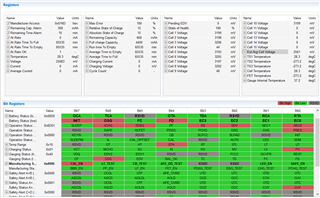
  • Thank you. So, for 8 cell operation, do I need to disable Cell 9 and cell 4 on AFE Cell Map register? Below is a screenshot of my Register tab. I am also trying to understand, why my ext. cell voltage is  2561mV, whereas it should be 3200mV.

    Note: I am applying a voltage of 25.6V on the battery terminals of the eval board

    Regards,

    Huzeifa

  • Hi First,

    Yes, set only the used cells in the AFE Cell Map.  For the 8 cells indicated 0x02F7.  The BQ78350-R1a should show cells in logical order.  You may need to re-start BQStudio to update the display.

    For the proper average voltage you will need to select the appropriate jumper on the EVM for the divider ratio and calibrate the voltage.

  • Hi WM5295,

    I have managed to configure the cell for 8 cell operation. I also identified my cell chemistry as LF105 LiFePO4/carbon. However, I am unsure how to proceed from this point to get an accurate SoC. Also, the max mAh on the fuel gauge setting is ~32000 mAh. Whereas, my single cell capacity is 105 Ah. Can you please explain how I should go about that. Thanks

  • Hi First,

    Unfortunately gauging setup is complicated.  For a better estimate of SOC at reset load the chemistry into the part. 

    For the capacity you will need scaling when the capacity exceeds the data range. The IPscale feature in BQ78350-R1 has some issue, you can load BQ78350-R2 firmware if desired www.ti.com/tool/BQ78350-R2-DEVICE-FW which fixes the issue. Loading the firmware will overwrite settings.  The IPScale provides 10x steps, so the capacity would then be 320 Ah instead of 32 Ah.  Currents will have 10x lower resolution.

    The 10x scaling causes a lower resolution, if desired you can scale the current by some factor, integers may be easiest.  You must know to apply that scaling to the values read from the gauge.  This lets you use more of the data range of the part.  For example if you are fitting the 105 Ah capacity into a 32 Ah range, 105/32 = 3.28, you might scale by a factor of 4. So the data range would accommodate 32 x 4 = 128 Ah and your 105 Ah cell would be represented as 105/4 = 26.25.  For information on scaling you might see this video although it is based on another gauge. 

    https://training.ti.com/advanced-topics-bq40z80-current-scaling

    Once you have selected scaling you will need to collect the logs and enter parameters to get improved SOC.