This thread has been locked.

If you have a related question, please click the "Ask a related question" button in the top right corner. The newly created question will be automatically linked to this question.

BQ34Z100-G1: Floating-point conversion issue

Part Number: BQ34Z100-G1
Other Parts Discussed in Thread: BQSTUDIO

Hi team,

Here's some questions from the customer may need your help:

Issue: the floating-point number of Bq34z100g1 is currently read out by a monolithic, and the hexadecimal number of 4 bytes is read correctly, but the conversion to the floating-point number is failed.

The conversion follows the method here and can correspond to its example, but the conversion of the following two values was unsuccessful:

The address of the register to be modified:

The value of the register to be modified: 8.123:

Four bytes corresponding to the read: 80 16 43 FE:

Taking the method here to convert, and got the value 0.586974978447.

Could you help check this case? Thanks.

Best Regards,

Cherry

  • Hello Cherry,

    bqStudio applies a formula to the result. It may be different for different gauges and is a common cause for confusion.

    Here is a link to a thread that will help

    https://e2e.ti.com/support/power-management-group/power-management/f/power-management-forum/551252/bq78350r1-smbus-floating-point-calculation/2020286#2020286

  • Hello,

    Thanks for your help! The thread you given do helps a lot.

    But here's a new issue from the customer:

    The decimal floating-point number is converted to hexadecimal. They have tried this way, but failed. 

    Convert it to c code according to the 4th page of the document vb code:

    The correct ones should be: Decimal: 10.124 to 0X7F6E8AAB. While what comes out of the program operation is: Decimal: 10.124 to 0X84A1FBE7.

    Thanks a lot.

    Best Regards,

    Cherry

  • Hello Cherry,

    There is a conversion within bqStudio which is referred to as the magic number in the other thread which is not accounted for in the code.

    I suggest that you use the following method for verification.

    Read hex value from gauge

    convert to decimal

    Convert back to hex

    The hex values should match.

  • Hello,

    With your help, converting hexadecimal to decimal is ok, but the decimal back to hexadecimal is still not working. And they also referred to the files you given, could you also help to check this? Thanks.

    Best Regards,

    Cherry
  • Hello Cherry,

    The C code uses floating point math. That may cause issues. Use integer math and bit shifting instead and let me know if that fixes the issue.

  • Hello Shirish,

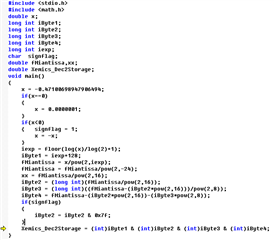
    They directly using the fourth page of the VB code from slva148a.pdf with the VB's compiled software also results in:10.124 being converted to 0x84A1FBE7, consistent with the C code. However, it does not match the result read by Bqstudio: 10.124 turns to 0X7F6E8AAB. Is there another decimal floating-point to hexadecimal method for the BQ34Z100G1? 

    The code is as follows:

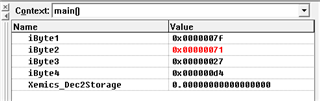
    And then got the results:

    Thanks and Best Regards,

    Cherry

  • Hello Cherry,

    bqStudio applies additional formula before displaying the value on screen, so it will not match.

    This is what should match

    1. Read hex value from gauge

    2. Convert hex value to decimal using sample code

    3. Convert decimal value from step 2 in hex using sample code

    4. compare hex values from step 1 and step 3. These hex values must be the same. If the values are same, then your code is correct.

  • Hello Shirish,

    Thanks for your patience.

    1. Read hex value from gauge

    1. With BQSTUDIO, read out the hex value of CCGain for the BQ34Z100G1, which is four bytes.

    2. Convert hex value to decimal using sample code

    2. using hex to decimal code conversion value 0x7F7127D4, and get a decimal value: –0.47100698947906494

    3. Convert decimal value from step 2 in hex using sample code

    3. using decimal to hexadecimal code conversion value: -0.47100698947906494, and get a hexadecimal value: 0x7F7127D4

    4. compare hex values from step 1 and step 3. These hex values must be the same. If the values are same, then your code is correct.

    You can see that the hex value of step three is equal to the first step, that is, the code is correct. However, the decimal floating point of the hex conversion decimal during conversion is not the same as the decimal number shown in the meter: 10.123, and the code conversion value: –0.47100698947906494, why is that?

    Thanks and Best Regards,

    Cherry

  • Hello Cherry,

    The other thread mentions a magic number. This is in the formula that is applied when bqStudio shows the number.

    I believe it is "4.768/x"