This thread has been locked.

If you have a related question, please click the "Ask a related question" button in the top right corner. The newly created question will be automatically linked to this question.

BQ34110: how to update battery from default to lead-acid for BQ34110

Part Number: BQ34110
Other Parts Discussed in Thread: BQSTUDIO, GPCCEDV

Dear Product line:
here is another question from customer.
the default configuration of BQ34110 is 1S cell Li-ion battery. But customer is a lead-acid battery. the basic information as below.
battery: lead-acid
Serial/Parallel:4S2P.
capacity:18Ah.
full-voltahe:55V.
maximum charge current:3.3A.
customer question: how to update the battery from Li-ion to lead-acid? which register need updated? does TI has any document or user-guide for reference?
big thanks for supporting!

Bill

  • Here is the link to an Excel spreadsheet from another thread on e2e that may help e2e.ti.com/.../7041.bq34110_5F00_dataflash_5F00_notes_5F00_rev03_5F00_20181002.xlsx

  • Hi Bill,

    The attached spreadsheet may be helpful. In the first tab, you can input the information about the battery (cell chemistry, number of cells, etc) and then on the 2nd tab it will calculate the suggested starting settings in blue. The 3rd tab can be copied to a text file to be used as a gg file for importing into BQStudio.

    1602.bq34110_dataflash_notes_rev03_20181002.xlsx

    Best regards,

    Matt

  • Hi, Matt

    thanks for supporting! customer still has issue as below. could you please supporting again? thanks.

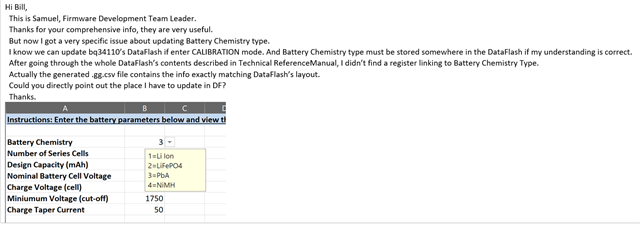
    " But now I got a very specific issue about updating Battery Chemistry type.

      I know we can update bq34110’s DataFlash if enter CALIBRATION mode. And Battery Chemistry type must be stored somewhere in the DataFlash if my understanding is correct.

      After going through the whole DataFlash’s contents described in Technical ReferenceManual, I didn’t find a register linking to Battery Chemistry Type.

      Actually the generated .gg.csv file contains the info exactly matching DataFlash’s layout.

      Could you directly point out the place I have to update in DF?"

  • Hi, Bill

        There is no single bit or byte setting to identify the chemistry type in the gg file, the excel file exemplifies how to the distributed parameters relating to chemistry are affected by chemistry type, you can peruse the cell marked blue in column K in the sheet of "34110_dataflash.gg", the final output sheet "Output for bqStudio" is just referencing the cells in the colunm k of the sheet "34110_dataflash.gg"

        There are some setting for Nixx chemistries' charge termination method, but these setting does not take effect if the bits  "NiMH_CHG_EN", "Ni_DT", "Ni_DV" are all 0s

        Please be noted that the excel file is an example on how to set the dataflash according to the typical value of a particular chemistry type, customer still need to check the variation between the actual spec from cell vendor and the data used in the excel file. And made change accordingly.

  • Hi, Steven

    another question from customer:

    "Can I draw the conclusion that bqStudio is the only way to update config for my specific usage?" 

    I think that Bqstudio is the best way for customer to update config for specific usage. but customer should also can update the config file in theory by IIC interface with an external MCU. but this need customer very familiar with battery. Am I right? thanks.

    regards,

    Bill

  •     The bqStudio is not the only way to change the configuration in the dataflash

        The content in the data flash can be accessed via I2C command, please reference section 4.1 in bq34110 TRM for details. The flash update can also be done with flashstream tool, for details, please reference: https://www.ti.com/lit/an/slua541a/slua541a.pdf

  • then the proble will be back again. how customer to configure the battery chemistry to Lead-acid? my understanding is customer need not to configure the battery chemistry. customer just need update battery full charge end voltage, discharge end voltage...these parameter will be decided by battery chemistry. the gauge don't care battery chemistry. Am I right?

    thanks.

    Bill 

  • Hi Bill,

    Yes, that is correct - there is no ChemID for this device - just the parameters in the blue boxes need to be updated from the spreadsheet. This is a CEDV gauge, so they also need to use the GPCCEDV tool (https://www.ti.com/tool/GPCCEDV ) and update the CEDV parameters in the data flash with the results. This involves discharging the battery from full charge with different load currents and temperatures.


    Best regards,

    Matt

  • Hi, Matt

    thank you so much for supporting! another question from customer.

    in customer application, customer use an external MCU to communicate with BQ34110. so customer's question is how to configure BQ34110 by their MCU on line and not use GPCCEDV or BQstudio. in other words, how customer config the blue box in excel file by IIC? I also add you in the email loop of cutomer. you can also show the process in the email to customer. thank you very much for supporting!

    regards,

    Bill  

  • Hello Bill,

    You can export a "golden image" using the golden image tab after writing all configuration parameters using bqStudio.

    The .fs extension file specifies the sequence of commands. The MCU can send the sequence of commands in the df.fs file over IIC to configure the gauge.