This thread has been locked.

If you have a related question, please click the "Ask a related question" button in the top right corner. The newly created question will be automatically linked to this question.

BQ24075: Random power on / locking on

Part Number: BQ24075
Other Parts Discussed in Thread: BQ25180

Hello TI gurus,

I'm desiging a project with this IC in for power path management and charge management of a 1200mAh battery. It's paired with an STM32F405 microcontroller. 

Basic design is that a keypad button is connected via a diode to the SYSOFF line, so that when you press the power button on the keypad, the SYSOFF like is pulled low, and powers everything on. 

BQ24075 Schematic.pdf

The micro boots, and then switches on Q2 (on the above schematic) and also pulls SYSOFF low. When the user releases the keypad, the system then remains on.

At some point, when the user wishes to power down, another push of the power button is seen by the micro through a second diode. It does housekeeping, and when it's ready it can let go of SYSOFF and power off.

There is a second MOSFET on the SYSOFF line from the USB, so that when the USB is connected, the system immediately powers on, and stays on as long as the USB is connected. This is to allow the micro to control and monitor the charge process.

The output from the BQ24075 is connected to an ULDO 3.3V regulator to provide a reasonably stable supply to the rest of the system.

For the most part, everything seems to function as intended, howver, occasionally the BQ24075 seems to randomly switch on, and won't switch off.

I originally thought it might be a bit of charge leakage through the micro, and causing it's output transistor to flick on enough that it's pulling SYSOFF low enough that it's causing a poweron, and then latching it on (I originally had the micro directly connected to SYSOFF with an open drain output), but putting a MOSFET between the micro and the SYSOFF line (with a strong pulldown to bleed away any excess charge) doesn't seem to have fixed it. It's a bit random (I haven't yet noticed any kind of pattern to times etc) and can be any time between a few minutes or hours, if it happens. 

When it's not doing silly things, it's working beautifully, charging the battery, powering on / off as expected. 

Any suggestions?

  • Hi Matthew,

    Apologies for the delay on replying, I could've sworn I answered this but I must've not hit reply. 

    This is great use of the SYSOFF pin and I agree that from what I can see from the schematic, I don't expect any problems since as you say, it works beautifully when it works perfectly. 

    Would you be able to provide waveforms showing the SYSOFF, POWER_ON, OUT and ISET voltages when it is working properly and then when it isn't working properly?

    Best Regards,

    Anthony Pham

  • Hi Anthony, 

    Not to worry, I write brain-mail all the time. Always stays in the outbox though :-D

    I'll certainly try. Might run into the issue where probing in with the trusty Agilent fixes it. 

    I've put a possible software fix in, where the micro checks the input from the button before pulling SYSOFF low via POWERON and the FET. If the button isn't showing as pressed, it drives the FET gate low instead. 

  • Hi Matthew,

    No worries if the signals are difficult. 

    micro checks the input from the button before pulling SYSOFF low via POWERON and the FET.

    Interesting, that does sound like it covers it. That's awesome if it is working.

    I see in your notes in the schematic that you're doing this creative solution to have essentially what we call ship mode and also button functionality.

    By chance, have you taken a look at the BQ25180? It has button functionality built in and also ship mode completely integrated. I'd be more than happy to show you the steps you could take if you were to switch in terms of software since it sounds like you do a bit of that already. 

    Best Regards,

    Anthony Pham

  • As fate would have it, it's failed, and quite late in the night, as the battery still has plenty of charge. 

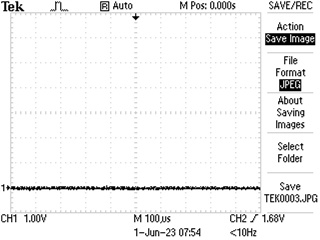
    Scope shots below. ISET is zero, as I'd expect, because we're not charging.

    OUT shows battery voltage-ish, SYSOFF is low, and POWERON is low. I also probed the gate of the other transistor, driven by the USB, and it's low too. 

    The micro is alive and running (it'd watchdog if it wasn't) and it's realised it shouldn't be on (the fix I put in yesterday) as it hasn't switched on the POWER_ON line) but SYSOFF is still low. 

    Oscilloscope trace from ISET Pin

    ISET Pin (taken from ISET resistor)

    Waveform from OUT pin

    OUT pin (taken from ULDO regulator input)

    SYSOFF pin waveform

    SYSOFF Pin (taken from pull-up resistor)

    POWER_ON net (taken from gate of transistor to SYSOFF)

  • Hey Matthew,

    Any chance you'd be able to try with a higher resistor value for R5? I've tested a very similar scenario in this app note: https://www.ti.com/lit/pdf/sluaa18 but we use a 1M resistor instead. 

    Best Regards,

    Anthony Pham

  • Hi Anthony,

    Thanks for the reply. It set of a few ideas that culminated in me taking off everything from the SYSOFF line, except the pull-up resistor. No FETs or buttons. And it still randomly powered on.

    It got me thinking about whether there could be some AC coupling between the SYSOFF line and other parts of the circuit, so I tried sticking a 100nF capacitor between SYSOFF and ground, and (hopefully not jinxing it) that seems to have done the trick. It's been sat in the off state for about 18 hours now.

    I've modified the PCB layout to put this capacitor next to the pull-up resistor, both very close to the BQ24075. I'll post a snip in a little while when I'm back in the office.

    I hope TI are watching, because it would be a good idea to put a note in the datasheet. 

  • As promised, a snip of the PCB layout. Pin 1 of the BQ24075 is on the top of the left hand side.

    The pull-up resistor and capacitor on SYSOFF are the middle two of the four smaller components in the top left of the snip.

    The battery connection is just off snip to the left, and the ULDO to 3.3V is just off snip to the right. USB VBUS comes onto the plane in the top right corner of the BQ24075.

  • Hi Matthew,

    I'll be sure to cross my fingers, wish on any shooting star, and knock on a bunch of wood for you and this fix. It's very interesting that the capacitor worked. I would not have guessed based on your oscilloscope waveforms that this would've kept everything off. 

    I hope TI are watching, because it would be a good idea to put a note in the datasheet. 

    I'll be performing some tests and see if adding the capacitor improves the accuracy and if without it there are any concerns on the SYSOFF functionality following this thread. The great thing about these threads is that when you get a reply, you're working with someone on the team and the BQ2407X would be my devices. So most certainly yes, we are watching and thankful for your find. 

    For now I'll be marking this thread as resolve with the 100nF. If you feel this isn't the case, feel free to reply back and we'll keep the back and forth replies for debug. 

    Best Regards,

    Anthony Pham

  • Hi Anthony,

    No worries. Happy to help! 

    I suspect (although I don't have the necessary resources to confirm) that the relatively long SYSOFF trace in my particular use-case may be significant.

    It has to run from the BQ24075, then pick up the hold-on signal from the micro, the hold-on signal from the USB, and then the keypad button as well.

    I can confirm that the circuit is still working properly after fitting the capacitor from SYSOFF to ground.

    If you would like, I'm happy to share the schematic and PCB layout files with TI to examine. 

  • Hi Matthew,

    I'll consult with the design team with your feedback and see. The information of a long trace and the 100nF may point to a board layout having an impact. 

    Best Regards,

    Anthony Pham