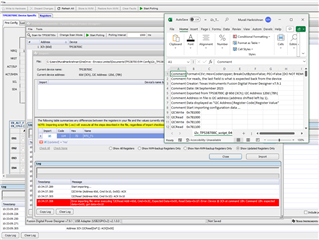
I am trying to export the script file from the EVM and write it back to the EVM. I get a write error and failed write.
I am using USB to GPIO 2 and Fusion digital 7.9.1. see snapshot below

This thread has been locked.
If you have a related question, please click the "Ask a related question" button in the top right corner. The newly created question will be automatically linked to this question.
I am trying to export the script file from the EVM and write it back to the EVM. I get a write error and failed write.
I am using USB to GPIO 2 and Fusion digital 7.9.1. see snapshot below

Hello Murali,
Some of the registers in the device constantly update such as the RTC. If you try to import a file that was exported with validate write commands, the constantly updating registers will not read back the same value that was written, causing the error. When exporting, deselect validate write commands.

Best,
Walter
I can understand that, but the error has occurred at a much earlier address 0x10. It did not reach to the RTC address.
Hello Murali,
Before exporting, try clicking "refresh all" first to update the GUI and make sure all faults are cleared. This fixed the issue of stopping at address 0x10 for me.

Best,
Walter
The issue is some where else. The only register which is updated is the RTC. The Excel sheet shows the address 10h as 00, but gui sees it as 10

Hi Murali
Walter will reply to you tomorrow. Thanks for your patience.
Regards
Trailokya
Hello Murali,
There seems to be a PEC fault that is being generated when the importer begins writing and reading. I am working with the team to find a solution in the next few days.
Thank you for your patience,
Walter
Hello Murali,
There are a few steps to disable PEC which should allow simple read and write without triggering the fault.

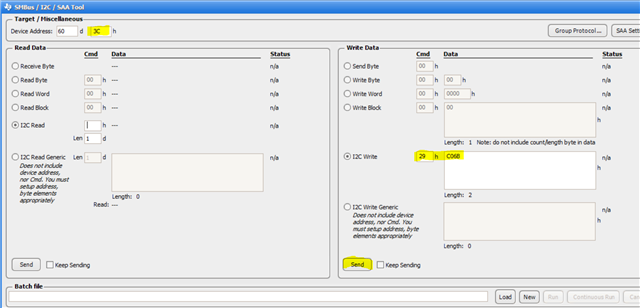
In the GUI, select the I2C tool in the tool menu.

In the tool, make sure the device address is set to 3C. In the write data section, to address 29 write C06B as shown and click send.
This should allow you to import without getting hung up on the error. Keep in mind that this must be done every time the device is power cycled. The device will revert to its factory programming with PEC enabled every time it is powered down. Let me know if this works.
Best,
Walter