This thread has been locked.

If you have a related question, please click the "Ask a related question" button in the top right corner. The newly created question will be automatically linked to this question.

TPS25751: Configuring the power to charge the battery

Part Number: TPS25751
Other Parts Discussed in Thread: BQ25792,

Tool/software:

Dear Sirs and Madams,

When using a combination of TPS25751 and BQ25792, I would like to limit battery charging to 24W. Is this possible to set using the TPS25751?

The auto-negotiation sink register allows you to set the minimum voltage, maximum voltage, and minimum required sink power, but I would like to specify the maximum power.

Regards,

Masashi

  • Hi Masashi, 

    Just to clarify, are you looking to the battery charge voltage/current to 24W or TPS25751 to only negotiate up to 24W sink contracts?

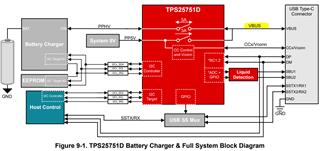
    The Autonegotiate Sink (reg 0x37) configures the min/max power TPS25751 will negotiate with the connected port partner, assuming TPS25751 is acting as a sink and a PD contract is established. Keep in mind this is the power between the USB-C connector to the PD (TPS25751) called VBUS (see image below for reference). For more details on how to configure Autonegotiate Sink refer to the TRM linked here: https://www.ti.com/lit/ug/slvucr8a/slvucr8a.pdf#page=83 

    If you're looking to actually modify the charge voltage/current of the physical battery (located at the BQ BAT pin), part of TPS25751 integrated I2C control is to configure BQ25792/8 battery charging voltage and current. These fields are configurable through Q14 and Q15, upon boot-up TPS25751 will configure BQ25792/8 battery charging voltage/current based on the user input settings. 

    Let us know if you have any further questions or concerns! 

    Thanks and Regards,

    Raymond Lin

  • Hello Lin,

    Your answer helped us understand how to negotiate a maximum 24W sink only contract with the TPS25751.

    Regards,

    Masashi