This thread has been locked.

If you have a related question, please click the "Ask a related question" button in the top right corner. The newly created question will be automatically linked to this question.

BQ34Z100-G1: Unsealing and Flash data modification impossible once Learning cycle started

Part Number: BQ34Z100-G1
Other Parts Discussed in Thread: BQ34Z100EVM, , BQSTUDIO, EV2400, BQ34Z100

Tool/software:

I’m using a bq34z100EVM board attached to a battery pack that I want to monitor with the bq34z100-G1.
I have configured part of the parameters related to my project, but I still need to make some modifications because I am in the evaluation stage.

The ChemID selection was done using the Chemical ID Selection Tool.
I then started the learning cycle as described in SLUA903.

However, once the IT_ENABLE command is sent and QEN is set, I am no longer able to modify anything in the Data Memory.
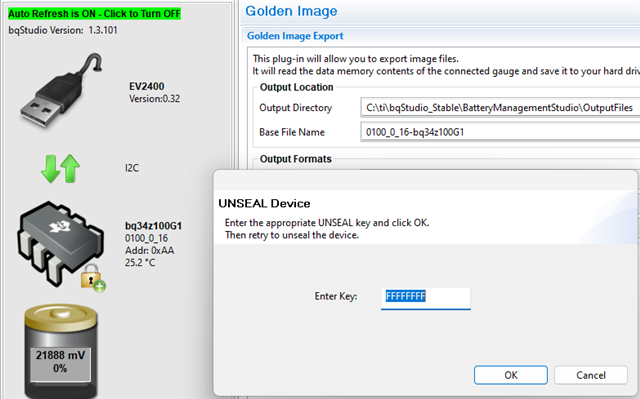
I can unseal the device (SS bit cleared, FAS set), but I cannot gain full access (FAS = 1).
Even in this state (unsealed but not full access), I cannot modify any information in memory.

Is this a normal situation?
I still need to modify and configure the behavior of some circuits on the EVM board (such as LED, ALERT, and others), but everything seems locked.
Is this expected behavior, or did I do something wrong?

I also tried to program the image I saved before entering the learning cycle, but it is not possible without full access.
Any ideas?

  • Hello,

    This question has been assigned, however the team is currently attending "Texas instruments BMS seminar" and won't be able to follow up till early next week.

    Thank you,
    Alan

  • Alan, Can you please look into this question and provide an answer please?

  • Hi,

    It appears your device is sealed, the default unseal full access key is FFFFFFFF. If this does not work then the default unseal full access key was changed, if this is the case then you can not access it.

    Regards,

    Diego

  • Hi Diego,

    Thank you for your reply. I'm the only one that uses the EVM board and I didn't modify the full access key. The device entered in this mode once IT_ENABLE command was sent. 

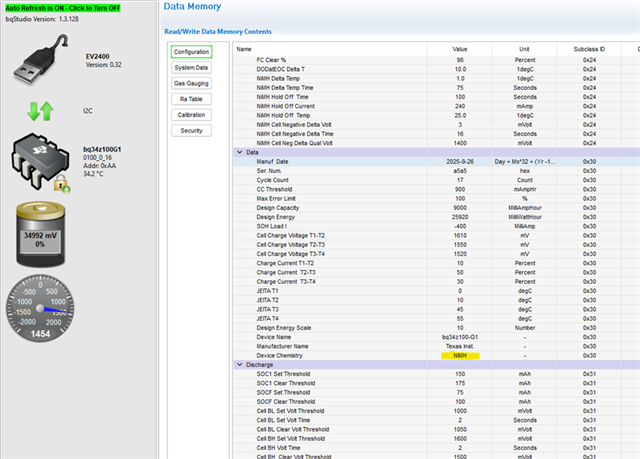
    Here is an information about Software and Firmware versions used:

    • BqStudio 1.3.128. I initially used the latest stable version but encountered issues and switched to the latest beta version.
    • Chemistry version 1182 (26-09-2025)
    • EV2400 Version 0.18 (initially), updated to 0.32  (no impact to my issue)
    • Bq34z100-g1 Version 0100_0_16. The EVM originally came with an older firmware version (0.06), which I updated to 0.16 to make it work properly.
  • can you extract the .srec and share it with me?

    Thanks,

    Evan

  • Hi Evan,

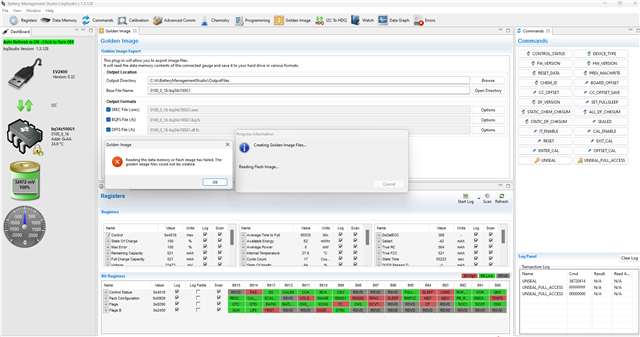
    No I can't. When I try to create the Golden Image I get this message :

    I have an older .srec file that I exported earlier. In the meantime, I decided to replace the IC on the EVM board. I programmed it with my old .srec, calibrated the gauge, and was able to unseal and modify the data in memory.

    However, at some point, the new IC got stuck again (FAS=1, SS=0). This time, I did not activate IT_ENABLE. There’s no way to recover from this state — a reset or removing power does not fix the issue.

  • Hi, 

    Ok so it sounds like your gauge is sealing on its own. Which is unusual, I have not seen this before. 

    Can you share the "older .srec"? I can test it on my setup.

    Regards, 

    Diego 

  • Hi Diego,

    Attached is the last Golden I was able to export. I also zipped the last Data Memory (gg.csv) export.

    Although in both cases the device is stuck in the described state (FAS=1, SS=0), there is however small difference in the behavior of the original circuit (IC1) and the new one (IC2) - With IC1 I was not able to modify the Flash, but with IC2 I still can change data in some registers. This is strange for me - if I can modiify the data, why I can not export the Golden?

    Here is some information about my setup.

    • The battery is 24S1P NiMH 9Ah (Chem ID 6100).
    • EVM jumpers: J5 >5V, J2=48V, J1=On, J6=Ext, J3=D
    • BqStudio 1.3.128. I initially used the latest stable version but encountered issues and switched to the latest beta version. I tryed both versions but they dont have impact to the issue.
    • Chemistry version 1182 (26-09-2025)
    • EV2400 Version 0.18, updated to 0.32 but this dont change enything to my issue.
    • Bq34z100-g1 Version 0100_0_16. The EVM originally came with an older firmware version (0.06), which I updated to 0.16 to make it work properly. IC2 was already with 0.16

    Thank you,

    Best regards,

    ,0407.GOLDEN.zip

  • Hi Diego,

    I wanted to check if you’ve had a chance to review my request. Were you able to reproduce the issue with your setup and the information I sent?

    I’m looking forward to your feedback and guidance.

    Thank you,

    Best regards,

  • Diego, Now that Gueorgui shared the .srec file, can you help provide an answer please?

  • Hi,

    Sorry for the delay.

    I flashed the .srec you provided onto my device.

    The unseal key was 36720414 and the unseal full access key was FFFFFFFF. 

    After sending the IT_enable cmd my device remained unsealed and I was still able to read data memory with no issues. I sent some more cmds and read/wrote to data memory, everything performed as expected.

    Anything I am missing?

    Regards,

    Diego

  • Hi Diego,

    Thank you for this try.

    Obviously, the problem is on my side. Could you help me troubleshoot this, please?

    What could explain the fact that I'm not able to export the image? The message says: "reading the data memory or flash image has failed."
    What could cause this error?

    A second hint is that I'm not able to get full access. It seems that the UNSEAL key is not recognized. It has always been FFFFFFFF.

    I restarted many times and unplugged the power, but nothing has changed.

  • Hi,

    I believe the error is due to the device not being unsealed full access.

    If the default key is not working, they keys must have been changed. For safety reasons that unit will remain sealed.

    You can try upgrading BQstudio (use the test version) and the EV2400 FW but I'm not sure this will fix the issue.

    Regards,

    Diego

  • HI Diego,


    I have never intentionally changed the keys. However, I can not see them in the memory – only zeros. Is that normal?


    I tried both the latest STABLE (1.3.101 May 7, 2020) and the latest  BETA (1.3.128 Aug 6, 2025) versions of BqStudio – same result.

    I’m using the latest FW version for EV2400 (0.32 Jun 27, 2021). Should I try with an older one – maybe v0.28 ?


    Is it possible that some of the values I entered in the Data Memory are causing the issue?


    Thank you,

    Best regards!

  • Hi,

    If your device is sealed, you should not be able to read from data memory. 

    I am unsure who you are able to read from data memory. 

    However, try using all zeros for your unseal and unseal full access key.

    Regards,

    Diego

  • Hi Diego,

    I tryed both FFFFFFFF (Expected one) and 00000000, still can not take full access and can not export Golden image. 

    Do you have any other suggestions, please?

    Here is a screenshot of BqStudio:

    Best regards,

  • Hi,

    Is it possible for you to swap that IC out with a different BQ34z100? (one with default FW?)

    Regards,

    Diego

  • Hi Diego,

    This is a good idea, thank you.

    Here are the steps I performed:

    • Exported the Data Memory to a gg.csv file.

    • Replaced the bq34z100-G1 IC on the EVM board with a new one.

    • Imported the Data Memory values from the gg.csv file.

    • Calibrated Voltage, Temperature, Offset, and Current.

    • Programmed the Chemistry ID (6100).

    • Created the GOLDEN image (V03).

    Up to this point everything was working correctly — I had Full Access mode.

    To validate the seal/unseal sequence, I then sent the following commands:

    • SEALED (0x20) - The device correctly entered sealed mode (the icon changed to a padlock).

    • UNSEAL (36720414) - The device entered unsealed mode but not full access (icon changed to padlock +).

    • UNSEAL_FULL_ACCESS (FFFFFFFF) - No effect; the device remained stuck. FAS is set, SS is clear.

    At this stage I can still modify some Data Memory fields, but I can no longer export a GOLDEN Image.

    Attached are:

    • A screenshot of bqStudio showing software/device versions, the Log Panel with the last commands, and the GOLDEN export failure message.

    • The latest Data Memory export (gg.csv).

    • The last GOLDEN Image generated before sealing the device.

    During the entire procedure I did not connect a charger to the EVM, only the battery. I initially suspected that plugging in the charger might introduce noise or transients, but this rules the charger out as a possible cause.

    I hope this information helps in identifying the issue.

    Thank you,
    Best regards!

    Bq34z100G1_Locked.zip

  • Hi,

    Do not send the seal cmd (as seen in your screen shot), i can help you fix the issue before the seal cmd is sent but not after. 

    Please follow all the steps you said above but do not send the seal cmd after flashing the golden image. instead follow the steps in the TRM to change the unseal and unseal full access keys.

    Regards,

    Diego

  • Hi Diego,

    Unfortunately I still cannot clearly understand what I am doing wrong. I would really appreciate it if you could share a bit more detail.

    By TRM, I assume you mean the Technical Reference Manual, which for the bq34z100-G1 should be SLUUBW5A. Is that correct?

    If so, I believe the relevant information would be in either:

    Section 2.2.33.4 – Sealing/Unsealing Data Flash Access, or

    Section 10 – Procedures to Seal and Unseal the Gauge.

    However, in both sections I do not see any explicit requirement or special procedure related to changing the Unseal or Full-Access keys. At the moment, I am not interested in changing the access keys and I am fine with using the default keys.

    My current understanding is that:

    There is no counter, fuse, or wear-out mechanism associated with SEAL / UNSEAL / FULL ACCESS transitions on the bq34z100-G1. Therefore, it should be possible to SEAL → UNSEAL → UNSEAL FULL ACCESS an unlimited number of times, provided the correct keys are used.

    Could you please confirm whether this understanding is correct?

    I am also using only the bqStudio user interface, without issuing any manual command sequences. From my perspective, when I click the UNSEAL_FULL_ACCESS button, bqStudio should be executing the procedure described in Section 10.2 – Unseal the Gauge to FULL ACCESS Mode, and the device should enter FULL ACCESS. However, this is not happening in my case.

    Could you please clarify why the device does not enter FULL ACCESS mode?

    Thanks in advance for your help and clarification.


    Best regards,

  • Hi,

    By TRM, I assume you mean the Technical Reference Manual, which for the bq34z100-G1 should be SLUUBW5A. Is that correct?

    yes

    Could you please confirm whether this understanding is correct?

    Yes

    Could you please clarify why the device does not enter FULL ACCESS mode?

    yes this should happen. since this is not happening this indicates that the unseal/unseal full access key is not the default.

    Regards,

    Diego

  • Hi Diego,

    I have never intentionally modified the security keys.

    I understand that if FULL ACCESS cannot be entered using the default key, then the only explanation is that the stored Full-Access key is no longer the default, and that the device is therefore not recoverable for flash access without knowing that key. However, I need to understand what mechanism could have modified the security keys, so that I can avoid this situation in the future.

    In Data Memory → Security, what I see for the security key fields is always 0x00000000. I understand that this is expected behavior and that the Unseal and Full-Access keys are write-only and intentionally masked on readback, so reading 0x00000000 does not reflect the actual stored key value.

    Given that, I would appreciate clarification on the following points:

    1. What is the correct procedure to modify the Unseal and Full-Access keys using the bqStudio UI?
      Is it sufficient to edit the fields in Data Memory → Security and press Write All, or are additional steps required?

    2. How exactly does the “Write All” button behave?
      If I modify a single data-flash field and then click Write All, does bqStudio rewrite all data-flash fields, or only those that were modified?

    3. What happens if a gg.csv file is imported where the security fields contain 0x00000000, and then “Write All” is executed?
      Will bqStudio attempt to overwrite the stored security keys with 0x00000000, or are the security key fields ignored unless explicitly changed?

    4. If such an overwrite is attempted, I would expect that unsealing with 0x00000000 should then succeed. However, this is not the case in my tests, which makes the behavior unclear.

    My main goal is to understand how to avoid any unintentional modification of the security fields in Data Flash when using bqStudio (for example during gg.csv imports or Write All operations).

    Thank you for your help and clarification.

    Best regards,