This thread has been locked.

If you have a related question, please click the "Ask a related question" button in the top right corner. The newly created question will be automatically linked to this question.

BQ25756EVM: Battery Management Studio Help

Part Number: BQ25756EVM
Other Parts Discussed in Thread: BQSTUDIO, BQ25758A

Good afternoon, 


I don't quite understand what fields I need to fill in in order to manipulate Voltage and Current for the BQ25856. I've downloaded and gone through the entire guide and purchased everything I need to test the BQ25856 via the 25756 charger in the software like instructed. I can power everything just fine and I get appropriate readings. But nowhere, that I've seen, in the guide does it tell you really what fields you need to adjust in order to start getting different readings. 

I need to know what fields I need to edit in either the 8 bit or 16 bit registers in order to change my Vout to something besides the default value of 14.4V. Could you send a screenshot of what I am supposed to edit? I want to be able to have a DC input of 24V and an output voltage of 16.5 for battery charging. 

Also, is there some tab I can select where I can get readings of what is happening on the board? Other softwares for other products like the Open UPS have a real time reading views of current, voltage, etc. 

  • Hello Aaron,

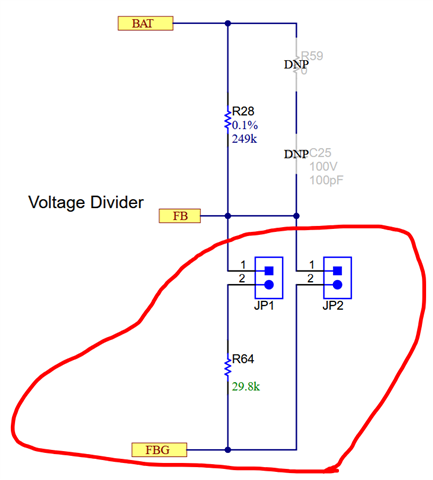
    To change the output voltage, you'll need to adjust the resistor feedback divider on the FB pin.

    We also have a design calculator that can help get the right values for the resistances.

    Also, is there some tab I can select where I can get readings of what is happening on the board?

    You can enable the ADCs and then set BQStudio to auto read. However, this will slow down BQStudio quite a bit if the auto read time is too fast. We have an FAQ on the ADC that might help.

    Best Regards,
    Ethan Galloway

  • Thank you,

    Adjusting the values with the calculator really helped for end design. For the EVM testing right now, I've read on other threads here that there is a way to change the output voltage using I2C. Could you let me know which settings I need to adjust so that I can test the EVM with the batteries. 

  • Thank you,

    Adjusting the values with the calculator really helped for end design. For the EVM testing right now, I've read on other threads here that there is a way to change the output voltage using I2C. Could you let me know which settings I need to adjust so that I can test the EVM with the batteries. 

  • Hello Aaron,

    You can use register 0x00 (Charge Voltage Limit) to finely adjust the feedback voltage. This register can't make large adjustments, though.

    If you need to make large adjustments to the battery charge voltage, could you use the BQ25758A? The BQ25758A is an I2C controlled DC-DC converter.

    Best Regards,
    Ethan Galloway

  • Ok I'll give that a try! Is this a hex or binary change to the value? I just needed to know where I could start and see results. 

    I don't think I will need the BQ25758A but I will keep it in mind. I believe the BQ25856 has everything I need. I just need to understand it better to make the changes that I need. 

    Thanks for the help. You may see me in here again. 

  • Hello Aaron,

    Your welcome. The register is a hex value.

    I'm going to close this thread for now. Let me know if you have any other E2E questions by opening a new E2E thread.

    Best Regards,
    Ethan Galloway