This thread has been locked.

If you have a related question, please click the "Ask a related question" button in the top right corner. The newly created question will be automatically linked to this question.

Problem using TLC5940EVM

Other Parts Discussed in Thread: TLC5940EVM, TLC5940

Below mentioned are observations that we made while testing TLC5940EVM board:-

 1.       We generated different LED frames using the ‘T.I. LED Frame software’, which is provided along with this EVM.

2.       We got correct results while running every frame independently.

3.       When we tried running these frames in a loop, in order to generate a specific lighting pattern, the pattern was successfully generated but with flickering of some of the LEDs.

4.       This flickering reduces if we slightly press TLC5940 Driver board with hand.

5.       Also, while switching from one frame to other in loop, there is a delay period during which LEDs go OFF. We don’t want LEDs to go OFF. We need continuous LED output without flickering.

Appreciate your feedback.

  • Hello Aparna,

    The interface board is relatively slow compared to the data speed, therefore the delay between the loops could be caused by this low communication speed. Could you send me the frames that you used and also the setting of the software that I can recheck it on another EVM?

    I never heard and observed that flickering changes if someone presses on the board. Are you sure that this is happening? Could there be a connection problem on the board?

    Best regards,
    Brigitte

  • Please find below the answers embedded.

    The interface board is relatively slow compared to the data speed, therefore the delay between the loops could be caused by this low communication speed. Could you send me the frames that you used and also the setting of the software that I can recheck it on another EVM?

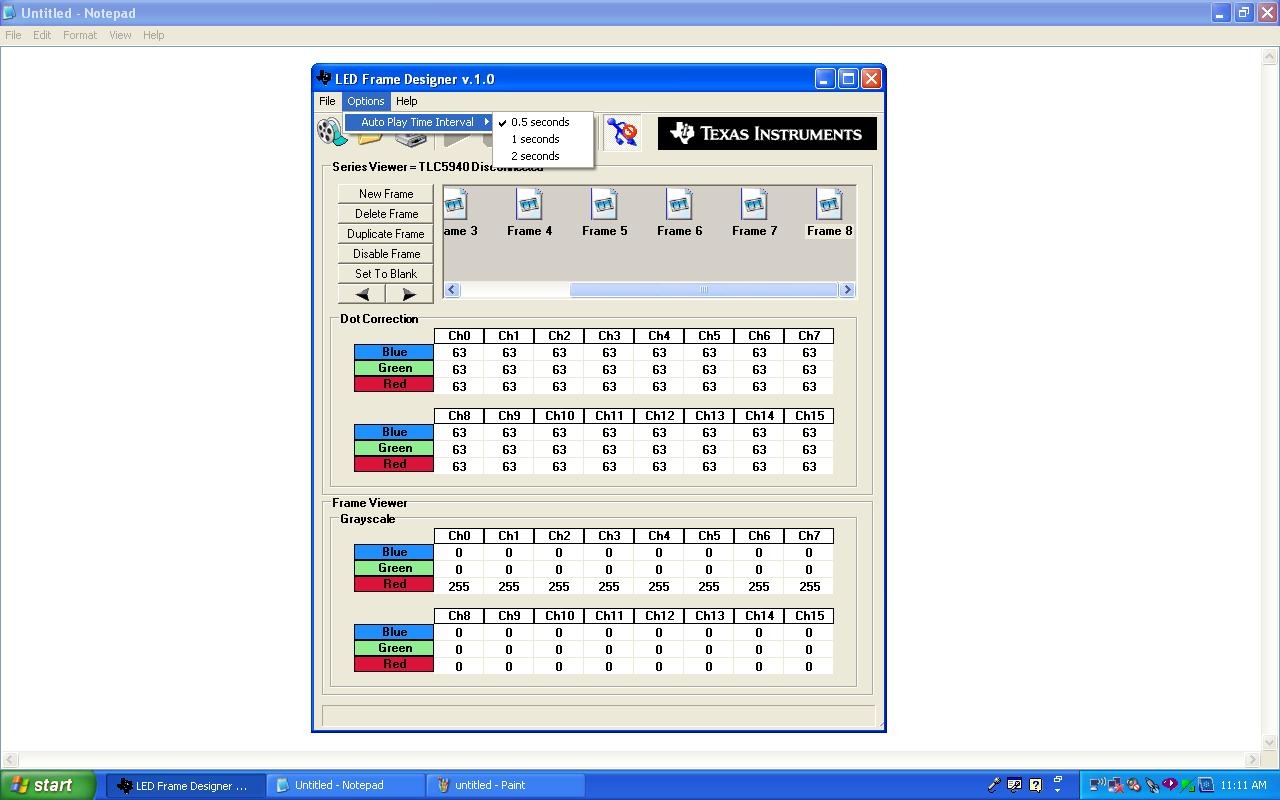
    1.Our requirement of auto play interval is 0.2sec but in EVM 0.5sec is minimum, so i selected 0.5Sec.

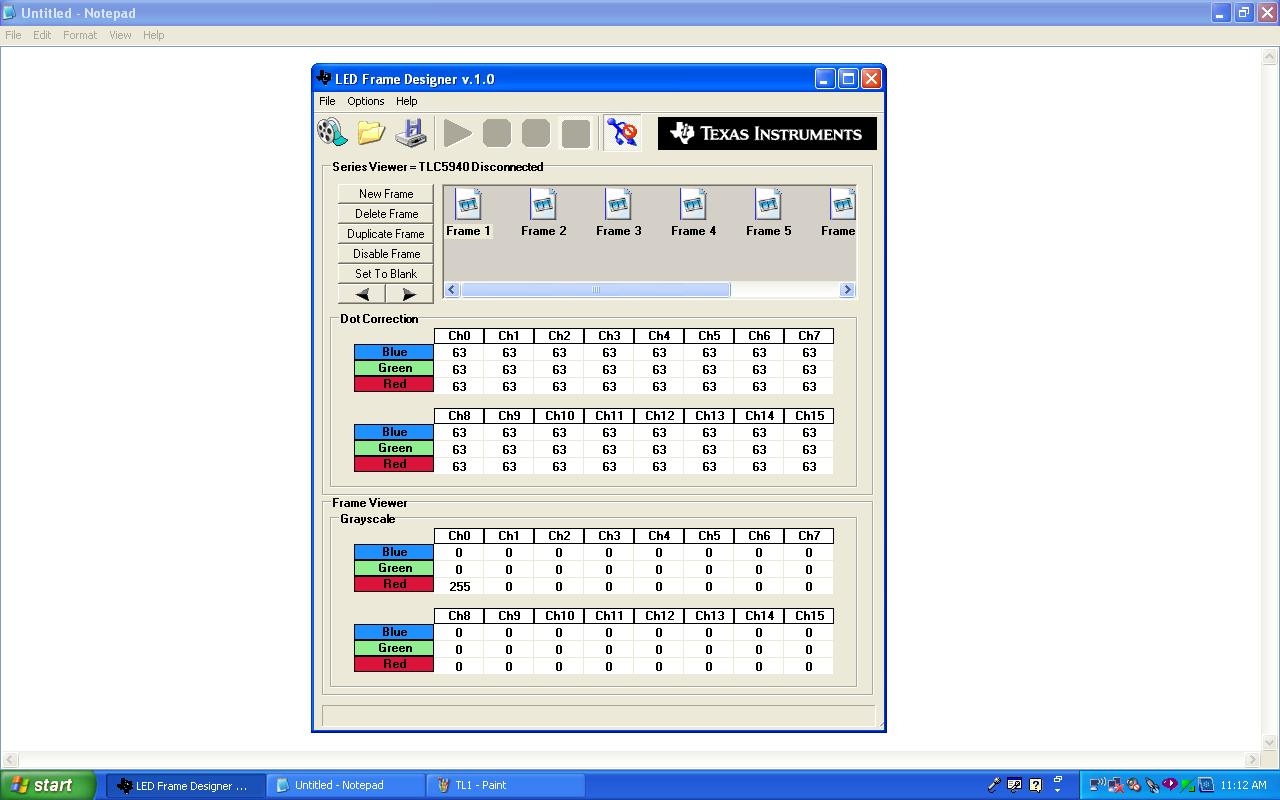
    2.I made 8 Frames with RED LED ON in sequence as follows

                 CH0  CH1  CH2  CH3  CH4  CH5  CH6  CH7 

    FRAME-1 RED  255   0    0    0    0    0    0    0   

    FRAME-2 RED  255  255   0    0    0    0    0    0   

    FRAME-3 RED  255  255  255   0    0    0    0    0   

    FRAME-4 RED  255  255  255  255   0    0    0    0   

    FRAME-5 RED  255  255  255  255  255   0    0    0   

    FRAME-6 RED  255  255  255  255  255  255   0    0   

    FRAME-7 RED  255  255  255  255  255  255  255   0   

    FRAME-8 RED  255  255  255  255  255  255  255  255  


    NOTE:PLEASE REFER ATTACHMENTS FOR FIRST FRAME


    GREEN & BLUE are set to 0 (Zero) value.

    Dot correction value: 63 count for all channel & frames.


    3.First I selected frame loop,and pressed Play button.

    4.Now patterns are appearing as expected,but during Frame change RGB LED's are flashing for very small amount of time.

       My question is, GREEN & BLUE LED data's are 0(zero) then why they are flashing? 

       What i observed is, when i placed my fingers at some of the components on driver PCB, other LED(Green & Blue) flashing reduces or increases.


    I never heard and observed that flickering changes if someone presses on the board. Are you sure that this is happening? Could there be a connection problem on the board?

    1. I ensure you, there is no connection problem.

    2. LED flashing is observed in two different EVM's supplied by TI techteam.

    3. This may be LED driver PCB layout issue?

    4. We are expecting a Flickering/flashing free LED drivers for demonstration,so please advice how to proceed further.

  • Please refer the attachment for 8th frame

  • Hello Aparna,

    During my evaluation in the lab I could reproduce the issue. The problem is that the driver board and the LED board have different power supplies and different grounds. When I am installing resistor R18 and connecting the grounds of the 2 boards together, the flashing of the green and blue LEDs is almost gone.

    Due to the fact that the grounding cannot be optimized with 2 boards, the flashing of the wrong LEDs still can happen. I found that the problem is gone most of the time if you first turn on the 3.3V supply, then connect the driver board to the PC and then turn on the 5.5V supply. If the resistor R18 is installed and the GND of the 2 boards is connected.

    Be careful in connecting R18 and a GND connection between the 2 boards, see below.

    The reason that the resistor is not installed by default and no GND connection is there between the boards is that this generates a direct GND connection between the PC and the lab power supply connected to the 3.3V and the 3.3V on the driver board is supplied from the USB port through a linear regulator which is no overdriven by the 3.3V supply connected to the LED board. This could damage the PC if the lab power supplies are generating an overvoltage during turn on or turn off or normal operation. In addition, the lab power supply could be damaged, if the 3.3V of the power supply is smaller than the 3.3V on the driver board and the power supply is not able to sink current.

    The TLC5940 evaluation module has this problem and there is no possibility to overcome this issue with a 2 board solution. It is not planned to generate another EVM for this part.

    Best regards,
    Brigitte