This thread has been locked.

If you have a related question, please click the "Ask a related question" button in the top right corner. The newly created question will be automatically linked to this question.

WEBENCH® Tools/TPS92513: Question about the RISENSE value

Part Number: TPS92513

Tool/software: WEBENCH® Design Tools

I used WEBENCH to design a circuit, and have built a prototype based off the design. My problem is that I am only getting about have the current expected to the LED string, 0.35A instead of the required 0.65A.

webench_project_3917516_13_380944486.pdf


I attached the WEBNCH project. The only change I have made is attaching the IADJ to VIN with 10M resistor.

Looking at the data sheet for the TPS92513, equation 7 and 8...

The value for the RISENSE in the WEBENCH design 0.51 Ohm resistor.. which is pretty close to the output from the above equation..

VISENSE = 1.8 / 6 = 300mV

RISENSE = 300mV / 0.65A = 0.46 Ohm

When I lower the value of this resistor to around 0.2 Ohms, I get the expected 0.65A output.

Can someone please help me understand why the value specified in WEBENCH does not yield the expected output current?

Thanks,

Derek

  • Hello Derek,

    There are some possibilities we can look into further if needed but let's start with the most simple of them. Can you measure the IADJ voltage to make sure that it is at least 1.8V? I have found that sometimes 10Mohm is a bit too high for the resistor between VIN and IADJ and it can cause the internal clamp voltage to be too low. It would also be a good idea to check the actual ISENSE voltage with a scope as well to make sure it is 300mV average like it is supposed to be even if IADJ is reading greater than 1.8V. If this is the issue you can just reduce the 10Mohm to something lower like 4.7Mohm or even 1Mohm.

    Regards,

    Clint

  • Hi Clint,

    I have already tried reducing the IADJ resistor to lower values, I forget the exact values, but I went all the way down to 2M. I also verified the voltage was over 1.8V on the IADJ pin. The smaller value resistors didn't make any difference, so I ended up boing back to the 10M.

    I will check the ISENSE voltage with my scope, but if it is not 300mV average, the solution you suggested I have already tried with no success.


    Thanks,
    Derek
  • Hello Derek,

    Understood. That was just the first place to look. I was skeptical myself since I have only usually seen an issue with 10Mohm at low input voltage, but it's worth checking. The next most likely culprit then is usually layout. A poor layout can cause all kinds of errors depending, but layout is critical with switchers due to the noise generated by fast switch edges. Could you give me any information about your PCB layout? Layer plots would really help. Layout is one of the most common causes of errors, unfortunately it's not as easy as the first thing I had you check. But I'm glad you already checked it.

    Regards,

    Clint

  • Hello Cliff,

    I had a feeling it was related to the layout. Do these work for you? I'm sorry they are a little messy, I didn't spend any time organizing the silk screen before sending them off. I am currently testing the left portion of the board.

    In this version I had mistakenly connected RIAD1 to GND, not VIN, so I have cut this trace and correctly connected it to VIN for my tests.

    Thanks,

    Derek

  • Hello Derek,

    I'm pretty sure this is your issue and it is a common one. Grounding really is key in switching regulators and you have to be careful how you do it. The most important for a buck converter is the input cap ground, the rectifier diode ground (D3), and the IC ground. You do have vias for each to the ground plane for the left one (not the right, it will likely be worse) but placement is important as well. As things are connected the ground return between the diode and the input cap is directly beneath the IC. You will also be injecting noise into IADJ and ISENSE because their ground point is forced to be noisy be the ground return currents. So my recommendations:

    1. The bottom layer ground plane is a very good thing to have. But I also recommend filling all unused space on the top layer with a ground fill as well. This makes layout easier and you can tie key ground points to the bottom layer easier.

    2. Move D8 up above L2 to get it out of the way. Then move D3 to where D8 was and rotate it so the ground is on the left. Then rotate CIN so that its ground is on the top side near the D3 ground. Get those two grounds close together, connect them with a top layer ground plane, and put (or keep) the vias connected to the bottom layer between them. This will shorten the loop and ground return and prevent the ground return currents from running directly beneath the IC and injecting noise to other more sensitive grounds.

    3. Also add a via next to the ground points for IADJ, ISENSE, RT, and UVLO to reduce possible errors.

    I believe if you do that it will operate much better.

    Regards,

    Clint

  • Hello Clint,

    Thank you for the extremely detailed response! I greatly appreciate it.

    I have reworked the design, using http://www.ti.com/tool/TIDA-01096 as a reference. It looks like it includes all the suggestions you made above.

    If you don't mind, could you take a quick look at the new design to see if there are any obvious issues?

    Thanks!

    Derek

  • Hello Derek,

    Assuming a bottom side ground plane that layout is very good. Whoever did that knows layout. EVMs and TI Designs are great as layout examples since they have been thoroughly tested and I should have mentioned that too. I have tested this device for many hours in many configurations so I know it is accurate with a good layout, this should solve your problem.

    Regards,

    Clint

  • Hello Clint,

    Yup, there is a bottom ground layer. Thank you for all your help!

    I will let you know how it goes once I get my board assembled.

    Cheers,
    Derek
  • Hi Clint,

    I just finished assembling the updated version of my design. I am seeing similar results. I am now seeing about 0.4A, so it has improved slightly, but still not at the 0.65A that the WEBENCH specifies.

    I took a look at the schematic for the reference design I duplicated, and the RISENSE looks to be a 0.05 Ohm resistor? which according to the datasheet would be a 6A output?

    Any help or additional things I could check would be greatly appreciated. I don't want to change the resistance to 0.2 Ohm's, unless that's the correct solution.

    Thanks,

    Derek

  • Hello Derek,

    After looking at your layout one more time I am wondering what you have connected to IADJ? Is it just floating? Have you tried your design on the EVM to confirm what you are seeing? If IADJ is floating that could be an issue.

    It looks like in that reference design they are setting a very low IADJ voltage which is why they are using 0.05ohm. I would not recommend operating like that. You could easily have +/-20% current tolerance or so at such a low current sense voltage.

    Regards,

    Clint

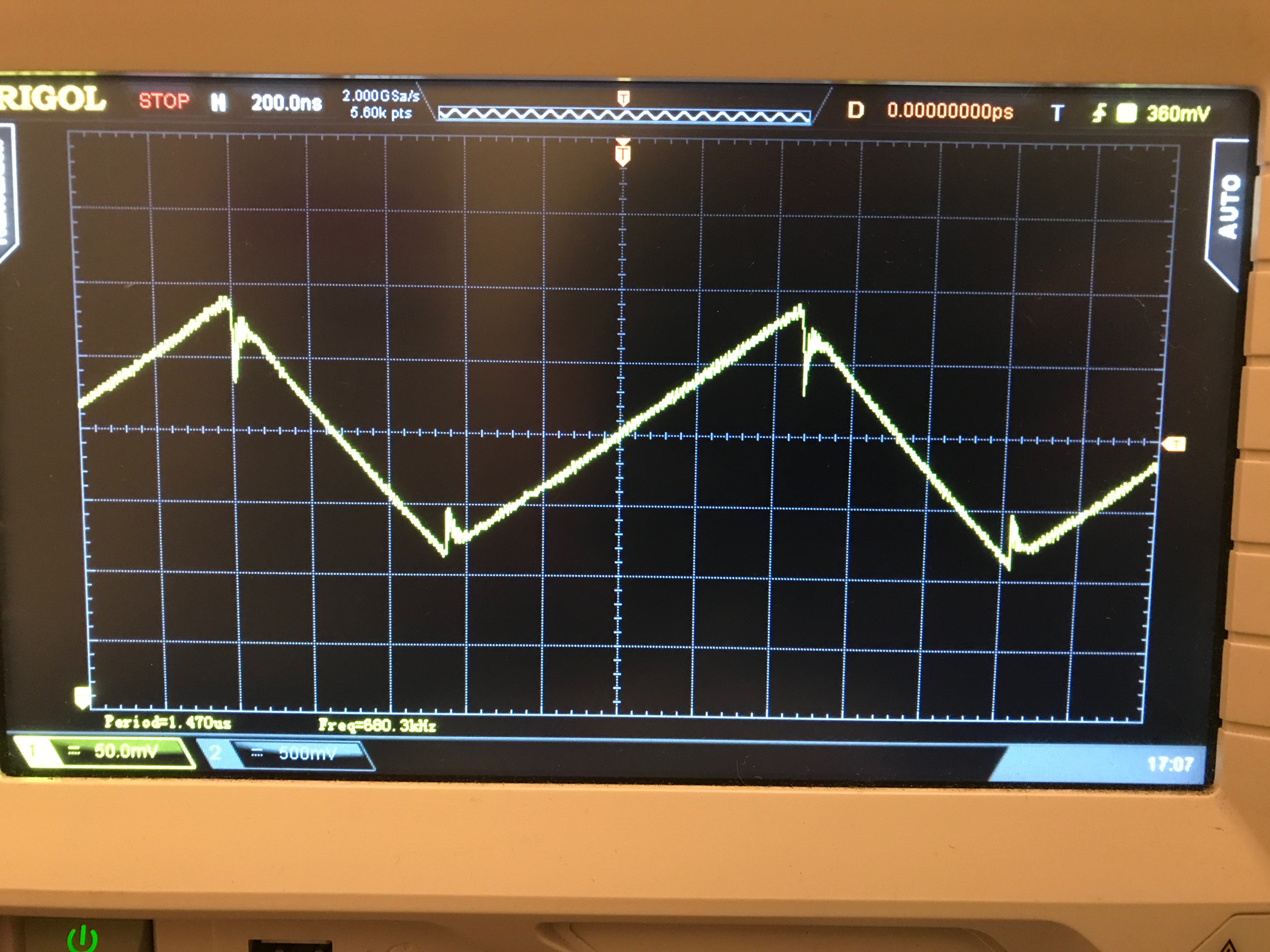
  • Here is the waveform at the ISENSE pin in case it helps.

  • That waveform looks clean so I doubt it is layout related. Do you know what the average value you are reading is? I can't see the ground point for the waveform. How is it that you are measuring the LED current? Are you by chance measuring input current?

    Thanks,

    Clint

  • Hi Clint,

    I have it going to a bread board where I have it connected to VIN with a 10M resistor.

    I didn't include the resistor as part of the board because I wanted to compare the analog and digital dimming capabilities, but first I was testing to make sure I am getting the max output before connecting it to an analog pin on my micro controller.

    Currently the PWM and CLK connector's are floating.

    This is the full board.

    Thanks,

    Derek

  • The peak is just under 300mV, and the average is around 200mV.

    I am just reading the current from my bench power supply.

    Thanks,
    Derek
  • Hello Derek,

    I see, the input current from your power supply will not be the same as the LED current. The input current will be approximately the LED current multiplied by duty cycle. In this case the duty cycle D = 15.29V/24V which is 0.637. So if you set the LED current to 0.65A you will get an input current (reading from your power supply) of around 0.65A*0.637 which is about 414mA. So your LED current is likely correct and can be measured by taking the average ISENSE voltage and dividing it by the current sense resistor value.

    Regards,

    Clint

  • Hi Clint,

    This makes perfect sense! Thank you so much for all your time. I'm feeling slightly useless right now, but I learned a lot!

    I have a feeling the power supply I designed for this project is overkill at 24V @ 2A output

    Thanks,
    Derek
  • Hi Derek,

    No problem. Sometimes I skip over more "simple" explanations because of my experience with regulators, I should have honed in on that more quickly probably. But it is a learning experience and in all honesty it is good you updated your layout anyway or you would likely be having other issues as well.

    Regards,

    Clint