This thread has been locked.

If you have a related question, please click the "Ask a related question" button in the top right corner. The newly created question will be automatically linked to this question.

BQ40Z50: Issues on Board

Part Number: BQ40Z50
Other Parts Discussed in Thread: BQSTUDIO, BQ25713, EV2400, BQ24040,

Hey team,

A customer is having a few issues coming up with bringing the BQ40z50 online and I was hoping you could assist in answering a few questions and debugging this problem.

The good news is the PCB powered up and communicated with the TI BMS software tool. I used Rick’s firmware package for a 1s2p configuration and adjusted the firmware for my application.

Unfortunately the PCB is not charging the battery cells.

  • With the power supply off the cell voltage appears at the pack +/- pins: 3.6V.
  • The LED’s light but do not flash which indicates it is not charging (also the current on the power supply is only 0.04A)p
  • The pack present has to be tied to GND.
  • The LED’s should only work when the pushbutton is pressed.

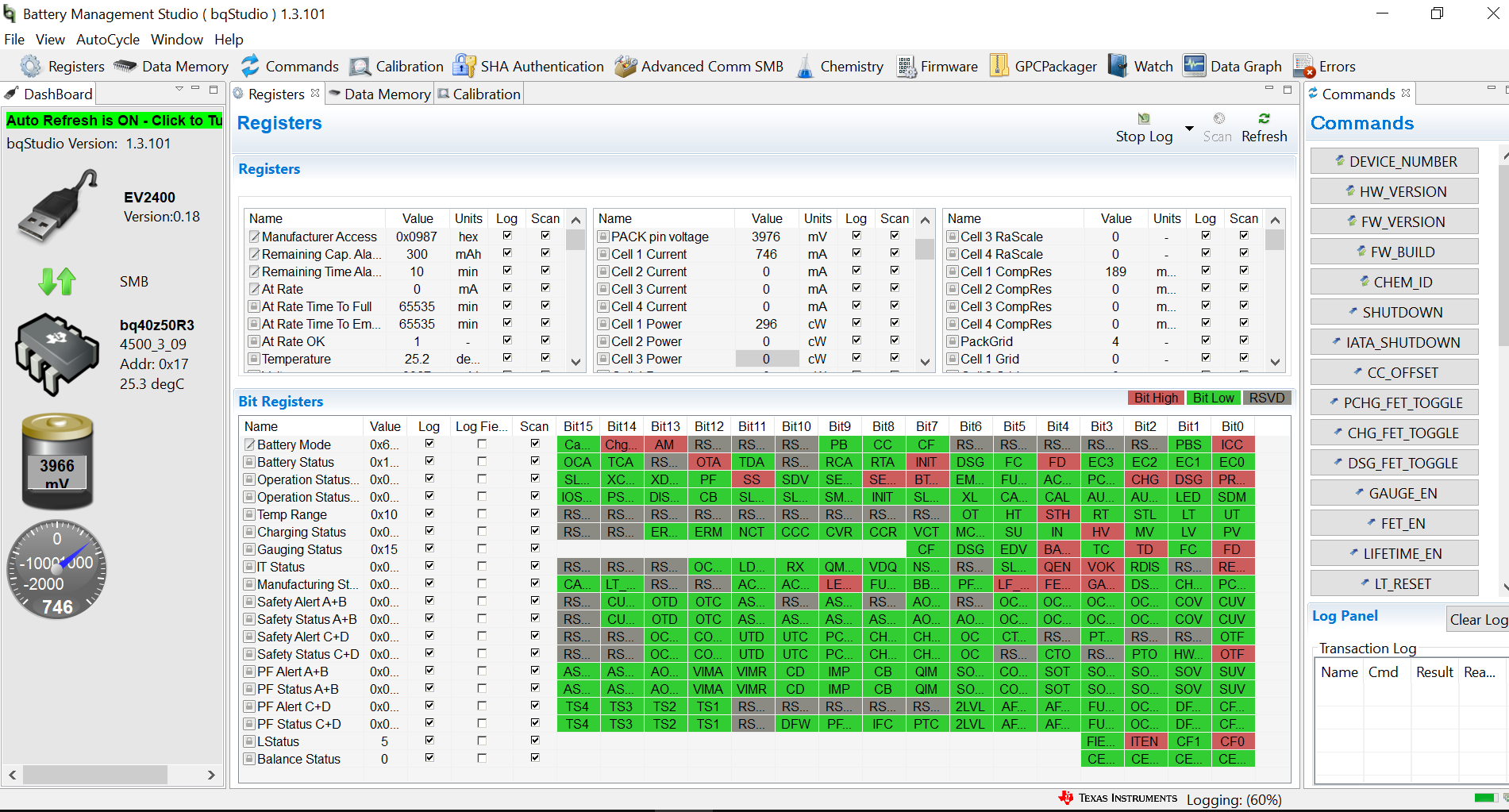
Here are some screen shots and photos….I am new to this firmware, there are a lot of features and maybe I missed something.

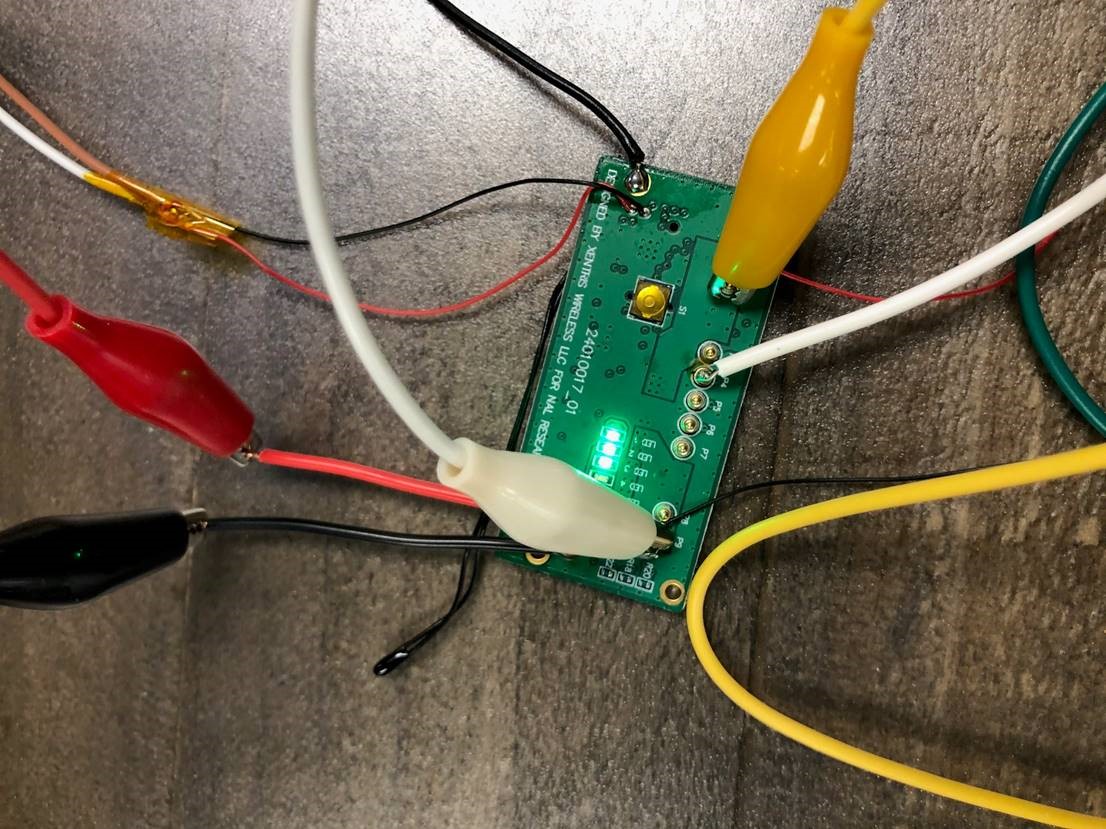
  • The firmware did work on the EVM but the EVM and my boards are not 100% the same. Also, I checked several of my PCB’s and they all have the same result. I checked the components on the PCB and for shorts. Everything is ok. The design was copied from a working project.
  • Another strange thing is when I shutdown the PCB and disconnect; then reconnect the PCB to the bqStudio it will not connect. I will check the Vout which should be 3.6V and it will read zero but I will tear down again and reconnect again and then it will work. Strange. This is consistent.

  • Hi Cameron,

    The xchg and xdsg bits would indicate if the fets were off, but in this case they are 0 so charging should be allowed. Is there a battery charger also on this BMS?

    Best regards,

  • Hey Nick,

    They are currently using a power supply set to around 4.5V (they can correct me if I'm wrong, it may have been 4.2V) to charge the device. It eventually will be attached to the BQ25713. I'm going to link the customer directly to the thread so they can answer any further questions.

    Thanks,

    Cameron

  • Hi Cameron,

    The OTF bit is set, this means the chg/dsg FETs have overheated. 

    Thanks,

  • Hi Nick,

    The DSG and CHG FET's on the PCB are not getting hot. The OTF  bit turns high (red) immediately after connecting to the TI BMS. From your experience have you heard from another customer or witnessed this happening immediately on startup? What indicates to the BMS IC that the FET's are too hot? 

    Thank You,

    David

  • Hi David,

    How are you connecting to the BMS? I would recommend using a charger instead of a power supply.

    Best regards,

  • Hi Nick,

    I connect the PCB through SMBus to the TI EV2400. Then from the EV2400 to my laptop using a USB Type A cable. We have used power supplies for other designs using the BQ40z50.

    How does the OTF register know there is an temperature issue with the FET's. What is the IC looking for? I have only one NTC and that is for the battery cells and is not near the FET's. This may help me in my troubleshooting.

    Thank You,

    David

  • Hi David,

    OTF may not be related to your issue, will look into this more.

    As I mentioned initially, the xchg  bit is not set so charging is allowed. It is strange that you are seeing otherwise. Can you upload the .gg and logs showing when you connect the power supply to PCB?

    Best regards,

  • Hi Nick,

    I am new to TI BMS software, where are the .gg and log files located? 

    Thank You,

    David

  • Hi David,

    The .gg can be exported from data memory tab in bqstudio. A log can also be started in bqstudio which contains IVT data.

    Best regards,

  • Hi Nick,

    I attached the .gg file and the log file. If there is anything else you need please let me know.

    Thank You,

    David 

    Fri Jan 22 13:15:06 CST 2021
    
    Device Version Info = 4500_3_09
    BQZ Device Name = bq40z50R3
    BQZ Firmware Version = V3_09_BLD73
    
    Design Capacity = 6700
    Design Voltage = 3635
    Specification Info = 0x0031
    Manufacturer Date = 1980-1-1
    Serial Number = 0x0001
    Manufacturer Name = Texas Instruments
    Device Name = bq40z50-R3
    Device Chemistry = LION
    
    Sample,DateTime,ElapsedTime,ManufAccess,RemCapAlarm,RemTimeAlarm,BattMode,@Rate(@),@TimeFull,@TimeEmpty,@RateOK,Temperature,Voltage,Current,AvgCurr,MaxErr,RSOC,ASOC,RemCap,FullChgCap,RunTimeEmty,AvgTimeEmty,AvgTimeFull,ChgCurr,ChgVolt,BattStat,CycleCnt,MaxTurboPwr,SusTurboPwr,MaxTurboCurr,SusTurboCurr,TurboRhf,TurboVx,TurboQpass,TurboIsim,TurboVloadCell1,TurboVloadCell2,TurboVloadCell3,TurboVloadCell4,TurboVloadStack,TurboVloadSystem,TurboReffCell1,TurboReffCell2,TurboReffCell3,TurboReffCell4,TurboReffStack,TurboReffSystem,TurboSPPCCell1,TurboSPPCCell2,TurboSPPCCell3,TurboSPPCCell4,TurboSPPCStack,TurboSPPCSystem,TurboRhfCell,SoH,OpStatA,OpStatB,TempRange,ChgStat,GaugeStat,ITStat,MfgStat,SafetyAlertAB,SafetyStatAB,SafetyAlertCD,SafetyStatCD,PFAlertAB,PFStatAB,PFAlertCD,PFStatCD,CellVolt1,CellVolt2,CellVolt3,CellVolt4,vBAT,vPACK,CellCurr1,CellCurr2,CellCurr3,CellCurr4,CellPower1,CellPower2,CellPower3,CellPower4,Power,AvgPow,IntTemp,TS1Temp,TS2Temp,TS3Temp,TS4Temp,CellTemp,FETTemp,GaugeTemp,UnCompCellVolt1,UnCompCellVolt2,UnCompCellVolt3,UnCompCellVolt4,FiltCellVolt1,FiltCellVolt2,FiltCellVolt3,FiltCellVolt4,FiltCellCurr1,FiltCellCurr2,FiltCellCurr3,FiltCellCurr4,FiltTemp,FltRemQ,FltRemE,FltFullChgQ,FltFullChgE,NoLoadRemCap,TrueRemQ,TrueRemE,InitialQ,InitialE,TrueFullChgQ,TrueFullChgE,T_sim,T_ambient,RaScale1,RaScale2,RaScale3,RaScale4,CompRes1,CompRes2,CompRes3,CompRes4,PackGrid,LStatus,CellGrid1,CellGrid2,CellGrid3,CellGrid4,StateTime,DOD0_1,DOD0_2,DOD0_3,DOD0_4,DOD0 Passed Q,DOD0 Passed E,DOD0 Time,DODEOC_1,DODEOC_2,DODEOC_3,DODEOC_4,QMax1,QMax2,QMax3,QMax4,QMaxDOD0_1,QMaxDOD0_2,QMaxDOD0_3,QMaxDOD0_4,QMaxPassedQ,QMaxTime,Tk,Ta,RawDOD_1,RawDOD_2,RawDOD_3,RawDOD_4,CBTime1,CBTime2,CBTime3,CBTime4,CBDOD_1,CBDOD_2,CBDOD_3,CBDOD_4,CBTotalDODChg,BalStat,SOH_FC_Q,SOH_FC_E,AccumT,AccumQ,LogRowTime(ms),LogStatus
    1,2021-01-22 13:15:11,4.001,0x0187,300,10,0x6001,0,65535,65535,1,24.7,3986,114,115,3,62,28,1835,2962,65535,65535,605,4488,4100,0x00C0,1,0,0,0,0,0,0,-3,-2297,3437,0,0,0,3437,3437,126,0,0,0,126,126,-9734,-32767,-32767,-32767,-9734,-2297,113,46,0x0187,0x0000,0x08,0x0004,0x50,0x0014,0x0238,0x0000,0x0000,0x0000,0x0000,0x0000,0x0000,0x0000,0x0000,3986,0,0,0,4000,4009,117,0,0,0,47,0,0,0,46,46,24.5,24.7,195.3,197.0,196.4,24.7,-273.2,24.7,398.7,0.0,0.0,0.0,3974,0,0,0,102,0,0,0,24.5,1835,597,2962,1012,2255,1835,597,1130,416,2962,1012,24.7,24.6,1000,0,0,0,0,0,0,0,0,5,0,0,0,0,93,5472,0,0,0,-3,-1,0,0,0,0,0,3382,3384,4400,4400,0,0,0,0,-3,0,0.65,2374,5472,0,0,0,0,0,0,0,0,0,0,0,0,0,3076,1083,0,0,1904,SUCCESS
    2,2021-01-22 13:15:15,8.001,0x0187,300,10,0x6001,0,65535,65535,1,24.7,3986,115,115,3,62,28,1835,2962,65535,65535,605,4488,4100,0x00C0,1,0,0,0,0,0,0,-3,-2297,3437,0,0,0,3437,3437,126,0,0,0,126,126,-9734,-32767,-32767,-32767,-9734,-2297,113,46,0x0187,0x0000,0x08,0x0004,0x50,0x0014,0x0238,0x0000,0x0000,0x0000,0x0000,0x0000,0x0000,0x0000,0x0000,3986,0,0,0,4000,4010,116,0,0,0,46,0,0,0,46,46,24.4,24.7,196.4,196.4,196.4,24.7,-273.2,24.7,398.7,0.0,0.0,0.0,3975,0,0,0,103,0,0,0,24.5,1835,597,2962,1012,2255,1835,597,1130,416,2962,1012,24.7,24.6,1000,0,0,0,0,0,0,0,0,5,0,0,0,0,97,5472,0,0,0,-3,-1,0,0,0,0,0,3382,3384,4400,4400,0,0,0,0,-3,0,0.65,2374,5472,0,0,0,0,0,0,0,0,0,0,0,0,0,3076,1083,0,0,1795,SUCCESS
    3,2021-01-22 13:15:19,12.002,0x0187,300,10,0x6001,0,65535,65535,1,24.6,3986,115,115,3,62,28,1835,2962,65535,65535,605,4488,4100,0x00C0,1,0,0,0,0,0,0,-3,-2297,3437,0,0,0,3437,3437,126,0,0,0,126,126,-9734,-32767,-32767,-32767,-9734,-2297,113,46,0x0187,0x0000,0x08,0x0004,0x50,0x0014,0x0238,0x0000,0x0000,0x0000,0x0000,0x0000,0x0000,0x0000,0x0000,3986,0,0,0,4000,4010,113,0,0,0,45,0,0,0,46,46,24.5,24.7,196.5,196.5,196.5,24.7,-273.2,24.7,398.6,0.0,0.0,0.0,3976,0,0,0,104,0,0,0,24.5,1835,597,2962,1012,2255,1835,597,1130,416,2962,1012,24.7,24.6,1000,0,0,0,0,0,0,0,0,5,0,0,0,0,101,5472,0,0,0,-3,-1,0,0,0,0,0,3382,3384,4400,4400,0,0,0,0,-3,0,0.65,2374,5472,0,0,0,0,0,0,0,0,0,0,0,0,0,3076,1083,0,0,1717,SUCCESS
    4,2021-01-22 13:15:23,16.002,0x0187,300,10,0x6001,0,65535,65535,1,24.6,3986,114,115,3,62,28,1835,2962,65535,65535,605,4488,4100,0x00C0,1,0,0,0,0,0,0,-3,-2297,3437,0,0,0,3437,3437,126,0,0,0,126,126,-9734,-32767,-32767,-32767,-9734,-2297,113,46,0x0187,0x0000,0x08,0x0004,0x50,0x0014,0x0238,0x0000,0x0000,0x0000,0x0000,0x0000,0x0000,0x0000,0x0000,3986,0,0,0,3999,4010,110,0,0,0,44,0,0,0,46,46,24.5,24.7,196.4,196.5,195.4,24.7,-273.2,24.7,398.6,0.0,0.0,0.0,3977,0,0,0,105,0,0,0,24.5,1835,597,2962,1012,2255,1835,597,1130,416,2962,1012,24.7,24.6,1000,0,0,0,0,0,0,0,0,5,0,0,0,0,105,5472,0,0,0,-3,-1,0,0,0,0,0,3382,3384,4400,4400,0,0,0,0,-3,0,0.65,2374,5472,0,0,0,0,0,0,0,0,0,0,0,0,0,3076,1083,0,0,1763,SUCCESS
    5,2021-01-22 13:15:27,20.003,0x0187,300,10,0x6001,0,65535,65535,1,24.7,3986,114,115,3,62,28,1835,2962,65535,65535,605,4488,4100,0x00C0,1,0,0,0,0,0,0,-3,-2297,3439,0,0,0,3439,3439,126,0,0,0,126,126,-9749,-32767,-32767,-32767,-9749,-2297,113,46,0x0187,0x0000,0x08,0x0004,0x50,0x0014,0x0238,0x0000,0x0000,0x0000,0x0000,0x0000,0x0000,0x0000,0x0000,3986,0,0,0,3999,4010,115,0,0,0,46,0,0,0,46,46,24.5,24.7,196.5,196.5,195.9,24.7,-273.2,24.7,398.6,0.0,0.0,0.0,3978,0,0,0,106,0,0,0,24.6,1835,597,2962,1012,2255,1835,597,1130,416,2962,1012,24.7,24.6,1000,0,0,0,0,0,0,0,0,5,0,0,0,0,109,5472,0,0,0,-3,-1,0,0,0,0,0,3382,3384,4400,4400,0,0,0,0,-3,0,0.65,2374,5472,0,0,0,0,0,0,0,0,0,0,0,0,0,3076,1083,0,0,1761,SUCCESS
    
    Battery Pack gg file_1-22-21.gg.csv

  • Hi Nick,

    I forgot to mention that I turned off the Thermistor bits so OTF is now low. I thought maybe that would help but it did not have any effect.

    Regards,

    David

  • Hi David,

    The log only contains 5 points, doesn't appear to show an adapter being connected.

    Best regards,

  • Hi Nick,

    I took more data points and attached a new log. I let the log run longer this time. Does the "adapter" you reference mean the SMBus connection or the power?Battery Pack Log_1-22-21b.log

    Thanks,

    David

  • Hi David,

    By adapter I mean the charger connection, I am trying to see how the gauge is responding when the charger is connected.

    In the new log it looks like battery is charging.

    I'm curious why you are using a 1-4 cell gauge in a 1s application. Is this just for testing?

    Best regards,

  • Hi Nick,

    Yes, There is a trickle charge but it has not been above 150mA. It should be around 1A. 

    I have been checking the hardware. Everything seems to be correct. I don't see any shorts or wrong component placement. I x-rayed the pcb too and found no issues.

    The design architecture was copied from a previous design. There is one difference....my BTP interrupt (pin 15) is grounded and the unused TS2 through TS4 (pins 11-13) are grounded too. In the previous design the BTP interrupt and TS2 - TS4 were no-connects. Do you think this is the problem? 

    The 1-4 cell gauge is just for testing. 

    This is a really baffling  problem. Nothing stands out as an issue.

    Thanks,

    David

  • Hi David,

    This sounds like an issue with charger. The gauge does not control the charging current. Are you able to try with a battery charger like bq24040?

    Best regards,

  • Hi Nick,

    I will try but the TI bq40z50EVM-561 worked with the power supply. With the same firmware it charged at about ~0.9A.

    Thanks,

    David

  • Hi Nick,

    I programmed a new PCBa and was able to discharge at 0.5A. At least I have discharge working. Charging still was not working but I will try charging again when the battery is discharged to 3V.

    Regards,

    David

  • Hi David,'

    If you can attach the logs when you try to charge I will take a look, so start logging and then connect the adapter.

    Also an image of the register and bit registers from bqstudio after you connect the charger.

    THanks,

  • Hi Nick,

    As of yesterday I successfully discharged the battery pack.

    The pcba started charging (but at a low rate of charge ~0.6A). I attached the log. I have about an hours worth of log data. Let me know your thoughts and if you see any issues.

    I was able to calibrate the voltage with no issues but when I tried to calibrate the current (-2000mA) it did not work. The calibrate icon had a "x" next to it. What could cause this issue?

    Thank You,

    David

    Battery Pack Log_1-26-21.log

  • Hi Nick,

    Attached is the screenshot of the registers while I was charging. 

    Regards,

    David

  • Hi David

    I'm not aware of any mechanism that the gauge could be causing the charger to not output its rated current. Also The logs show a spike in current/voltage that we don't normally see.

    There should have been an error message at the bottom of bqstudio when you tried to calibrate.

    BEst regards,

  • Hi Nick,

    I re-calibrated the voltage and current and it worked. Also, thanks for the feedback regarding the current/voltage spike.

    We tried to update the "Gas Gauging" tab on the left hand column in the Data Memory section.

    The "set voltage threshold" needs to be changed due to a customer requirement. It currently is 2500mA and we need the voltage to be 3000mA. 

    I changed to 3000mA and it would not accept. The 2500mA re-appeared.  What would cause the firmware to be locked and not accept new values?  Other values could not be changed either.

    Another engineer where I work used the the IC (BQ40Z50) on a different but similar product and could change the values with no issues. 

    Please let me know.

    Thank You,

    David Kitzerow


  • Hi David,

    My understanding is that this is not the same as the orignal issue. Please make a new e2e post and we will get to your question.

    THanks,