This thread has been locked.

If you have a related question, please click the "Ask a related question" button in the top right corner. The newly created question will be automatically linked to this question.

BQ78350-R2-DEVICE-FW: BqStudio 1.3.101 missing "Hex Dump" button in "Data Memory" tab

Part Number: BQ78350-R2-DEVICE-FW
Other Parts Discussed in Thread: BQ78350, BQSTUDIO

Hi,

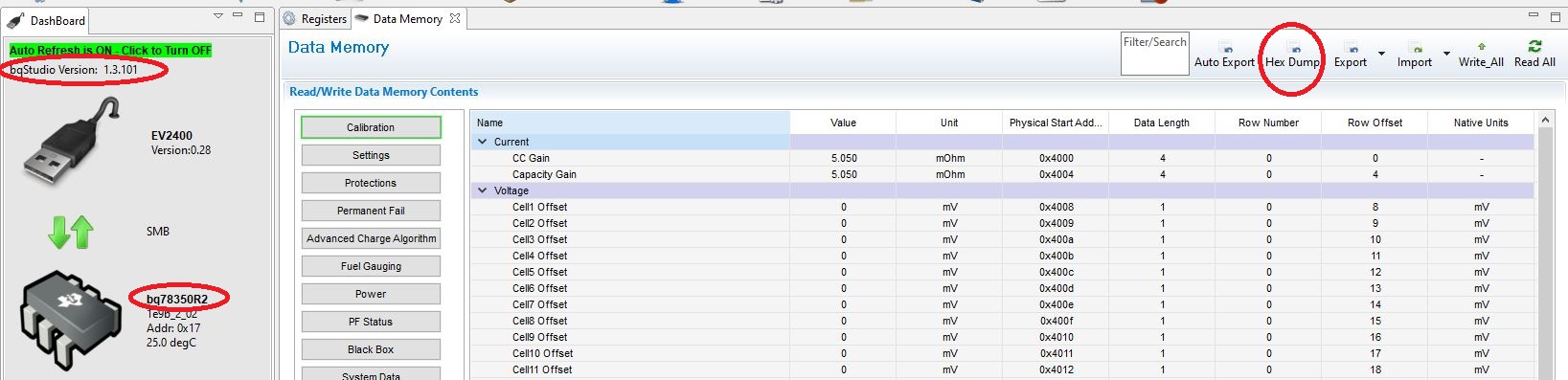
I'm trying to dump the flash memory for the BQ78350 and can not find the "Hex Dump" button that should be available in the "Data Memory" tab. 

It does not show up either when the device is connected correctly to the tool.

What am I missing?

Thank you

Best regards,

AAK

  • Hi AAK,

    This device does not have the "Hex Dump" feature in BQStudio. The only way to get the complete hex data for all of the data memory is to Export the srec file from the Firmware tab. The top section of the srec contains the data flash, and the second part contains the instruction flash.

    Since you are using the R2 firmware (you need to write the srec), you can save a 'golden' srec from BQStudio. This will contain the R2 firmware + you data flash settings in the same file.

    Best regards,

    Matt

  • Hi Matt,

    Thank you for your answer. I however don't believe this is correct.

    On my former colleges computer the "Hex Dump" button is available. He has unfortunately stopped and I'm trying to take over after him.

    Installing BqStudio on my computer is not giving the same results.

    See attached screenshot taken from BqStudio with BQ78350R2 attached to his computer

    Update: Copying my colleges 1.3.101 BqStudio installation folder and using it to replace my 1.3.101 installation seems to do the trick? Hex Dump is available and works - I just tried it. 

  • Hi AAK,

    I apologize, I was mistaken and this button is available for this device. To see this option, you need to go to Winddow->Preferences and select 'Show Advanced Views'. Then this export option will be displayed.

    Best regards,

    Matt

  • Hi Matt,

    That did it! 

    Thank you!

    Best regards,

    AAK