This thread has been locked.

If you have a related question, please click the "Ask a related question" button in the top right corner. The newly created question will be automatically linked to this question.

[TDA4x] Error when write CAN message via MCU_MCAN_0 with SocketCAN

Other Parts Discussed in Thread: TDA4VM

Hi. 

I'm sending CAN messages via MCU_MCAN_0 with SocketCAN.

write() is blocked within 10 ~ 20 minutes after starting it 

I can see "Resource temporarily unavailable" when I set  sockopt to SO_SNDTIMEO.

I couldn't have seen this error at PSDK6.2.

I'm using PSDK7.1.

Regards

Dongwon Choi

  • Hi Dongwon Choi,

    Which core are you using to control the MCU_MCAN0? What piece of SW is running in the other cores?

    Please add more detials.

    Regards,

    Karan

  • Hi Karan.

    A72 core (Linux) is used to control the MCU_MCAN0.

    The below cores are used.

    Capture, MSC, (LDC), C7x(TIDL), A72(post processing),  A72(sending outputs via socketCAN)

    before starting application, I run the below commands for setting ip up.

    ip link set can0 type can bitrate 500000
    ip link set can0 txqueuelen 1024
    ip link set can0 up

    Regards

    Dongwon Choi

  • Hi Karan.

    Do you have any updates for this problem?

    Regards

    Dongwon Choi

  • Hi Dongwon Choi,

    Can you please provide me the logs for the error. Also can you sent the code for setting up the can0 interface, after that are you sending messages continuously when you see it getting blocked after 10-20mins?

    Regards,

    Karan

  • Hi Karan.

    I'm attaching the code and log when write is blocked.

    About 60 CAN messages is sent for results via can0 every 33ms.

    - the log when wirte() is failed

    oz_can_write_frame:114:  #ERROR : Can't write CAN socket [-1]
    #ERROR : Can't write CAN socket: Resource temporarily unavailable

    - the code for setting up the can0

    int32_t oz_can_sender_init(SvRecordHandle* hdl)
    {
      int ret = 0;	
      struct sockaddr_can addr;
      struct ifreq ifr;
      uint32_t frm_cnt = 0;
      struct timeval timeout; 
    
    	/* create socket */
     	hdl->can_sock = socket(PF_CAN, SOCK_RAW, CAN_RAW);
     	if (hdl->can_sock == -1) {
        KERNEL_PRINTF(" #ERROR : Can't open CAN TX socket\n");
       	return -1;
     	}
      
     	addr.can_family = AF_CAN;
     	memset(&ifr.ifr_name, 0, sizeof(ifr.ifr_name));
      
      if (hdl->createParams.can_tx_if == SV_CAN_IF_MCU_MCAN0) {
        memcpy(ifr.ifr_name, "can0", strlen("can0"));
      }
    
      if (strcmp(ANYDEV, ifr.ifr_name) != 0) {
       	if (ioctl(hdl->can_sock, SIOCGIFINDEX, &ifr) < 0) {
          KERNEL_PRINTF(" #ERROR : Can't map an index for CAN TX socket \n");
          return -1;
       	}
       	addr.can_ifindex = ifr.ifr_ifindex;
      } else {
       	addr.can_ifindex = 0; /* any can interface */
      }  
    
      timeout.tv_sec = 3;
      timeout.tv_usec = 0;
      if (setsockopt (hdl->can_sock, SOL_SOCKET, SO_SNDTIMEO, (char *)&timeout, sizeof(timeout)) < 0) {
        KERNEL_PRINTF(" #ERROR : Can't socket SNDTIMEO \n");
      }
    
      if (bind(hdl->can_sock, (struct sockaddr *)&addr, sizeof(addr)) < 0) {
        KERNEL_PRINTF(" #ERROR : Can't bind CAN TX socket\n");	
       	return -1;
      }
    
      return ret;
    }
    

    - the code for sending outputs via can0

    static int32_t oz_can_write_frame(SvRecordHandle* hdl, uint32_t can_id, uint8_t* can_data_ptr, int32_t can_data_len)
    {
      uint32_t ret = 0;
      struct can_frame frame;
      int32_t can_send_len = 0;
    
      if(can_data_len == 0) {
        KERNEL_PRINTF(" #ERROR: CAN data is zero\n");				
    	  return -1;		
      }
    
      if(can_data_len > CAN_MAX_DLEN) {
        KERNEL_PRINTF(" #ERROR : CAN data is out of range\n");	
    	  return -1;
      }
    
      frame.can_id  = can_id;
      frame.can_dlc = CAN_MAX_DLEN;
    
      memcpy((uint8_t*)frame.data, (uint8_t*)can_data_ptr, CAN_MAX_DLEN);
    
      /* send a CAN frame */
      can_send_len = write(hdl->can_sock, &frame, sizeof(struct can_frame));
    
      if (can_send_len <= 0) {
        perror("#ERROR : Can't write CAN socket");	
        KERNEL_PRINTF(" #ERROR : Can't write CAN socket [%d]\n",can_send_len);		
        return -1;
      }
    
    	return ret;
    }
    
    static int32_t oz_can_send_messages(SvRecordHandle* hdl, sv_can_frame* frame_ptr, uint32_t frame_cnt)
    {
      uint32_t ret = 0;
      uint32_t i = 0;
    
      /* send CAN messages */
      for(i=0;i<frame_cnt;++i) {
        ret = oz_can_write_frame( hdl, frame_ptr[i].can_id, (uint8_t*)frame_ptr[i].data, sizeof(frame_ptr->data) );
        if(ret != 0) {
          return -1;
        }
      }
    
    	return ret;
    }

    Regards

    Dongwon Choi

  • Hi Dongwon Choi,

    Can you check the value of PSR register for the CAN module you are using to see what is the error reported from the CAN core?

    Regards,

    Karan

  • Hi Karan.

    I read the MCU_MCAN0_PSR with devmem2 command when the error is happend.

    [when write() is blocked]

    root@j7-evm:~# devmem2 0x40528044 w
    /dev/mem opened.
    Memory mapped at address 0xffff84f40000.
    Read at address 0x40528044 (0xffff84f48044): 0x00000708

    [read PSR register one more time]
    root@j7-evm:~# devmem2 0x40528044 w
    /dev/mem opened.
    Memory mapped at address 0xffffb2100000.
    Read at address 0x40528044 (0xffffb2108044): 0x0000070F

    Regards

    Dongwon Choi

  • Hi Karan

    Do you have any updates?

    If there is any register or anythings that I have to check, please let me know.

    Regards

    Dongwon Choi

  • Hi

    Do you have any updates?

    I look forward to your prompt reply.

    Regards

    Dongwon Choi

  • Hi Dongwon Choi,

    From the PSR register I see there is no Protocol error reported.

    Can you get some more information by changing the CAN bit rate to 1) higher and then 2) lower, keep you write rate of 60msgs per 30ms same.

    What change the CAN bitrate change does on the time when you start to see the errors. (10-20mins as you said before)

    Regards,

    Karan

  • Hi Karan.

    I have tested the same scenario with differnent CAN bitrate.

    (58 messages is sent per 30ms)

    1. 250K : not reproduced for 1 hour

    2. 500K : reproduced within 4 minutes

    3. 800K : reproduced within 1 minutes

    4. 1000K : reproduced within 1 minutes

    Regards

    Dongwon Choi

  • Hi Karan.

    I have tested the same scenario with differnent CAN bitrate.

    (58 messages is sent per 30ms / D3 RVP) 

    1. 250K : not reproduced for 1 hour

    2. 500K : reproduced within 4 minutes

    3. 800K : reproduced within 1 minutes

    4. 1000K : reproduced within 1 minutes

    However, the issue is reproduced at EVM board with changing CAN bitrate to 250K in 10 minutes.

    Regards

    Dongwon Choi

  • Hi Dongwon Choi,

    When you send CAN frames using cansend command, is the error also replicated then?

    I just gave this a try on the EVM and do not see an issue.

    I use commands mentioned in https://e2e.ti.com/support/processors-group/processors/f/processors-forum/922168/faq-tda4vm-how-can-i-use-can-on-linux to test using an external CAN emulator connected to the PC.

    #can0 corresponds to MAIN CAN0 (J27) and can1 corresponds to MAIN CAN2 (J28) on the TDA4 EVM
    #replace can0 with can1 in case you are using MAIN MCAN2
    #setup can0 in CAN FD mode with BRS enabled, 1Mbps of nominal bit rate and 5Mbps of data bit rate
    ip link set can0 type can bitrate 1000000 dbitrate 5000000 fd on
    ip link set can0 up
    
    #this should send a message on to your CAN emulator and you should be able to see this
    #send CAN FD frame
    cansend can0 113##2AAAAAAAA
    
    #send CAN FD frame with BRS
    cansend can0 143##1AAAAAAAA
    
    #after running the below command, send messages from the CAN emulator to the MCAN0 interface. You will see the messages on the EVM’s console. 
    candump can0

    Regards

    Karan

  • Hi Karan.

    I have attached the result of additional test for this issue.

    1. test with cangen only

    I executed the below command for writing CAN test.

    cangen can0 -g 0

    The issue is not reproduced for 1 hours.

    2. test with cangen + application

    1) I ran SV application ( CAM -> TIDL -> Post(A72)) without any CAN related functions

    2) execute cangen can0 -g 0 after starting the application

    cangen is blocked within few minutes.

    The application didn't execute any CAN related work, but cangen is not working soon.

    Regards

    Dongwon Choi

  • Hi Dongwon Choi,

    I'll try to replicate this on the EVM, meanwhile can you send the logs from your test and confirm that the PSR register still give any protocol errors as mentioned in https://e2e.ti.com/support/processors-group/processors/f/processors-forum/1000260/tda4x-error-when-write-can-message-via-mcu_mcan_0-with-socketcan/3713165#3713165 ?

    Regards,

    Karan

  • Hi Karan

    I read PSR register again with devmem2 command after cangen is not working.

    [reproduce step]

    1. run SV application

    2. run cangen can0 -g 0

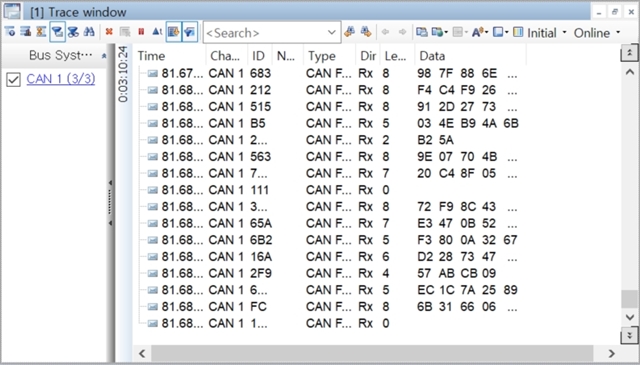
    3. monitor incoming CAN messages with CANape

    4. I read PSR register with devmem2 when I find out  CAN message is not sent to CANape.

    [PSR register]

    root@j7-evm:~# devmem2 0x40528044 w
    /dev/mem opened.
    Memory mapped at address 0xffffb7c20000.
    Read at address 0x40528044 (0xffffb7c28044): 0x00000708


    root@j7-evm:~# devmem2 0x40528044 w
    /dev/mem opened.
    Memory mapped at address 0xffffbd410000.
    Read at address 0x40528044 (0xffffbd418044): 0x0000070F

    Is it appropriate way to read PSR register at my side?

    Please let me know there is other way to read PSR for this issue.

    Regards

    Dongwon Choi

  • Hi Dongwon Choi,

    Please let me know there is other way to read PSR for this issue.

    You can connect a debugger and use CCS to read the PSR register. You may want to connect to MCU2_0 or MCU1_0 to read the register.

    2. run cangen can0 -g 0

    I am running this on the EVM along with the app_tidl_avp3 app as I do not have a camera and display. For the last 10 mins I am not seeing an issue. I am able to get messages on the external CAN emulator.

    I have the txqueuelen of 1024 and controller programmed for 500Kbps.

    ip link set can0 type can bitrate 500000
    ip link set can0 txqueuelen 1024
    ip link set can0 up

    Are your settings the same?

    I however saw an issue when the txqueuelen was 10 (default value). I saw that 11 messages were sent to the external emulator before we ran out of buffers in the MCAN IP. (write: No buffer space available)

    The above makes sense as we only have 10 buffers and we are not having any time interval between sending the packets (-g 0).

    Regards,

    Karan

  • Hi Karan.

    1) PSR register

    I have attached the MCU_MCAN0_CFG register file that is exported with CCS.

    521177 13
    R MCU_MCAN0_CFG_MCAN_CREL 0x0000000B 0x32380608
    R MCU_MCAN0_CFG_MCAN_ENDN 0x0000000B 0x87654321
    R MCU_MCAN0_CFG_MCAN_DBTP 0x0000000B 0x00000A33
    R MCU_MCAN0_CFG_MCAN_TEST 0x0000000B 0x00000080
    R MCU_MCAN0_CFG_MCAN_RWD 0x0000000B 0x00000000
    R MCU_MCAN0_CFG_MCAN_CCCR 0x0000000B 0x00000000
    R MCU_MCAN0_CFG_MCAN_NBTP 0x0000000B 0x00008A13
    R MCU_MCAN0_CFG_MCAN_TSCC 0x0000000B 0x00000000
    R MCU_MCAN0_CFG_MCAN_TSCV 0x0000000B 0x00000000
    R MCU_MCAN0_CFG_MCAN_TOCC 0x0000000B 0xFFFF0000
    R MCU_MCAN0_CFG_MCAN_TOCV 0x0000000B 0x0000FFFF
    R MCU_MCAN0_CFG_MCAN_ECR 0x0000000B 0x00000000
    R MCU_MCAN0_CFG_MCAN_PSR 0x0000000B 0x00000708
    R MCU_MCAN0_CFG_MCAN_TDCR 0x0000000B 0x00000000
    R MCU_MCAN0_CFG_MCAN_IR 0x0000000B 0x00000000
    R MCU_MCAN0_CFG_MCAN_IE 0x0000000B 0x27FFFFFF
    R MCU_MCAN0_CFG_MCAN_ILS 0x0000000B 0x00000000
    R MCU_MCAN0_CFG_MCAN_ILE 0x0000000B 0x00000001
    R MCU_MCAN0_CFG_MCAN_GFC 0x0000000B 0x00000000
    R MCU_MCAN0_CFG_MCAN_SIDFC 0x0000000B 0x00000000
    R MCU_MCAN0_CFG_MCAN_XIDFC 0x0000000B 0x00000000
    R MCU_MCAN0_CFG_MCAN_XIDAM 0x0000000B 0x1FFFFFFF
    R MCU_MCAN0_CFG_MCAN_HPMS 0x0000000B 0x00000000
    R MCU_MCAN0_CFG_MCAN_NDAT1 0x0000000B 0x00000000
    R MCU_MCAN0_CFG_MCAN_NDAT2 0x0000000B 0x00000000
    R MCU_MCAN0_CFG_MCAN_RXF0C 0x0000000B 0x00200000
    R MCU_MCAN0_CFG_MCAN_RXF0S 0x0000000B 0x00000000
    R MCU_MCAN0_CFG_MCAN_RXF0A 0x0000000B 0x00000000
    R MCU_MCAN0_CFG_MCAN_RXBC 0x0000000B 0x00000000
    R MCU_MCAN0_CFG_MCAN_RXF1C 0x0000000B 0x00000900
    R MCU_MCAN0_CFG_MCAN_RXF1S 0x0000000B 0x00000000
    R MCU_MCAN0_CFG_MCAN_RXF1A 0x0000000B 0x00000000
    R MCU_MCAN0_CFG_MCAN_RXESC 0x0000000B 0x00000777
    R MCU_MCAN0_CFG_MCAN_TXBC 0x0000000B 0x01000908
    R MCU_MCAN0_CFG_MCAN_TXFQS 0x0000000B 0x00000001
    R MCU_MCAN0_CFG_MCAN_TXESC 0x0000000B 0x00000007
    R MCU_MCAN0_CFG_MCAN_TXBRP 0x0000000B 0x00000000
    R MCU_MCAN0_CFG_MCAN_TXBAR 0x0000000B 0x00000000
    R MCU_MCAN0_CFG_MCAN_TXBCR 0x0000000B 0x00000000
    R MCU_MCAN0_CFG_MCAN_TXBTO 0x0000000B 0x00000001
    R MCU_MCAN0_CFG_MCAN_TXBCF 0x0000000B 0x00000000
    R MCU_MCAN0_CFG_MCAN_TXBTIE 0x0000000B 0x00000000
    R MCU_MCAN0_CFG_MCAN_TXBCIE 0x0000000B 0x00000000
    R MCU_MCAN0_CFG_MCAN_TXEFC 0x0000000B 0x00010900
    R MCU_MCAN0_CFG_MCAN_TXEFS 0x0000000B 0x00000000
    R MCU_MCAN0_CFG_MCAN_TXEFA 0x0000000B 0x00000000
    

    PSR register is same with read by devmem2 command.

    2) ip setting is same as you mentioned.

    ip link set can0 type can bitrate 500000
    ip link set can0 txqueuelen 1024
    ip link set can0 up

    Regards

    Dongwon Choi

  • HI Dongwon Choi,

    Can you send the logs when your can transmission is blocked on the EVM when sending CAN packets using cansend?

    I've been running for over 2 hours now and still able to get messages with AVP3 demo running.

    Regards

    Karan

  • Hi Karan.

    write() in cangen is set to blocking mode.

    So cangen is waiting forever without any log.

    I could find out cangen is blocked because incoming CAN message is stopped.

    please refer to the below code for cangen

    https://github.com/linux-can/can-utils/blob/master/cangen.c

    Regards

    Dongwon Choi

  • Hi Dongwon Choi,

    I have tested this for over 4 hours now, I do not see cangen blocking on the EVM.

    I could find out cangen is blocked because incoming CAN message is stopped.

    Cangen will not wait for receiving message, it will be purely for transmission from the board to other nodes on the CAN bus. What piece of code you referred to in https://github.com/linux-can/can-utils/blob/master/cangen.c to deduce this?

    Regards,

    Karan

  • Hi Karan.

    cangen is not waiting for receiving message.

    As I mentioned, I was monitoring incoming CAN message with CANape.

    CAN messages from cangen was just stopped such as below.

    nbytes = write(s, &frame, mtu); (line 492 of cangen.c)

    write() doesn't return any error value when this issue is occurred.

    It is blocked forever if it is not set to non-blocking mode.

    (it is set to blocking mode at cangen)

    This is the same problem of my application.

    I add the below codes to set SO_SNDTIMEO for finding out error code.

      timeout.tv_sec = 3;
      timeout.tv_usec = 0;
      if (setsockopt (hdl->can_sock, SOL_SOCKET, SO_SNDTIMEO, (char *)&timeout, sizeof(timeout)) < 0) {
        KERNEL_PRINTF(" #ERROR : Can't socket SNDTIMEO \n");
      }

      /* send a CAN frame */
      can_send_len = write(hdl->can_sock, &frame, sizeof(struct can_frame));
    
      if (can_send_len <= 0) {
        perror("#ERROR : Can't write CAN socket");	
        KERNEL_PRINTF(" #ERROR : Can't write CAN socket [%d]\n",can_send_len);		
        return -1;
      }

    Then, write() returns EAGIN and Resource temporarily unavailable is printed.

    Regards

    Dongwon Choi

  • Hi Karan.

    cangen is not waiting for receiving message.

    As I mentioned, I was monitoring incoming CAN message with CANape.

    CAN messages from cangen was just stopped such as below.

    nbytes = write(s, &frame, mtu); (line 492 of cangen.c)

    write() doesn't return any error value when this issue is occurred.

    It is blocked forever if it is not set to non-blocking mode.

    (it is set to blocking mode at cangen)

    This is the same problem of my application.

    I add the below codes to set SO_SNDTIMEO for finding out error code.

      timeout.tv_sec = 3;
      timeout.tv_usec = 0;
      if (setsockopt (hdl->can_sock, SOL_SOCKET, SO_SNDTIMEO, (char *)&timeout, sizeof(timeout)) < 0) {
        KERNEL_PRINTF(" #ERROR : Can't socket SNDTIMEO \n");
      }

      /* send a CAN frame */
      can_send_len = write(hdl->can_sock, &frame, sizeof(struct can_frame));
    
      if (can_send_len <= 0) {
        perror("#ERROR : Can't write CAN socket");	
        KERNEL_PRINTF(" #ERROR : Can't write CAN socket [%d]\n",can_send_len);		
        return -1;
      }

    Then, write() returns EAGIN and Resource temporarily unavailable is printed.

    Regards

    Dongwon Choi

  • Hi Karan.

    I think the differences of test is the usage of A72.

    SV application have several nodes working at A72.

    TIDL application doesn't have any node working at A72.

    Can you check the below step for reproducing this problem at your side?

    // make CPU load

    root@j7-evm:~# sudo stress-ng --cpu  1 --timeout 600

    root@j7-evm:~# cangen can0 -g 0

    CAN messages from cangen are stopped within 10 minutes.

    Regards

    Dongwon Choi

  • Hi Dongwon Choi,

    I will check this shortly.

    Regards

    Karan

  • Hi Dongwon Choi,

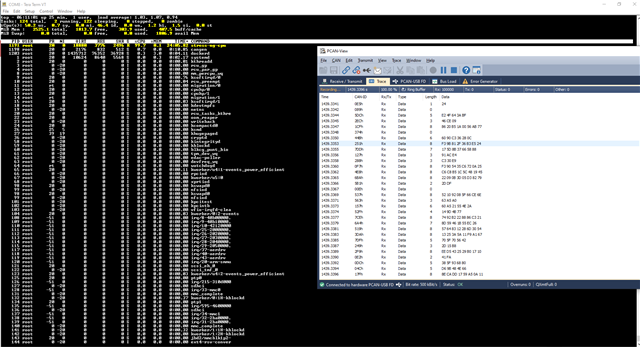
    I ran this test almost 30mins and did not see an issue. See below screen:

    Another thing to note is that even when you hang, you never get a protocol error. The error where write() returns EAGIN and Resource temporarily unavailable is printed - this may hence purely be a socket related error.

    There was however a case the other try where my A72 somehow hanged when running both together, I don't think that is what you observed.

    I remember from your initial response that you never saw such an issue with SDK6.2, if this was due to excess load on A72 should this now be reproducible using the commands set as below?

    sudo stress-ng --cpu  1 --timeout 0 & (note, I changed the timeout to 0 so that it runs indefinitely)

    ip link set can0 type can bitrate 500000
    ip link set can0 txqueuelen 1024
    ip link set can0 up

    cangen can0 -g 0

    Regards

    Karan

  • Hi Karan.

    ip configuration is same that you mentioned.

    ip link set can0 type can bitrate 500000
    ip link set can0 txqueuelen 1024
    ip link set can0 up

    root@j7-evm:/sd/can-utils# ip -details link show can0
    3: can0: <NOARP,UP,LOWER_UP,ECHO> mtu 16 qdisc pfifo_fast state UP mode DEFAULT group default qlen 1024
        link/can  promiscuity 0 minmtu 0 maxmtu 0
        can state ERROR-ACTIVE (berr-counter tx 0 rx 0) restart-ms 0
              bitrate 500000 sample-point 0.875
              tq 12 prop-seg 69 phase-seg1 70 phase-seg2 20 sjw 1
              m_can: tseg1 2..256 tseg2 1..128 sjw 1..128 brp 1..512 brp-inc 1
              m_can: dtseg1 1..32 dtseg2 1..16 dsjw 1..16 dbrp 1..32 dbrp-inc 1
              clock 80000000 numtxqueues 1 numrxqueues 1 gso_max_size 65536 gso_max_segs 65535
    

    Additionally, I have attached the modified cangen binary and source code(cangen, cangen.c).

    cangen_modified_20210701.zip

    I modified cangen for working wth non-blocking mode.

    I've reproduced this problem at RVP board within 10 mins

    It took about 2 hours at EVM board.

    Can you check the below step with the attached binary?

    root@j7-evm:~# sudo stress-ng --cpu 2 --timeout 0 &
    [1] 1677
    root@j7-evm:~# stress-ng: info: [1678] dispatching hogs: 2 cpu

    root@j7-evm:~# cd /sd/can-utils/
    root@j7-evm:/sd/can-utils# ./cangen can0 -g 0
    ======= modified cangen non-blocking mode started ==========
    [ 55.423659] can: controller area network core (rev 20170425 abi 9)
    [ 55.435277] NET: Registered protocol family 29
    [ 55.457628] can: raw protocol (rev 20170425)
    errno = 11
    write: Resource temporarily unavailable

    You can see errno and reason if you can reproduce this issue at your side.

    Regards

    Dongwon Choi

  • Hi Dongwon Choi,

    write: Resource temporarily unavailable

    This is an error from socket read/write operation see https://stackoverflow.com/questions/14370489/what-can-cause-a-resource-temporarily-unavailable-on-sock-send-command 

    In all cases we have been using sockets so to isolate the issue I tried to do raw CAN message sending to the external bus using the below script.

    #! /bin/bash

    ip link set can0 type can bitrate 500000
    ip link set can0 txqueuelen 1024
    ip link set can0 up

    sudo stress-ng --cpu 2 --timeout 0 &

    while true
    do
        cansend can0 123#0011
    done

    With this I was able to send messages for more than an hour before I stopped testing. You may run out of Transmit buffers if you send very fast and hence I advise to add some delay in the while loop to match your expected packet rate.

    Can you try this on your boards?

    Regards

    Karan

  • Hi Karan.

    Did you test this issue at PSDK7.1?

    Can you check which silicon revision of your EVM board?

    Regards

    Dongwon Choi

  • Hi Dongwon Choi,

    Let me give this a try with SDK7.1, till now I have tested on SDK7.3.

    Did you get a chance to try my last suggestion as mentioned below?

    This is an error from socket read/write operation see https://stackoverflow.com/questions/14370489/what-can-cause-a-resource-temporarily-unavailable-on-sock-send-command 

    In all cases we have been using sockets so to isolate the issue I tried to do raw CAN message sending to the external bus using the below script.

    #! /bin/bash

    ip link set can0 type can bitrate 500000
    ip link set can0 txqueuelen 1024
    ip link set can0 up

    sudo stress-ng --cpu 2 --timeout 0 &

    while true
    do
        cansend can0 123#0011
    done

    With this I was able to send messages for more than an hour before I stopped testing. You may run out of Transmit buffers if you send very fast and hence I advise to add some delay in the while loop to match your expected packet rate.

    Can you try this on your boards?

    Regards

    Karan

  • Hi Dongwon Choi,

    -1- Testing on SDK7.1

    I tried the same experiment with SDK7.1 on the TDA4VM EVM. Its been ~2 hours and I haven't seen an issue when I use the script below:

    #! /bin/bash

    ip link set can0 type can bitrate 500000
    ip link set can0 txqueuelen 1024
    ip link set can0 up

    sudo stress-ng --cpu 2 --timeout 0 &

    while true
    do
        cansend can0 123#0011
    done

    I am attaching a small video showing how and what am I testing. Please take a look at the below:

    I will let the test run for more time to see if things change.

    -2-

    Were you able to try using cansend using the script I sent? Can you confirm?

    #! /bin/bash

    ip link set can0 type can bitrate 500000
    ip link set can0 txqueuelen 1024
    ip link set can0 up

    sudo stress-ng --cpu 2 --timeout 0 &

    while true
    do
    cansend can0 123#0011
    done

    Regards

    Karan

  • To add to -1- I mentioned above, I continued this run overnight (~12 hrs) and the result is the same.

    Regards

    Karan

  • Hi Karan.

    I have tested additinal tests for this problem.

    Please refer to the below test result.

    -------------------------------------------------------------------------------------------------------------------

    cansend Use case

    cansend test what you mentioned.

    1. cansend test (1)

    The problem is reproduced, but error code is different.

    ip link set can0 type can bitrate 500000
    ip link set can0 txqueuelen 1024
    ip link set can0 up

    sudo stress-ng --cpu 2 --timeout 0 &


    root@j7-evm:~# date
    Fri Jul 9 12:16:57 UTC 2021
    root@j7-evm:~# while true; do /sd/can-utils/cansend can0 123#0011
    done
    time: 14:14:54
    write: No such file or directory

    2. cansend test (2)

    I ran same test again.

    The same problem is not reproduced for about 8 hours more.

    -------------------------------------------------------------------------------------------------------------------

    Camera Use case

    I have tested some test cases after adding delay with SV's camera usecase.

    58 CAN messages are sending at every frame.

    I can find out the reproduce rate is changed when I add some delays after write().

    However I don't understand why this issue is happened.

    The CAN bitrate is set to 500K bps.

    58 can messages x 8bytes x 8 x 30(fps) = about 108K(per 1sec)

    It is not out of range.

    Additionally, adding delay makes total performance(as processing time) low than before.

    Please let me know if you have any guidance for avoiding this problem without adding delays.

    1. changing the order of creation of socket.

    [Test Result]
    Start 2:59
    Error 3:07
    #ERROR : Can't write CAN socket: No buffer space available
    oz_can_write_frame:115: #ERROR : Can't write CAN socket [-1]
    ===========================================================================

    2. 1 milisecond sleep at every frame

    I added 1 msec dealy after write() is called


    Start 3:12
            5:00

    not reproduced
    ===========================================================================

    3. 1 msec delay per 10 CAN messages

    Start 5:07
    Error 5:10
    #ERROR : Can't write CAN socket: No buffer space available
    oz_can_write_frame:115: #ERROR : Can't write CAN socket [-1]
    ===========================================================================

    4. 150 micro seconds delay at every frame
    Strat 6:19
             8:00

    not reproduced
    ===========================================================================

    Regards

    Dongwon Choi