This thread has been locked.

If you have a related question, please click the "Ask a related question" button in the top right corner. The newly created question will be automatically linked to this question.

[Cap + VDis] Color Space Problem?

Hi,

    I am now using EVM8168 + Catalog Daughter Card with the DVRRDK4.0 for developing.  Aiming on achieving an extremely simple usecase for testing and verifying, I managed to make a chain like this:

   1080p60 YUV422P Component ====>  Cap ===1080p60 YUV422I_YUYV ====> Vdis ====> On-Chip HDMI Display

   Though I could print the colorbar on my HDMI Monitor, the colors are not properly displayed.


   That's what I expect:
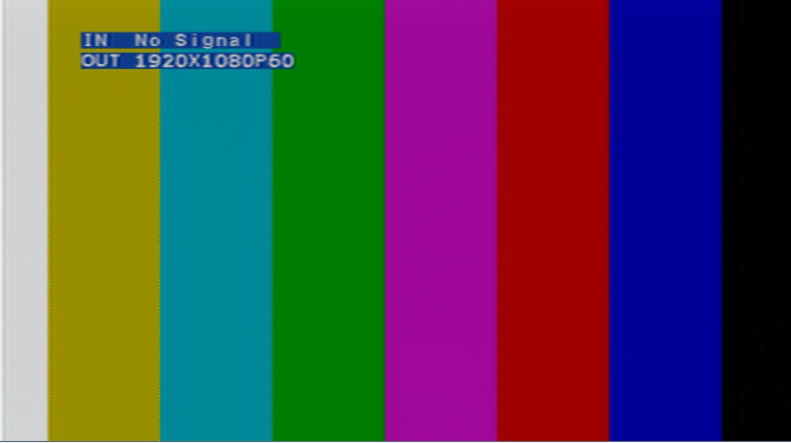
     Yet the monitor showed me this:
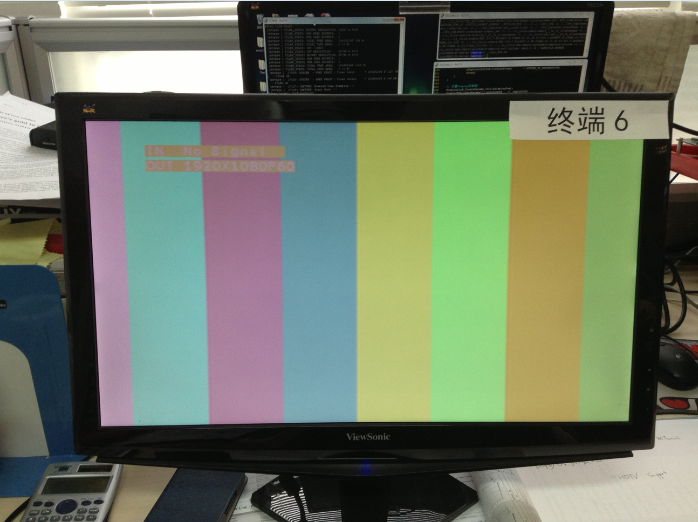
      Shall I configure any addtional parameters for the DisplayLink to display a proper colorbar?

      Could you give me some advise so that I could trace the problem and figure out this issue?


Naroah

Feb/17/2014

  •      I've tried to insert the DEI Link and make the chain like this:

    1080p60 YUV422P Component ==>  Cap ===1080p60 YUV420SP_UV ===> DEI ==> DisplayLink ==> On-Chip HDMI Display

        However, I get the same result, say, the colorbar remains an improper appearance


        Thus, I thought the issue may be caused by improper configuration of DisplayLink.  Looking up to the DVRRDK API, managing to find something relevant to this issue, however, I do not get something useful until now.

        Could you please give me some tips and help me trace this problem?


    Naroah

    Feb/18/2014

  • Hi Naroah,


    I dont think this is coming because of unavailability of DEI, It seems that somewhere either CSC is disabled or not configured properly, could you check in your monitor that it supports RGB888 or YUV422 format? Can you try setting bit15 of offset 0x48106000 to enable internal color bar of the venc? This will make sure that VENC is output is correct or not.


    Regards,

    Brijesh

  • Hi Brijesh,

         Thank you for your reply.  Actrually, you are right.  It's indeed the inproper configuration of CSC that cause my issues.  I have check my monitor and set the RGB888 format.  Everything goes well now.

         Thank you for your help!

    Naroah

    Feb/18/2014