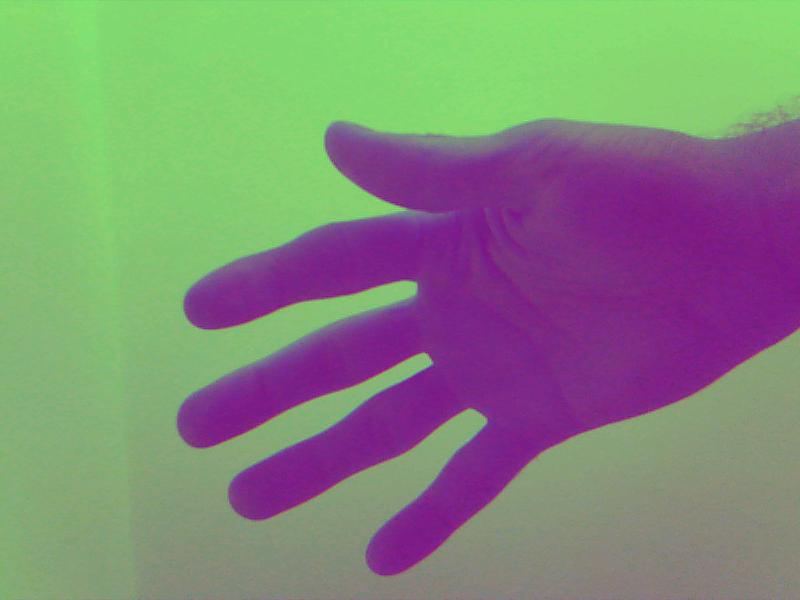
Hi TI,
I'm using camera OV2659 sensor with TI Linux kernel. I'm trying to convert RGB565 (BE) format to BGR32. I think my algorith is fine, but there is serious problem with colors in output picture.
Here, in OV2659 driver (https://gitorious.ti.com/ti-linux-kernel/ti-linux-kernel/blobs/64a589b496e788c0d078f9ed3142df3f60417f75/drivers/media/i2c/ov2659.c) is written:
/* Output Format Configuration
* 0x00 -- RAW Bayer BGGR <== Verified
* 0x30 -- YUV422 YUYV <== Verified
* 0x32 -- YUV422 UYVY <== Verified
* 0x40 -- YUV420 <== Does not appear to be supported
* 0x50 -- YUV420 Legacy <== Does not appear to be supported
* 0x60 -- RGB565 <== Not Verified yet
*/
Is this format correct then?
Here is the code:
void calculateRGB565toRGB32(uint8_t *in_frame, uint8_t *out_frame, int width, int heigth)
{
// Input format: V4L2_PIX_FMT_RGB565X 'RGBR' r4 r3 r2 r1 r0 g5 g4 g3 g2 g1 g0 b4 b3 b2 b1 b0
// Output format: BGR
uint8x16_t shuffle_mask = { 1, 0, 3, 2, 5, 4, 7, 6, 9, 8, 11, 10, 13, 12, 15, 14 };
uint16x8_t var16x8;
uint16_t *pvar16x1 = (uint16_t *)&var16x8;
uint8x16_t *pui8 = (uint8x16_t *)in_frame;
uint16_t red_mask = 0xF800;
uint16_t green_mask = 0x7E0;
uint16_t blue_mask = 0x1F;
const int loop = width*heigth/8;
int ind = 0;
for(int i = 0; i < loop; ++i){
var16x8 = (uint16x8_t) __builtin_shuffle(pui8[i], shuffle_mask); // MSB to LSB switch
for (int j = 0; j < 8; ++j) {
uint8_t red_value = (pvar16x1[j] & red_mask) >> 11;
uint8_t green_value = (pvar16x1[j] & green_mask) >> 5;
uint8_t blue_value = (pvar16x1[j] & blue_mask);
// Expand to 8-bit values.
out_frame[ind+2] = (red_value << 3);
out_frame[ind+1] = (green_value << 2);
out_frame[ind] = (blue_value << 3);
ind += 4 ;
}
}
}
And I attached picture from camera.
Thank you