A related question is a question created from another question. When the related question is created, it will be automatically linked to the original question.
If you have a related question, please click the "Ask a related question" button in the top right corner. The newly created question will be automatically linked to this question.
[FAQ] PROCESSOR-SDK-AM57X: Steps to modify DDR/RAM configurations for Custom boards.
The recommended way of configuring the DDR for AM57x devices is by using the EMIF tool.
The tool is present online.
Steps to be followed:
Download the tool. It is in the form of spreadsheet.
Have your DDR datasheet handy, as it will be needed to fill various parameters in the spreadsheet.
You can take the reference of Application Report for AM57x, DRA7x, and TDA2x EMIF Tools, which will guide you to fill the spreadsheet step by step.
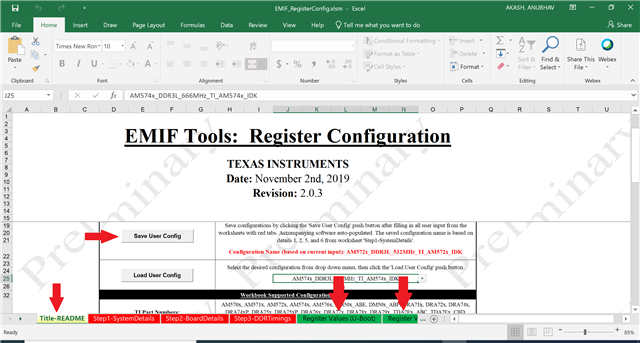
Once you are done with step1, step2 and step3 in the spreadsheet, you have to click the “Save User Config” present in the first tab – Title-README - of the spreadsheet. This will auto populate the registers values in the respective tabs.
You will get required Register values for U-Boot and GEL_SBL as a output of this tool.
You can follow the steps mentioned in Application Report section 3.3 for configuring U-Boot.
However, for RTOS, you have to integrate your changes at two places:
GEL files, which will work with CCS.
Board library, for SBL/RTOS.
GEL file update for AM57x,
You will find the AM57x related gel files here: <CCS_root_folder>\ccs\ccs_base\emulation\boards\am57<X>x\gel\.
You will find AM57<X>x_startup_common.gel, which will have AM57<X>x_DDR3_<YYY>MHz_Config() function, which is responsible for doing DDR configuration and defined in respective AM57<X>x_ddr_config.gel.
You have to copy the values of the MACROS from Register_Values(GEL_SBL) (step5 above) to AM57<X>x_ddr_config.gel.
Then, you have to create and launch the target configuration and connect to a core(A15). Follow this for instructions on how to setup CCS.
It will load your DDR configuration(enabled from AM57<X>x_startup_common.gel, as mentioned above) and if it connects properly, you can load any test, for example Helloworld out of DDR memory.
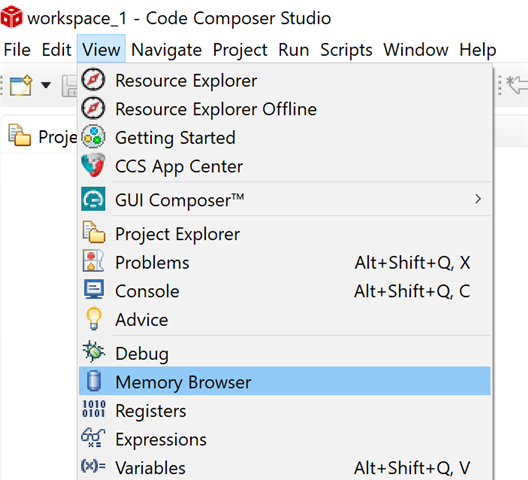
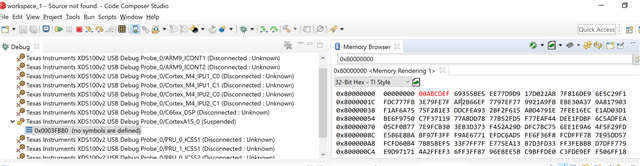
There is another way in which you can check your DDR configuration before running any test - you can open the memory browser and check for your DDR address and confirm it’s read/write accessibility. You can double click and write a new value to the location.
Board library update for AM57x,
Once you confirm the DDR configuration from GEL point of view, you can integrate those changes in the board library at below path: <pdk_root_folder>\packages\ti\board\src\<board>\<board>_ddr.c.
This will only come into play when you have BOARD_INIT_DDR enabled while calling Board_init().
There are couple of more files which is worth looking, if you are using our diagnostics - as is.
You may have to change the memory structure defined for diagnostics at: <pdk_root_folder>\packages\ti\board\diag\common\<board>\*.cmd. You can get the information about which diagnostic is using which linker.cmd file by looking into makefile of that particular diagnostic.
Also, you have to update the DDR start and end address at below path: <pdk_root_folder>\packages\ti\board\src\<board>\include\board_cfg.h.
*<X> - 1/2/4 for AM571/2/4.
*<YYY> - 666 for AM571/4 & 532 for AM572.
Note:
We recommend that you test the settings in CCS by creating a GEL file with the modified settings before modifying the source in the board library.
For updating the <pdk_root_folder>\packages\ti\board\src\<board>\<board>_ddr.c file, please keep following pointers in mind:
You will not get direct structure/MACROs (like gel), which you can search and update the values.
You have to manually update all the values at all places in the file (no top level structure like uboot).
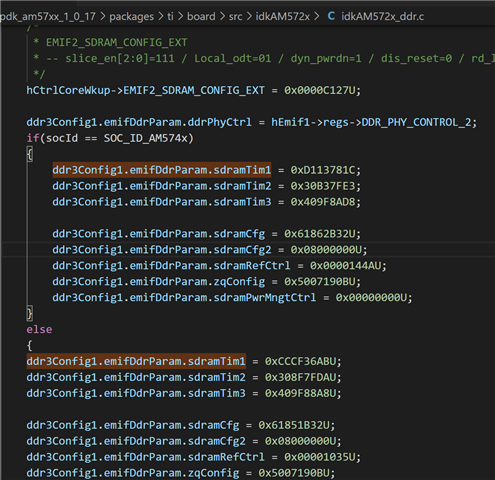
If you have modified the gel file, then you would have noticed that same naming convention is followed in both EMIF tool and Gel file. But, this is not the case with the board library. You will find similar kind of naming here but it will not be a exact match with what you got from the EMIF tool. For example see the below picture :
In this "ddr3Config1.emifDdrParam.sdramTim1" is SDRAMTIME1 and so on.