Other Parts Discussed in Thread: MATHLIB, 66AK2G02, SYSBIOS, AM3359
Tool/software: TI-RTOS
Following "Processor_SDK_RTOS_Getting_Started_Guide#Peripheral_Driver_Examples",
I installed "ti-processor-sdk-rtos-k2g-evm-04.00.00.04-Windows-x86-Install" into the default paths.
I ran into trouble following the directions for "Rebuilding_The_PDK"
Does anyone have a suggestion?
Thank you all,
Bob
log:
C:\ti\pdk_k2g_1_0_6\packages>pdksetupenv
**************************************************************************
Environment Configuration:
LIMIT_SOCS : k2g
LIMIT_BOARDS : evmK2G iceK2G
PDK_INSTALL_PATH : /ti/PDK_K2~1/packages
C6X_GEN_INSTALL_PATH : C:/ti/ti-cgt-c6000_8.1.3
TOOLCHAIN_PATH_GCC : C:/ti/gcc-arm-none-eabi-4_9-2015q3
TOOLCHAIN_PATH_A15 : C:/ti/gcc-arm-none-eabi-4_9-2015q3
TOOLCHAIN_PATH_A8 : C:/ti/gcc-arm-none-eabi-4_9-2015q3
TOOLCHAIN_PATH_A9 : C:/ti/gcc-arm-none-eabi-4_9-2015q3
TOOLCHAIN_PATH_M4 : C:/ti/ti-cgt-arm_16.9.2.LTS
TOOLCHAIN_PATH_Arm9 : C:/ti/ti-cgt-arm_16.9.2.LTS
TOOLCHAIN_PATH_EVE : C:/ti/arp32_1.0.8
CL_PRU_INSTALL_PATH : C:/ti/ti-cgt-pru_2.1.5
UTILS_INSTALL_DIR : C:/ti/xdctools_3_32_01_22_core/bin
FPULIB_PATH : C:/ti/gcc-arm-none-eabi-4_9-2015q3/lib/gcc/arm-none-eabi/4.9.3/fpu
CROSS_TOOL_PRFX : arm-none-eabi-
XDC_INSTALL_PATH : C:/ti/xdctools_3_32_01_22_core
BIOS_INSTALL_PATH : C:/ti/bios_6_46_05_55
IPC_INSTALL_PATH : C:/ti/ipc_3_46_00_02
EDMA3LLD_BIOS6_INSTALLDIR : C:/ti/edma3_lld_2_12_04_28
NDK_INSTALL_PATH : C:/ti/ndk_2_25_01_11
IMGLIB_INSTALL_PATH : C:/ti/imglib_c66x_3_1_1_0
DSPLIB_INSTALL_PATH : C:/ti/dsplib_c66x_3_4_0_0
MATHLIB_INSTALL_PATH : C:/ti/mathlib_c66x_3_1_1_0
UIA_INSTALL_PATH : C:/ti/uia_2_00_06_52
CG_XML_BIN_INSTALL_PATH : C:\ti\cg_xml\bin
**************************************************************************
Changing to short name to support directory names containing spaces
current directory: /ti/PDK_K2~1/packages
PDK BUILD ENVIRONMENT CONFIGURED
**************************************************************************
C:\ti\PDK_K2~1\packages>pdkProjectCreate K2G
=========================================================================
Configuration:
SOC : K2G
BOARD : all
ENDIAN : little
MODULE : all
PROCESSOR : arm
PDK_SHORT_NAME : C:\ti\PDK_K2~1\packages\
=========================================================================
Checking Configuration...
Complete
=========================================================================
PDK_PARTNO : 66AK2G02
PDK_ECLIPSE_ID : com.ti.pdk.k2g
RTSC_PLATFORM_NAME : ti.platforms.evmTCI66AK2G02
RTSC_TARGET : gnu.targets.arm.A15F
CCS_DEVICE : "Cortex A.66AK2G02"
*****************************************************************************
Detecting all projects in PDK and importing them in the workspace C:\ti\pdk_k2~1\packages\MyExampleProjects
Detected Test Project: cppievmK2GArmBiosTestProject
--------------------------------------------------------------------------------
Creating project 'cppievmK2GArmBiosTestProject'...
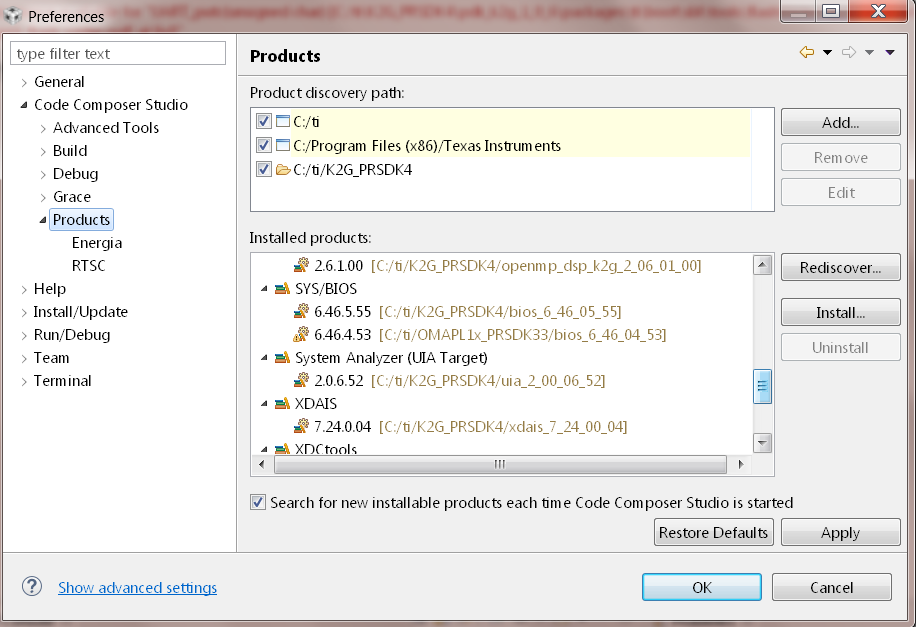
!ERROR: No products of type 'com.ti.rtsc.SYSBIOS' are currently installed!
Copying macro.ini
The system cannot find the path specified.
0 file(s) copied.
Detected Test Project: EMAC_BasicExample_evmK2G_armBiosExampleProject
--------------------------------------------------------------------------------
Creating project 'EMAC_BasicExample_evmK2G_armBiosExampleProject'...
!ERROR: No products of type 'com.ti.rtsc.SYSBIOS' are currently installed!
Copying macro.ini
The system cannot find the path specified.
0 file(s) copied.
Detected Test Project: EMAC_BasicExample_iceK2G_armBiosExampleProject
Copying macro.ini
0 file(s) copied.
Terminate batch job (Y/N)? y
C:\ti\PDK_K2~1\packages>