This thread has been locked.

If you have a related question, please click the "Ask a related question" button in the top right corner. The newly created question will be automatically linked to this question.

CCS/TMDSICE3359: Using USB port to debug Linux App with GBD

Part Number: TMDSICE3359
Other Parts Discussed in Thread: PROFIBUS,

Tool/software: Code Composer Studio

Dear all,

I'm trying to debug a Linux application with GDB using the USB Interface of the device. In other examples Ethernet connection is used to debug applications, however I can't use the Ethernet ports as I'm running an industrial communication protocol on them. Thus, as I understand I don't have any other option rather than the USB port.

I followed these instructions to setup GDB with CCS, but using Serial Communication instead of TCP:

This is my connection setting:

By default the board uses the UART3 for serial console, thus I run this command to initialise the GDBServer:

gdbserver /dev/ttyS3 myApp

However when I launch the application from CCS, the GDBServer goes crazy:
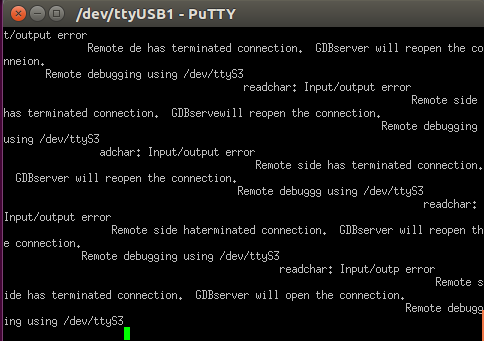
I would appreciate any advice to debug Linux applications from CCS without using the Ethernet ports.

Thanks in advance,

Álvaro

  • 1) Please be sure CONFIG_USB_MUSB_GADGET is enabled in your linux config file.
    If not add it and rebuild you kernel.

    2) Install the gadget device driver
    > modprobe g_ether

    3) Assign an IP address to the network interface associated with the usb device.
    For example, if eth0 is the corresponding usb interface then
    > ifconfig eth0 192.168.1.2 (Note: "ifconfig" w/o parameters will list all ethernet interfaces)

    4) be sure you can ping between the host where CCS runs and the target debug platform

  • HI Marcus,

    Thanks for your reply. CONFIG_USB_MUSB_GADGET was not enabled, thus I modified the kernel configuration and rebuild it. USB Gadget Support is enabled as well.

    However during boot up it fails to load the gadget device driver, then modprobe says:

    Could you please specify the second step? I have no clue about how to install the gadget device driver...

    Thanks in advance.

    Álvaro

  • Just for some more information, this is the output I have when I run systemctl status gadget-init.service

    systemctl status gadget-init.service
    
    [[0;1;31m●[[0m gadget-init.service - Start USB gadget
       Loaded: loaded (/lib/systemd/system/gadget-init.service; enabled; vendor preset: enabled)
       Active: [[0;1;31mfailed[[0m (Result: exit-code) since Sun 2018-07-22 01:25:02 UTC; 43s ago
      Process: 459 ExecStart=/usr/bin/gadget-init.sh [[0;1;31m(code=exited, status=1/FAILURE)[[0m
     Main PID: 459 (code=exited, status=1/FAILURE)
    
    Jul 22 01:25:00 am335x-evm systemd[1]: Starting Start USB gadget...
    Jul 22 01:25:00 am335x-evm gadget-init.sh[459]: SERIAL_NUMBER = 1234BBBK5678
    Jul 22 01:25:00 am335x-evm gadget-init.sh[459]: PRODUCT = am335x_evm
    Jul 22 01:25:00 am335x-evm gadget-init.sh[459]: host_addr = 68:C9:0B:E4:4F:10
    Jul 22 01:25:01 am335x-evm gadget-init.sh[459]: ifconfig: SIOCGIFFLAGS: No such device
    Jul 22 01:25:02 am335x-evm gadget-init.sh[459]: ifconfig: SIOCSIFADDR: No such device
    Jul 22 01:25:02 am335x-evm systemd[1]: [[0;1;39mgadget-init.service: Main process exited, code=exited, status=1/FAILURE[[0m
    Jul 22 01:25:02 am335x-evm systemd[1]: [[0;1;31mFailed to start Start USB gadget.[[0m
    Jul 22 01:25:02 am335x-evm systemd[1]: [[0;1;39mgadget-init.service: Unit entered failed state.[[0m
    Jul 22 01:25:02 am335x-evm systemd[1]: [[0;1;39mgadget-init.service: Failed with result 'exit-code'.[[0m


  • Hi Alvaro,

    Your host CCS configures /dev/ttyUSB1 port, which is the board usb serial port. But your board gdbserver listens to /dev/ttyS3 which is the board UART3 port. Both gdb and gdbserver are not on the same channel, right?

    You need to decide either use UART or usb serial channel, then configure both CCS gdb and board gdbserver on both ends of the same channel.

    BTY, please don't change the USB kernel configs, just use tisdk_am335x-evm_defconfig in the SDK kernel, which has all the related USB config options enabled.
  • Hi Bin Liu,

    Yes, My host CCS configures /dev/ttyUSB1 port, but because it is the USB serial port of the computer not of the board. The board has two serial ports, ttyS0 and ttyS3. ttyS3 is configured as console output in the uboot configuration file. I guess ttyS0 is the DB9 connector used for CAN/Profibus.

    Moreover, I can see with Putty that I'm connected to the ttyS3 port on the Splash Screen:

    Thus both ttyUSB1(PC) and ttyS3(Board) endpoints are in the same channel. My guess is that I can't use the same serial connection for the console output and gdbserver, they must run separately. Therefore it would be great to configure the USB as a gadget, then I could use SSH and GDB running on different ports but with the same USB connection... However I'm struggling to set up the USB Gadget, I require some documentation or hints to proceed with that.

    Just some extra info, this is my lsmod output:

    Module                  Size  Used by
    sha512_generic         20480  0
    sha512_arm             20480  0
    sha256_generic         20480  0
    sha1_generic           16384  0
    sha1_arm               16384  0
    md5                    16384  0
    des_generic            28672  0
    cbc                    16384  0
    xfrm_user              32768  2
    xfrm4_tunnel           16384  0
    ipcomp                 16384  0
    xfrm_ipcomp            16384  1 ipcomp
    esp4                   20480  0
    ah4                    16384  0
    af_key                 36864  0
    xfrm_algo              16384  5 xfrm_user,esp4,ah4,af_key,xfrm_ipcomp
    g_multi                16384  0
    usb_f_mass_storage     53248  1 g_multi
    usb_f_rndis            28672  1 g_multi
    u_ether                24576  2 g_multi,usb_f_rndis
    libcomposite           53248  3 usb_f_mass_storage,g_multi,usb_f_rndis
    pvrsrvkm              413696  0
    ti_am335x_adc          16384  0
    pm33xx                 16384  0
    wkup_m3_rproc          16384  1
    wkup_m3_ipc            16384  1 pm33xx
    omap_aes_driver        24576  0
    remoteproc             40960  2 wkup_m3_rproc,wkup_m3_ipc
    crypto_engine          16384  1 omap_aes_driver
    omap_crypto            16384  1 omap_aes_driver
    omap_sham              28672  0
    ti_emif_sram           16384  1 pm33xx
    gpio_pisosr            16384  0
    gpio_pca953x           20480  4
    gpio_tpic2810          16384  0
    rtc_omap               20480  2
    omap_wdt               16384  0
    ti_am335x_tscadc       16384  1 ti_am335x_adc
    gpio_decoder           16384  0
    input_polldev          16384  1 gpio_decoder
    sch_fq_codel           20480  1
    uio_module_drv         16384  0
    uio                    16384  1 uio_module_drv
    usbserial              32768  0
    usbcore               204800  1 usbserial
    cryptodev              45056  1
    

    On the other hand please find attached the startup output and the kernel configuration file, perhaps its an useful information.

    1033.config.txt

    U-Boot 2018.01-g131dc82830 (Jul 25 2018 - 15:16:37 +0000)
    
    CPU  : AM335X-GP rev 2.1
    Model: TI AM3359 ICE-V2
    DRAM:  256 MiB
    ETH0, PRU
    ETH1, PRU
    NAND:  0 MiB
    MMC:   OMAP SD/MMC: 0
    *** Warning - bad CRC, using default environment
    
    <ethaddr> not set. Validating first E-fuse MAC
    Net:   cpsw, usb_ether
    Hit any key to stop autoboot:  0
    switch to partitions #0, OK
    mmc0 is current device
    SD/MMC found on device 0
    ** Unable to read file boot.scr **
    ** Unable to read file uEnv.txt **
    switch to partitions #0, OK
    mmc0 is current device
    Scanning mmc 0:1...
    switch to partitions #0, OK
    mmc0 is current device
    SD/MMC found on device 0
    3789312 bytes read in 369 ms (9.8 MiB/s)
    35542 bytes read in 39 ms (889.6 KiB/s)
    ## Flattened Device Tree blob at 88000000
       Booting using the fdt blob at 0x88000000
       Loading Device Tree to 8df03000, end 8df0ead5 ... OK
    
    Starting kernel ...
    
    [    0.000000] Booting Linux on physical CPU 0x0
    [    0.000000] Linux version 4.14.40-rt29-gd5443cbd3b (tidevel@tidevel-VirtualBox) (gcc version 5.4.0 20160609 (Ubuntu/Linaro 5.4.0-6ubuntu1~16.04.9)) #3 PREEMPT RT Fri Oct 12 14:54:40 CEST 2018
    [    0.000000] CPU: ARMv7 Processor [413fc082] revision 2 (ARMv7), cr=10c5387d
    [    0.000000] CPU: PIPT / VIPT nonaliasing data cache, VIPT aliasing instruction cache
    [    0.000000] OF: fdt: Machine model: TI AM3359 ICE-V2 - dual PRUETH
    [    0.000000] Memory policy: Data cache writeback
    [    0.000000] efi: Getting EFI parameters from FDT:
    [    0.000000] efi: UEFI not found.
    [    0.000000] cma: Reserved 48 MiB at 0x8a800000
    [    0.000000] CPU: All CPU(s) started in SVC mode.
    [    0.000000] AM335X ES2.1 (sgx neon)
    [    0.000000] Built 1 zonelists, mobility grouping on.  Total pages: 64960
    [    0.000000] Kernel command line: console=ttyO3,115200n8 root=PARTUUID=abc53595-02 rw rootfstype=ext4 rootwait
    [    0.000000] PID hash table entries: 1024 (order: 0, 4096 bytes)
    [    0.000000] Dentry cache hash table entries: 32768 (order: 5, 131072 bytes)
    [    0.000000] Inode-cache hash table entries: 16384 (order: 4, 65536 bytes)
    [    0.000000] Memory: 198248K/262144K available (7168K kernel code, 333K rwdata, 2408K rodata, 1024K init, 320K bss, 14744K reserved, 49152K cma-reserved, 0K highmem)
    [    0.000000] Virtual kernel memory layout:
    [    0.000000]     vector  : 0xffff0000 - 0xffff1000   (   4 kB)
    [    0.000000]     fixmap  : 0xffc00000 - 0xfff00000   (3072 kB)
    [    0.000000]     vmalloc : 0xd0800000 - 0xff800000   ( 752 MB)
    [    0.000000]     lowmem  : 0xc0000000 - 0xd0000000   ( 256 MB)
    [    0.000000]     pkmap   : 0xbfe00000 - 0xc0000000   (   2 MB)
    [    0.000000]     modules : 0xbf000000 - 0xbfe00000   (  14 MB)
    [    0.000000]       .text : 0xc0008000 - 0xc0800000   (8160 kB)
    [    0.000000]       .init : 0xc0b00000 - 0xc0c00000   (1024 kB)
    [    0.000000]       .data : 0xc0c00000 - 0xc0c535c0   ( 334 kB)
    [    0.000000]        .bss : 0xc0c535c0 - 0xc0ca3874   ( 321 kB)
    [    0.000000] SLUB: HWalign=64, Order=0-3, MinObjects=0, CPUs=1, Nodes=1
    [    0.000000] Preemptible hierarchical RCU implementation.
    [    0.000000]  RCU priority boosting: priority 1 delay 500 ms.
    [    0.000000]  No expedited grace period (rcu_normal_after_boot).
    [    0.000000]  Tasks RCU enabled.
    [    0.000000] NR_IRQS: 16, nr_irqs: 16, preallocated irqs: 16
    [    0.000000] IRQ: Found an INTC at 0xfa200000 (revision 5.0) with 128 interrupts
    [    0.000000] OMAP clockevent source: timer2 at 24000000 Hz
    [    0.000016] sched_clock: 32 bits at 24MHz, resolution 41ns, wraps every 89478484971ns
    [    0.000033] clocksource: timer1: mask: 0xffffffff max_cycles: 0xffffffff, max_idle_ns: 79635851949 ns
    [    0.000041] OMAP clocksource: timer1 at 24000000 Hz
    [    0.000264] timer_probe: no matching timers found
    [    0.000511] Console: colour dummy device 80x30
    [    0.000699] WARNING: Your 'console=ttyO3' has been replaced by 'ttyS3'
    [    0.000702] This ensures that you still see kernel messages. Please
    [    0.000704] update your kernel commandline.
    [    0.000737] Calibrating delay loop... 597.60 BogoMIPS (lpj=2988032)
    [    0.058728] pid_max: default: 32768 minimum: 301
    [    0.058998] Mount-cache hash table entries: 1024 (order: 0, 4096 bytes)
    [    0.059011] Mountpoint-cache hash table entries: 1024 (order: 0, 4096 bytes)
    [    0.060105] CPU: Testing write buffer coherency: ok
    [    0.061024] Setting up static identity map for 0x80100000 - 0x80100060
    [    0.061349] Hierarchical SRCU implementation.
    [    0.062188] EFI services will not be available.
    [    0.064012] devtmpfs: initialized
    [    0.076465] random: get_random_u32 called from bucket_table_alloc+0x118/0x2a0 with crng_init=0
    [    0.077067] VFP support v0.3: implementor 41 architecture 3 part 30 variant c rev 3
    [    0.077476] clocksource: jiffies: mask: 0xffffffff max_cycles: 0xffffffff, max_idle_ns: 19112604462750000 ns
    [    0.077509] futex hash table entries: 256 (order: 1, 8192 bytes)
    [    0.082104] pinctrl core: initialized pinctrl subsystem
    [    0.083069] DMI not present or invalid.
    [    0.083706] NET: Registered protocol family 16
    [    0.087272] DMA: preallocated 256 KiB pool for atomic coherent allocations
    [    0.105549] omap_hwmod: debugss: _wait_target_disable failed
    [    0.166701] OMAP GPIO hardware version 0.1
    [    0.170646] GPIO line 100 (PR1_MII_CTRL) hogged as output/high
    [    0.170681] GPIO line 106 (MUX_MII_CTL1) hogged as output/low
    [    0.180981] No ATAGs?
    [    0.181004] hw-breakpoint: debug architecture 0x4 unsupported.
    [    0.201935] edma 49000000.edma: TI EDMA DMA engine driver
    [    0.206634] omap_i2c 44e0b000.i2c: could not find pctldev for node /ocp/l4_wkup@44c00000/scm@210000/pinmux@800/i2c0_pins_default, deferring probe
    [    0.206803] media: Linux media interface: v0.10
    [    0.206880] Linux video capture interface: v2.00
    [    0.207031] pps_core: LinuxPPS API ver. 1 registered
    [    0.207043] pps_core: Software ver. 5.3.6 - Copyright 2005-2007 Rodolfo Giometti <giometti@linux.it>
    [    0.207076] PTP clock support registered
    [    0.207126] EDAC MC: Ver: 3.0.0
    [    0.207772] dmi: Firmware registration failed.
    [    0.208294] omap-mailbox 480c8000.mailbox: omap mailbox rev 0x400
    [    0.208739] Advanced Linux Sound Architecture Driver Initialized.
    [    0.210619] clocksource: Switched to clocksource timer1
    [    0.223676] NET: Registered protocol family 2
    [    0.224772] TCP established hash table entries: 2048 (order: 1, 8192 bytes)
    [    0.224836] TCP bind hash table entries: 2048 (order: 3, 49152 bytes)
    [    0.224972] TCP: Hash tables configured (established 2048 bind 2048)
    [    0.225109] UDP hash table entries: 256 (order: 2, 16384 bytes)
    [    0.225166] UDP-Lite hash table entries: 256 (order: 2, 16384 bytes)
    [    0.225441] NET: Registered protocol family 1
    [    0.226075] RPC: Registered named UNIX socket transport module.
    [    0.226093] RPC: Registered udp transport module.
    [    0.226104] RPC: Registered tcp transport module.
    [    0.226114] RPC: Registered tcp NFSv4.1 backchannel transport module.
    [    0.227219] hw perfevents: no interrupt-affinity property for /pmu, guessing.
    [    0.227377] hw perfevents: enabled with armv7_cortex_a8 PMU driver, 5 counters available
    [    0.229380] workingset: timestamp_bits=14 max_order=16 bucket_order=2
    [    0.236740] squashfs: version 4.0 (2009/01/31) Phillip Lougher
    [    0.237986] NFS: Registering the id_resolver key type
    [    0.238042] Key type id_resolver registered
    [    0.238054] Key type id_legacy registered
    [    0.238122] ntfs: driver 2.1.32 [Flags: R/O].
    [    0.241170] Block layer SCSI generic (bsg) driver version 0.4 loaded (major 245)
    [    0.241197] io scheduler noop registered
    [    0.241208] io scheduler deadline registered
    [    0.241416] io scheduler cfq registered (default)
    [    0.241431] io scheduler mq-deadline registered
    [    0.241443] io scheduler kyber registered
    [    0.243149] pinctrl-single 44e10800.pinmux: 142 pins at pa f9e10800 size 568
    [    0.321960] Serial: 8250/16550 driver, 10 ports, IRQ sharing disabled
    [    0.326061] 481a6000.serial: ttyS3 at MMIO 0x481a6000 (irq = 30, base_baud = 3000000) is a 8250
    [    0.960596] console [ttyS3] enabled
    [    0.966652] omap_rng 48310000.rng: Random Number Generator ver. 20
    [    0.988454] brd: module loaded
    [    1.001972] loop: module loaded
    [    1.008854] m25p80 spi0.0: found s25fl064k, expected w25q64
    [    1.014615] m25p80 spi0.0: s25fl064k (8192 Kbytes)
    [    1.019482] 4 ofpart partitions found on MTD device spi0.0
    [    1.024999] Creating 4 MTD partitions on "spi0.0":
    [    1.029842] 0x000000000000-0x000000080000 : "u-boot-spl"
    [    1.036609] 0x000000080000-0x000000180000 : "u-boot"
    [    1.042834] 0x000000180000-0x0000001a0000 : "u-boot-env"
    [    1.049384] 0x0000001a0000-0x000000800000 : "misc"
    [    1.056683] libphy: Fixed MDIO Bus: probed
    [    1.063728] i2c /dev entries driver
    [    1.067756] IR NEC protocol handler initialized
    [    1.072373] IR RC5(x/sz) protocol handler initialized
    [    1.077452] IR RC6 protocol handler initialized
    [    1.082004] IR JVC protocol handler initialized
    [    1.086556] IR Sony protocol handler initialized
    [    1.091195] IR SANYO protocol handler initialized
    [    1.095922] IR Sharp protocol handler initialized
    [    1.100647] IR MCE Keyboard/mouse protocol handler initialized
    [    1.106508] IR XMP protocol handler initialized
    [    1.112302] sdhci: Secure Digital Host Controller Interface driver
    [    1.118514] sdhci: Copyright(c) Pierre Ossman
    [    1.124748] sdhci-pltfm: SDHCI platform and OF driver helper
    [    1.137384] NET: Registered protocol family 10
    [    1.143664] Segment Routing with IPv6
    [    1.147464] sit: IPv6, IPv4 and MPLS over IPv4 tunneling driver
    [    1.154469] NET: Registered protocol family 17
    [    1.159279] Key type dns_resolver registered
    [    1.163949] omap_voltage_late_init: Voltage driver support not added
    [    1.210913] tps65910 0-002d: No interrupt support, no core IRQ
    [    1.219289] vrtc: supplied by vbat
    [    1.226613] vio: supplied by vbat
    [    1.231624] vdd1: supplied by vbat
    [    1.237012] vdd2: supplied by vbat
    [    1.243917] vdig1: supplied by vbat
    [    1.248946] vdig2: supplied by vbat
    [    1.254000] vpll: supplied by vbat
    [    1.258944] vdac: supplied by vbat
    [    1.263899] vaux1: supplied by vbat
    [    1.268945] vaux2: supplied by vbat
    [    1.273988] vaux33: supplied by vbat
    [    1.279099] vmmc: supplied by vbat
    [    1.284067] vbb: supplied by vbat
    [    1.315974] Console: switching to mono frame buffer device 12x2
    [    1.348945] ssd1307fb 0-003c: fb0: Solomon SSD1307 framebuffer device registered, using 192 bytes of video memory
    [    1.359382] omap_i2c 44e0b000.i2c: bus 0 rev0.11 at 400 kHz
    [    1.421438] hctosys: unable to open rtc device (rtc0)
    [    1.427406] ALSA device list:
    [    1.433288]   No soundcards found.
    [    1.441210] Waiting for root device PARTUUID=abc53595-02...
    [    1.478017] mmc0: host does not support reading read-only switch, assuming write-enable
    [    1.488049] mmc0: new high speed SDHC card at address 0007
    [    1.494241] mmcblk0: mmc0:0007 SL16G 14.5 GiB
    [    1.501083]  mmcblk0: p1 p2
    [    1.566013] EXT4-fs (mmcblk0p2): mounted filesystem with ordered data mode. Opts: (null)
    [    1.574261] VFS: Mounted root (ext4 filesystem) on device 179:2.
    [    1.588815] devtmpfs: mounted
    [    1.593976] Freeing unused kernel memory: 1024K
    [    2.032585] systemd[1]: System time before build time, advancing clock.
    [    2.116408] systemd[1]: systemd 234 running in system mode. (+PAM -AUDIT -SELINUX +IMA -APPARMOR +SMACK +SYSVINIT +UTMP -LIBCRYPTSETUP -GCRYPT -GNUTLS +ACL +XZ -LZ4 -SECCOMP +BLKID -ELFUTILS +KMOD -IDN2 -IDN default-hierarchy=hybrid)
    [    2.138176] systemd[1]: Detected architecture arm.
    
    Welcome to Arago 2018.04!
    
    [    2.181639] systemd[1]: Set hostname to <am335x-evm>.
    [    2.679929] systemd[1]: /lib/systemd/system/gadget-init.service:15: Unknown lvalue 'ExecStopPre' in section 'Service'
    [    3.063631] random: systemd: uninitialized urandom read (16 bytes read)
    [    3.071118] systemd[1]: Listening on Syslog Socket.
    [  OK  ] Listening on Syslog Socket.
    [    3.164258] random: systemd: uninitialized urandom read (16 bytes read)
    [    3.171295] systemd[1]: Reached target Swap.
    [  OK  ] Reached target Swap.
    [    3.201180] random: systemd: uninitialized urandom read (16 bytes read)
    [    3.223800] systemd[1]: Listening on Process Core Dump Socket.
    [  OK  ] Listening on Process Core Dump Socket.
    [    3.261728] systemd[1]: Listening on Journal Socket.
    [  OK  ] Listening on Journal Socket.
    [    3.291601] systemd[1]: Listening on Journal Socket (/dev/log).
    [  OK  ] Listening on Journal Socket (/dev/log).
    [    3.321619] systemd[1]: Started Forward Password Requests to Wall Directory Watch.
    [  OK  ] Started Forward Password Requests to Wall Directory Watch.
    [  OK  ] Listening on udev Control Socket.
    [  OK  ] Created slice System Slice.
             Mounting Kernel Debug File System...
             Starting Journal Service...
    [  OK  ] Created slice system-serial\x2dgetty.slice.
    [  OK  ] Created slice system-getty.slice.
    [  OK  ] Started Dispatch Password Requests to Console Directory Watch.
             Mounting POSIX Message Queue File System...
    [  OK  ] Listening on /dev/initctl Compatibility Named Pipe.
    [  OK  ] Listening on Network Service Netlink Socket.
    [  OK  ] Reached target Remote File Systems.
             Mounting Temporary Directory (/tmp)...
    [  OK  ] Listening on udev Kernel Socket.
             Starting Remount Root and Kernel File Systems...
    [  OK  ] Reached target Paths.
    [  OK  ] Created slice User and Session Slice.
    [    3.927733] EXT4-fs (mmcblk0p2): re-mounted. Opts: (null)
    [  OK  ] Reached target Slices.
             Starting Load Kernel Modules...
    [  OK  ] Mounted Kernel Debug File System.
    [    4.043137] cryptodev: loading out-of-tree module taints kernel.
    [    4.055698] cryptodev: driver 1.9 loaded.
    [  OK  ] Mounted POSIX Message Queue File System.
    [    4.100560] usbcore: registered new interface driver usbfs
    [  OK  ] Mounted Temporary Directory (/tmp).
    [    4.108294] usbcore: registered new interface driver hub
    [    4.118540] usbcore: registered new device driver usb
    [  OK  ] Started Journal Service.
    [    4.136130] usbcore: registered new interface driver usbserial
    [  OK  ] Started Remount Root and Kernel File Systems.
    [FAILED] Failed to start Load Kernel Modules.
    See 'systemctl status systemd-modules-load.service' for details.
             Mounting Kernel Configuration File System...
             Starting Apply Kernel Variables...
             Starting Rebuild Hardware Database...
             Starting Create System Users...
             Starting Flush Journal to Persistent Storage...
    [  OK  ] Mounted Kernel Configuration File System.
    [  OK  ] Started Apply Kernel Variables.
    [  OK  ] Started Create System Users.
    [    4.722123] systemd-journald[71]: Received request to flush runtime journal from PID 1
             Starting Create Static Device Nodes in /dev...
    [  OK  ] Started Flush Journal to Persistent Storage.
    [  OK  ] Started Create Static Device Nodes in /dev.
             Starting udev Kernel Device Manager...
    [  OK  ] Reached target Local File Systems (Pre).
             Mounting /var/volatile...
             Mounting /media/ram...
    [  OK  ] Mounted /var/volatile.
    [  OK  ] Mounted /media/ram.
    [  OK  ] Reached target Local File Systems.
             Starting Rebuild Dynamic Linker Cache...
             Starting Rebuild Journal Catalog...
             Starting Create Volatile Files and Directories...
             Starting Load/Save Random Seed...
    [  OK  ] Started udev Kernel Device Manager.
    [  OK  ] Started Load/Save Random Seed.
    [  OK  ] Started Create Volatile Files and Directories.
             Starting Network Time Synchronization...
             Starting Update UTMP about System Boot/Shutdown...
    [  OK  ] Started Rebuild Journal Catalog.
    [  OK  ] Started Update UTMP about System Boot/Shutdown.
    [  OK  ] Started Rebuild Dynamic Linker Cache.
    [  OK  ] Started Network Time Synchronization.
    [  OK  ] Reached target System Time Synchronized.
    [  OK  ] Started Rebuild Hardware Database.
             Starting Update is Completed...
             Starting udev Coldplug all Devices...
    [  OK  ] Started Update is Completed.
    [   15.814111] gpio-decoder gpio-decoder: unable to acquire input gpios
    [   16.054885] omap_wdt: OMAP Watchdog Timer Rev 0x01: initial timeout 60 sec
    [   16.089202] gpio-decoder gpio-decoder: unable to acquire input gpios
    [   16.102399] omap_rtc 44e3e000.rtc: already running
    [   16.150594] omap_rtc 44e3e000.rtc: registered as rtc0
    [   16.248368] pca953x 0-0041: 0-0041 supply vcc not found, using dummy regulator
    [   16.261643] gpio-decoder gpio-decoder: unable to acquire input gpios
    [  OK  ] Started udev Coldplug all Devices.
    [   16.410026] input: gpio-decoder as /devices/platform/gpio-decoder/input/input0
    [  OK  ] Reached target System Initialization.
    [  OK  ] Started Daily rotation of log files.
    [  OK  ] Started Daily Cleanup of Temporary Directories.
    [  OK  ] Reached target Timers.
             Starting Network Service...
    [  OK  ] Listening on dropbear.socket.
    [  OK  ] Listening on D-Bus System Message Bus Socket.
    [  OK  ] Listening on RPCbind Server Activation Socket.
    [  OK  ] Listening on Avahi mDNS/DNS-SD Stack Activation Socket.
    [  OK  ] Reached target Sockets.
    [  OK  ] Reached target Basic System.
             Starting Avahi mDNS/DNS-SD Stack...
    [  OK  ] Started D-Bus System Message Bus.
    [   17.935100] hrtimer: interrupt took 40292 ns
    [   18.191296] omap-sham 53100000.sham: hw accel on OMAP rev 4.3
    [   18.281100] wkup_m3_ipc 44e11324.wkup_m3_ipc: could not get rproc handle
    [   18.314579] omap-aes 53500000.aes: OMAP AES hw accel rev: 3.2
    [   18.374202] omap-aes 53500000.aes: will run requests pump with realtime priority
    [   18.391027] wkup_m3_ipc 44e11324.wkup_m3_ipc: could not get rproc handle
    [   18.409893] PM: Cannot get wkup_m3_ipc handle
    [   18.436523] remoteproc remoteproc0: wkup_m3 is available
    [   18.486846] PM: Cannot get wkup_m3_ipc handle
    [   18.490801] remoteproc remoteproc0: powering up wkup_m3
    [   18.525555] remoteproc remoteproc0: Booting fw image am335x-pm-firmware.elf, size 224628
    [   18.525843] remoteproc remoteproc0: remote processor wkup_m3 is now up
    [   18.525912] wkup_m3_ipc 44e11324.wkup_m3_ipc: CM3 Firmware Version = 0x192
    [  OK  ] Started Avahi mDNS/DNS-SD Stack.
    [  OK  ] Started Hardware RNG Entropy Gatherer Daemon.
    [   19.252568] PM: bootloader does not support rtc-only!
    [  OK  ] Started Periodic Command Scheduler.
    [  OK  ] Started Job spooling tools.
             Starting uim-sysfs.service...
             Starting Print notice about GPLv3 packages...
             Starting RPC Bind Service...
             Starting Login Service...
    [  OK  ] Reached target Containers.
    [  OK  ] Started System Logging Service.
    [  OK  ] Started Kernel Logging Service.
    [  OK  ] Started Network Service.
    [  OK  ] Started RPC Bind Service.
    [  OK  ] Found device /dev/ttyS3.
    [  OK  ] Found device /dev/ttyS0.
    [   23.057167] FAT-fs (mmcblk0p1): Volume was not properly unmounted. Some data may be corrupt. Please run fsck.
    [  OK  ] Found device /dev/mmcblk0p1.
             Starting Start USB gadget...
    [  OK  ] Listening on Load/Save RF Kill Switch Status /dev/rfkill Watch.
    [  OK  ] Created slice system-systemd\x2dbacklight.slice.
             Starting Load/Save Screen Backlight…ghtness of backlight:ssd1307fb0...
             Starting Wait for Network to be Configured...
    [  OK  ] Reached target Network.
             Starting Network Name Resolution...
    [  OK  ] Started Redis In-Memory Data Store.
    [   26.374965] udc-core: couldn't find an available UDC - added [g_multi] to list of pending drivers
             Starting Lightning Fast Webserver With Light System Requirements...
             Starting Permit User Sessions...
             Starting Enable and configure wl18xx bluetooth stack...
             Starting Simple Network Management Protocol (SNMP) Daemon....
    [  OK  ] Started Load/Save Screen Backlight Brightness of backlight:ssd1307fb0.
    [  OK  ] Started Lightning Fast Webserver With Light System Requirements.
    [  OK  ] Started Permit User Sessions.
    [  OK  ] Started Enable and configure wl18xx bluetooth stack.
    [  OK  ] Started Login Service.
    [  OK  ] Started Network Name Resolution.
    [FAILED] Failed to start Start USB gadget.
    See 'systemctl status gadget-init.service' for details.
    [  OK  ] Started uim-sysfs.service.
    [  OK  ] Started Simple Network Management Protocol (SNMP) Daemon..
             Starting rc.pvr.service...
    [  OK  ] Reached target Host and Network Name Lookups.
    [  OK  ] Started NFS status monitor for NFSv2/3 locking..
    [  OK  ] Started Getty on tty1.
    [  OK  ] Started Serial Getty on ttyS3.
    [  OK  ] Started Serial Getty on ttyS0.
    [  OK  ] Started rc.pvr.service.
             Starting weston.service...
    [  OK  ] Started weston.service.
             Starting telnetd.service...
    [  OK  ] Started telnetd.service.
             Starting busybox-udhcpd.service...
             Starting thttpd.service...
    [  OK  ] Started busybox-udhcpd.service.
    [  OK  ] Started thttpd.service.
             Starting rng-tools.service...
    [  OK  ] Started rng-tools.service.
    ***************************************************************
    ***************************************************************
    NOTICE: This file system contains the following GPLv3 packages:
            autoconf
            bash-dev
            bash
            binutils
            cifs-utils
            cpio
            cpp-symlinks
            cpp
            dosfstools
            elfutils
            findutils
            g++-symlinks
            g++
            gawk
            gcc-symlinks
            gcc
            gdb
            gdbserver
            gettext
            gstreamer1.0-libav
            gzip
            hidapi
            libdw1
            libelf1
            libgdbm-compat4
            libgdbm-dev
            libgdbm4
            libgettextlib
            libgettextsrc
            libgmp10
            libidn11
            libmavconn
            libmpc3
            libmpfr4
            libreadline-dev
            libreadline7
            libunistring2
            m4-dev
            m4
            make
            mavlink
            mavros-extras
            mavros-msgs
            mavros
            nettle
            python3-pycairo
            socketcan-interface
            which
    
    If you do not wish to distribute GPLv3 components please remove
    the above packages prior to distribution.  This can be done using
    the opkg remove command.  i.e.:
        opkg remove <package>
    Where <package> is the name printed in the list above
    
    NOTE: If the package is a dependency of another package you
          will be notified of the dependent packages.  You should
          use the --force-removal-of-dependent-packages option to
          also remove the dependent packages as well
    ***************************************************************
    ***************************************************************
    [  OK  ] Started Print notice about GPLv3 packages.
    
     _____                    _____           _         _
    |  _  |___ ___ ___ ___   |  _  |___ ___  |_|___ ___| |_
    |     |  _| .'| . | . |  |   __|  _| . | | | -_|  _|  _|
    |__|__|_| |__,|_  |___|  |__|  |_| |___|_| |___|___|_|
                  |___|                    |___|
    
    Arago Project http://arago-project.org am335x-evm ttyS3
    
    Arago 2018.04 am335x-evm ttyS3
    

    Thanks in advance,

    Álvaro

  • Alvaro,

    Thanks for explanation, now I understand you use a USB-serial dongle on the host PC, and board UART3 and PC ttyUSB1 are on the same channel.
    I see your lsmod output shows g_multi driver is already loaded. To use the board USB port to create new network channel, can you please do the follow sequence to see if you can ping between the board and PC?

    -- on the board:
    # modprobe -r g_multi
    # modprobe g_ether
    # ifconfig usb0 <ip_address>

    -- connect the board usb port to PC usb port, run 'ifconfig -a' command on PC, it should show usb0 interface, assign an IP address on usb0 to the same network as that on the board.

    -- now try to ping from board to PC, or from PC to the board.

    If ping works, the network channel is created, you should be able to use CCS gdb on it.
  • By the way, I chcked your kernel config and startup logs, the USB drivers are not configured correctly. Please use tisdk-AM335x_evm-defconfig to build the kernel.

  • Hi Bin Liu,

    Thanks for your support. I rebuilt the kernel with the default configuration but still is not working. I downloaded then the latest SDK version and installed a fresh image with the create-sdcard script, but always I end with this error:

    root@am335x-evm:~# modprobe -r g_multi
    root@am335x-evm:~# modprobe g_ether
    [   83.461889] udc-core: couldn't find an available UDC - added [g_ether] to list of pending drivers


    When I analyse the dmesg output, I see that during boot-up I have the same issue with g_multi

    root@am335x-evm:~# dmesg | grep g_multi
    [   45.004489] udc-core: couldn't find an available UDC - added [g_multi] to list of pending drivers

    As I said, this is with the default configuration kernel configuration and with a fresh image. I tried Marcus' proposal but as you can see in my first reply I have the same issue too.

    My guess is that somehow the USB is not correctly loaded as network interface and thereby the init service fails (line 11 and 12):

    [[0;1;31m●[[0m gadget-init.service - Start USB gadget
       Loaded: loaded (/lib/systemd/system/gadget-init.service; enabled; vendor preset: enabled)
       Active: [[0;1;31mfailed[[0m (Result: exit-code) since Sat 2018-10-06 01:56:03 UTC; 4min 5s ago
      Process: 886 ExecStart=/usr/bin/gadget-init.sh [[0;1;31m(code=exited, status=1/FAILURE)[[0m
     Main PID: 886 (code=exited, status=1/FAILURE)
    
    Oct 06 01:56:03 am335x-evm systemd[1]: Starting Start USB gadget...
    Oct 06 01:56:03 am335x-evm gadget-init.sh[886]: SERIAL_NUMBER = 1234BBBK5678
    Oct 06 01:56:03 am335x-evm gadget-init.sh[886]: PRODUCT = am335x_evm
    Oct 06 01:56:03 am335x-evm gadget-init.sh[886]: host_addr = 00:00:00:00:00:00
    Oct 06 01:56:03 am335x-evm gadget-init.sh[886]: ifconfig: SIOCGIFFLAGS: No such device
    Oct 06 01:56:03 am335x-evm gadget-init.sh[886]: ifconfig: SIOCSIFADDR: No such device
    Oct 06 01:56:03 am335x-evm systemd[1]: [[0;1;39mgadget-init.service: Main process exited, code=exited, status=1/FAILURE[[0m
    Oct 06 01:56:03 am335x-evm systemd[1]: [[0;1;31mFailed to start Start USB gadget.[[0m
    Oct 06 01:56:03 am335x-evm systemd[1]: [[0;1;39mgadget-init.service: Unit entered failed state.[[0m
    Oct 06 01:56:03 am335x-evm systemd[1]: [[0;1;39mgadget-init.service: Failed with result 'exit-code'.[[0m
    

    ifconfig does not show any usb0 device:

    root@am335x-evm:~# ifconfig
    eth0      Link encap:Ethernet  HWaddr 68:C9:0B:E4:4F:0E
              inet6 addr: fe80::6ac9:bff:fee4:4f0e%763612/64 Scope:Link
              UP BROADCAST RUNNING MULTICAST  MTU:1500  Metric:1
              RX packets:2 errors:0 dropped:0 overruns:0 frame:0
              TX packets:29 errors:0 dropped:0 overruns:0 carrier:0
              collisions:0 txqueuelen:1000
              RX bytes:499 (499.0 B)  TX bytes:5614 (5.4 KiB)
    
    eth1      Link encap:Ethernet  HWaddr 68:C9:0B:E4:4F:10
              UP BROADCAST MULTICAST  MTU:1500  Metric:1
              RX packets:0 errors:0 dropped:0 overruns:0 frame:0
              TX packets:0 errors:0 dropped:0 overruns:0 carrier:0
              collisions:0 txqueuelen:1000
              RX bytes:0 (0.0 B)  TX bytes:0 (0.0 B)
    
    lo        Link encap:Local Loopback
              inet addr:127.0.0.1  Mask:255.0.0.0
              inet6 addr: ::1%763612/128 Scope:Host
              UP LOOPBACK RUNNING  MTU:65536  Metric:1
              RX packets:165 errors:0 dropped:0 overruns:0 frame:0
              TX packets:165 errors:0 dropped:0 overruns:0 carrier:0
              collisions:0 txqueuelen:1000
              RX bytes:12612 (12.3 KiB)  TX bytes:12612 (12.3 KiB)
    

    Thanks again for your help, hopefully we find soon a solution :)

  • Please any advice on this topic? I still stuck with the issue... I tried different kernel configurations without success.

    Thanks.
  • Alvaro,

    Sorry for my late response, for some reason I didn't get the notification of your update on this thread.

    I just noticed this post title has "CCS/TMDSICE3359", is this on the ICE board? If so, you cannot use usb gadget on this board. The board doesn't support any USB function, you can confirm it by checking the board schematics. The only micro USB port you see on the board is for serial console, it doesn't connect to any of the AM335x USB modules.
