This thread has been locked.

If you have a related question, please click the "Ask a related question" button in the top right corner. The newly created question will be automatically linked to this question.

TDA2SX: azimuth results for "AWR1243 Capture + Radar Object Detect..." EVM demo use case

Part Number: TDA2SX
Other Parts Discussed in Thread: AWR1243, MMWAVE-STUDIO, TIDEP-01012

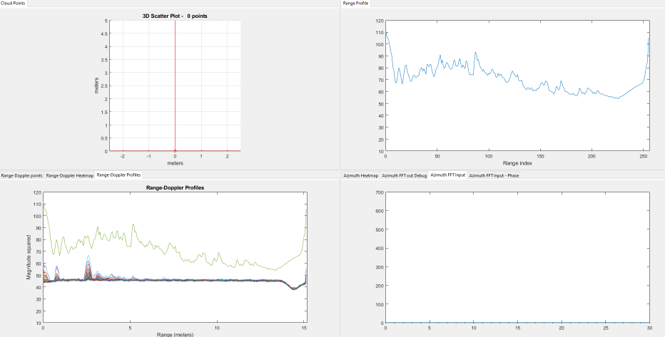
For the usecase "AWR1243 Capture + Radar Object Detect..." I have the demo running on the EVM. However in the MATLAB output to "Texas Instruments - Cascade demo" display, the "Azimuth Heatmap" and all the other Azimuth taps in that display quadrant - do not show any data. In the uart interface I have tried all the combinations of 1/0 in the "GUI Control" without getting any azimuth results'.

What do I need to do to see the Azimuth results?

Thank you,

Zach

  • Hello Zach,

    Could you try other Cascade application from SDK to make sure that hardware health is fine? Or if this is TIDEP-01012 board the try to verify the same with mmwave-studio.

    Regards,

    Jitendra

  • Are you able to see any points in the point cloud or only the Azimuth is a problem?

    Thanks and Regards

    Piyali

  • Attached see the results I am getting from Matlab.  

    Azimuth in the lower right corner has no results except FFT input has all zeros showing...

  • Zach

    Can you please run the calibration sequence and store the calibration data in the SD card?

    Refer: C:\PROCESSOR_SDK_VISION_03_08_00_00\vision_sdk\docs\Radar\ProcessorSDKRadar_UserGuide.pdf for calibration steps.

    Thanks and Regards

    Piyali

  • For the demo, the uart for calibration is asking for the following and the pdf you reference does not specify these values of this demo:

    Calibration setting (<numFrames> <rangeStartBin> <rangeEndBin>):

    What should I use for "numFrames", "rangeStartBin", & "rangeEndBin"?

    Thank you,

    Zach

  • Hi Piyali,

    In the PDF reference link you shared, the details are not available for numFrames, rangeStartBin, & rangeEndBin. I have attempted for make "educated guess" for these values to run and load cc.M on the SD card. The results are not a expected, so I want to try again with more information from you for running calibration.  Please provide any other meaningful context for cascade EVM  AWR1243 capture + object detect use case calibration. For example, when we calibrate our other radars we need sensor rotation as well.

    Thank you,

    Zach

  • Hi Zach

    After you generate the cc.mat, you would need to run the MATLAB script 

    vision_sdk\apps\src\rtos\radar\src\usecases\cascade_radar_object_detect\create_calib_coefs.m

    Then you need to load the .bin file generated into the SD card.

    For the calibration, you would need to place a corner reflector at boresight.

    Thanks and Regards

    Piyali

  • Hi Piyali,

    Thank you. I was able run create_calib_coefs.m and get the CC.m on the SD card. 

    I will run calibration again with a CR at the boresight.

    Please, I still need to know what values to input to the terminal when running calibration:

    Calibration setting (<numFrames> <rangeStartBin> <rangeEndBin>):

    What should I use for "numFrames", "rangeStartBin", & "rangeEndBin"?

    Thank you,

    Zach

  • Zach

    You can use numFrames as 30-50 (Just long enough for multiple frames to be captured), rangeStart and end should be such that the corner reflector potential side lobes are captured. 

    I usually give 2 times the distance from the radar of the corner reflector as the end and 0 as the start bin numbers.

    Thanks and Regards

    Piyali