


Dear Sir,
We are using the TMS320C6657CZHA25 in our application board.
The CVDD, CVDD1 VDD1, VDD2 AVDD1 and AVDD2 and 1.8V, 1.5V, 0.75V are stable and with the right power on sequence.
The on board FPGA programs the clock Generator CDCE62005RGZT from TI so the DSP Core CLK is 100MHz LVDS after the PS sequence.
The FPGA then release the Reset signals: DSP_RESETZ, DSP_PORZ and DSP_RESETFULLZ with that order.
We use the XDS 100 V3 from Olimex and XDS 100 V2 from Spectrum digital as the JTAG controller with the target board configured by CCS ver 10.
The following power supplies and signals were tested:
1) Power supplies are with the right voltages
2) The clock generator provides the core clock as 100MHz
3) The reset signals released in the right order with time spacing of 0.5msec.
4) The JTAG connector was connected as in the 14 pin JTAG connector requirements.
5) The JTAG emulator was configured correctly as in the CCS v10 instructions.
Although the above when I did test connection by the CCS ver 10 first with the XDS 100 V3 and then with the XDS 100 V2, the TMS, the TDI, TCK and TRESETn were measured by an oscilloscope and seems to be activated properly.
There was no response from the DSP on the TDO line
We also received the following message on the XDS100:
The received message from the XDS100v2
[Start: Texas Instruments XDS100v2 USB Debug Probe_0]
Execute the command:
%ccs_base%/common/uscif/dbgjtag -f %boarddatafile% -rv -o -F inform,logfile=yes -S pathlength -S integrity
[Result]
-----[Print the board config pathname(s)]------------------------------------
C:\Users\moshe\AppData\Local\TEXASI~1\CCS\
ccs1000\0\0\BrdDat\testBoard.dat
-----[Print the reset-command software log-file]-----------------------------
This utility has selected a 100- or 510-class product.
This utility will load the adapter 'jioserdesusb.dll'.
The library build date was 'Feb 13 2020'.
The library build time was '18:30:11'.
The library package version is '9.1.0.00001'.
The library component version is '35.35.0.0'.
The controller does not use a programmable FPGA.
The controller has a version number of '4' (0x00000004).
The controller has an insertion length of '0' (0x00000000).
This utility will attempt to reset the controller.
This utility has successfully reset the controller.
-----[Print the reset-command hardware log-file]-----------------------------
The scan-path will be reset by toggling the JTAG TRST signal.
The controller is the FTDI FT2232 with USB interface.
The link from controller to target is direct (without cable).
The software is configured for FTDI FT2232 features.
The controller cannot monitor the value on the EMU[0] pin.
The controller cannot monitor the value on the EMU[1] pin.
The controller cannot control the timing on output pins.
The controller cannot control the timing on input pins.
The scan-path link-delay has been set to exactly '0' (0x0000).
-----[The log-file for the JTAG TCLK output generated from the PLL]----------
There is no hardware for programming the JTAG TCLK frequency.
-----[Measure the source and frequency of the final JTAG TCLKR input]--------
There is no hardware for measuring the JTAG TCLK frequency.
-----[Perform the standard path-length test on the JTAG IR and DR]-----------
This path-length test uses blocks of 64 32-bit words.
The JTAG IR instruction path-length was not recorded.
-----[Perform the Integrity scan-test on the JTAG IR]------------------------
This test will use blocks of 64 32-bit words.
This test will be applied just once.
Do a test using 0xFFFFFFFF.
Scan tests: 1, skipped: 0, failed: 0
-----[An error has occurred and this utility has aborted]--------------------
This error is generated by TI's USCIF driver or utilities.
The value is '-183' (0xffffff49).
The title is 'SC_ERR_CTL_CBL_BREAK_FAR'.
The explanation is:
The controller has detected a cable break far-from itself.
The user must connect the cable/pod to the target.
[End: Texas Instruments XDS100v2 USB Debug Probe_0]
See below the board schematics (the relevant) and some pictures of the TCLK and the CLOCKCOREP 100MHz signal (before the serial capacitors).
the JTAG connector pin out is:
DSP_TMS 1
DSP_TDI 3
VCC1v8 5
DSP_TDO 7
DSP_TCK 11 and connected also to 9
DSP_EMU0 13
DSP_TRST# 2
NC 4
GND 8,10,12
DSP_EMU1 14
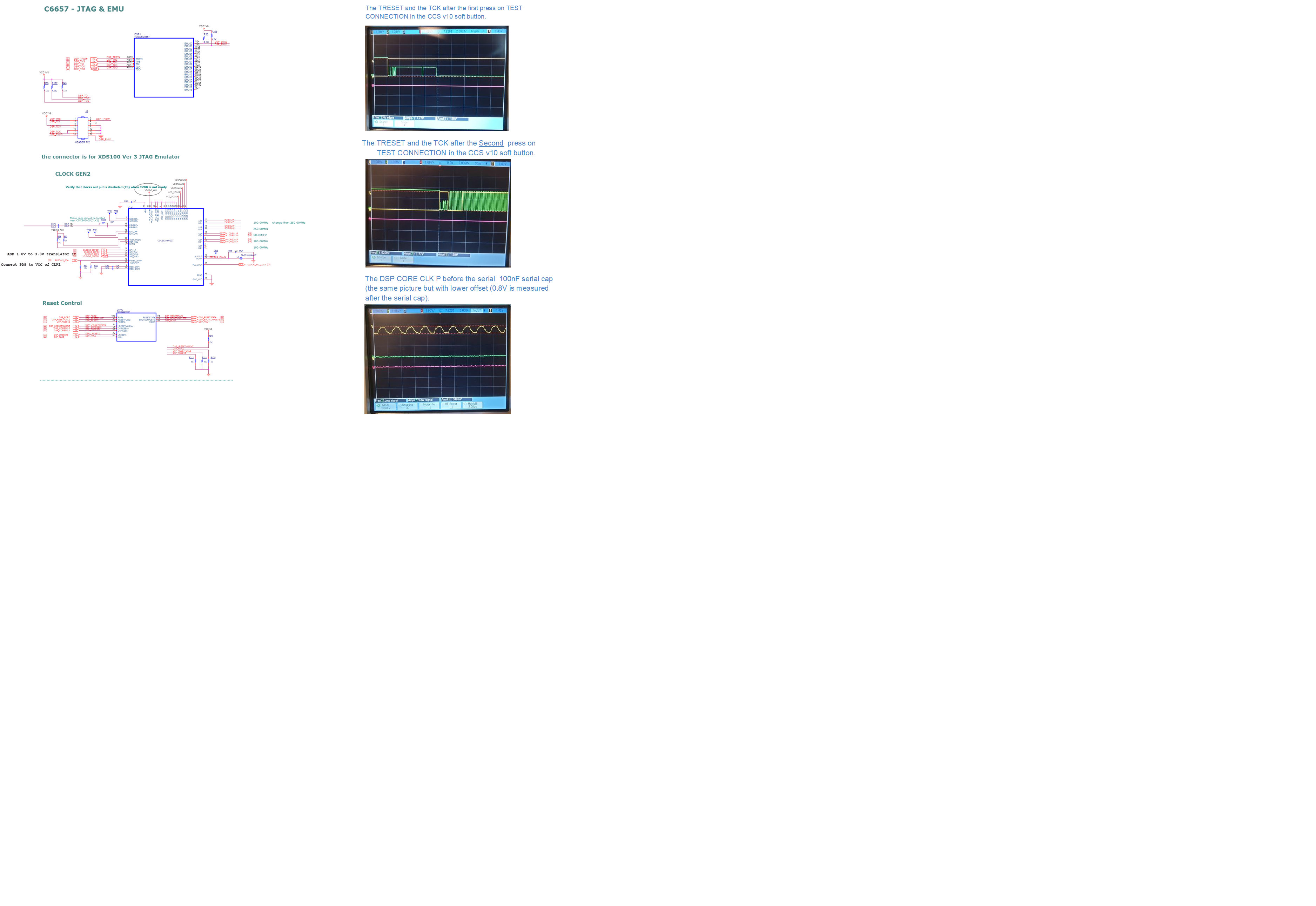 The TRESET# and the TCK after the first press on TEST CONNECTION in the CCS v10 soft button seems different then in the following presses on TEST CONNECTION.
Sometimes the CLOCK levels seems between 0 to 0.9V on the trailer and before the proper levels clock signals.
The TRESET and the TCK after the Second press on TEST CONNECTION in the CCS v10 soft button seems as proper clock signals.
The TRESET and the TCK after the first press on TEST CONNECTION in the CCS v10 soft button.
The TRESET and the TCK after the Second press on TEST CONNECTION in the CCS v10 soft button.
The DSP CORE CLK P before the serial 100nF serial cap (the same picture but with lower offset (0.8V is measured after the serial cap).
(if needed I can send photo of the TCK signal).
The DSP CORE CLK P before the serial 100nF cap is 1.2V offset and about 400mV amplitude (after the serial capacitor seems the same as before the serial capacitor but with lower offset 0.8V measured after the serial cap).
The questions are:
1) What are the minimum required settings for DSP in order to communicate with the XDS100 as the proper power supplies, DSP CORE CLOCK P&N, Released reset signals in the right order etc'?
2) Are the CORE CLOCK P&N required for the proper operation of the JTAG and the reception of the data via DSP TDO? If yes how can the DSP internal PLL configured in order to provide the clock in the DSP when the boot flash is not active?
3) What may cause then to the above received message and what can be done in order to communicate correctly with the 6657 DSP and receive a response from the DSP TDO signal?
If any other information or test results are needed then please let me know.
If needed to add schematics or photos, please let me know with instructions how to send it to you.
Thanks,
Moshe Zach

