This thread has been locked.

If you have a related question, please click the "Ask a related question" button in the top right corner. The newly created question will be automatically linked to this question.

TMS320C6678: Compiler version 8.3.2 not installed, !ERROR: No products of type 'com.ti.rtsc.SYSBIOS' are currently installed!

Part Number: TMS320C6678
Other Parts Discussed in Thread: SYSBIOS

Hi everyone,

I have been looking ar Processor SDK RTOS Getting started guide and was trying to generate the peripheral examples for C66x dsp board. However I am getting an error when I try to 'Rebuild PDK files' at the step of '1.4.5.1.5. PDK Example and Test Project Creation'. I get the following error when I type the following command in the windows prompt

format: pdkProjectCreate.bat [soc] [board] [endian] [module] [project type] [processor] [pdkDir]

pdkProjectCreate.bat C6678 all little all all dsp <pdkDir>
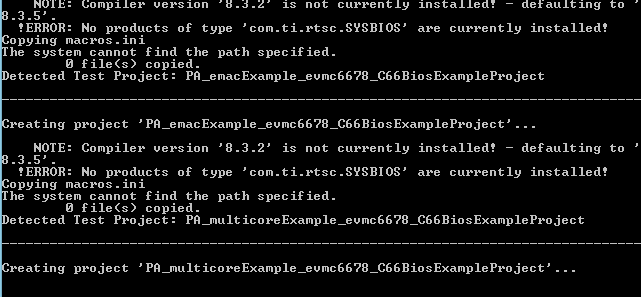
I referred the post https://e2e.ti.com/support/processors/f/791/t/619431?RTOS-EVMK2G-pdkProjectComplete-bat-fails-with-ERROR-No-products-of-type-com-ti-rtsc-SYSBIOS-are-currently-installed- that spoke about the same problem but could not figure out what to do. 

I already installed CCS v9.3 and PDK as mentioned in essentials category on the page http://software-dl.ti.com/processor-sdk-rtos/esd/C667x/latest/index_FDS.html

Can someone suggest what to do?

Thanks in advance,

-Chandrasekhar DVS

  • Hi,

    When you download the Processor SDK RTOS for C6678, the SYSBIOS and CGT are parts of the installer. We typically install it under c:\ti. Then you need to start the CCS 9.3, it will detect the SYSBIOS, PDK, NDK, IPC, EDMA, ....etc installed under the search path (e.g. c:\ti) and register them.

    Then you can run the pdkprojectcreate script to create CCS project.

    Regards, Eric

  • Hi Iding,

    So I do not have space let in C drive and hence had to install the processor SDK in F drive -> ti. I also installed the CCS v9.3 in F drive -> ti folder. As per the documentation, I changes the CCS_INSTALL_PATH to F:/ti/ccs930/ccs in pdkProjectCreate.bat but was getting the above error.

     Can you suggest I do something so that the project generation can happen in this location instead of the C drive? Also what did you mean by "register them"? Can you elaborate?

    Thanks in advance,

    -Chandrasekhar DVS
  • Hi,

    If you installed everything to F: drive, 

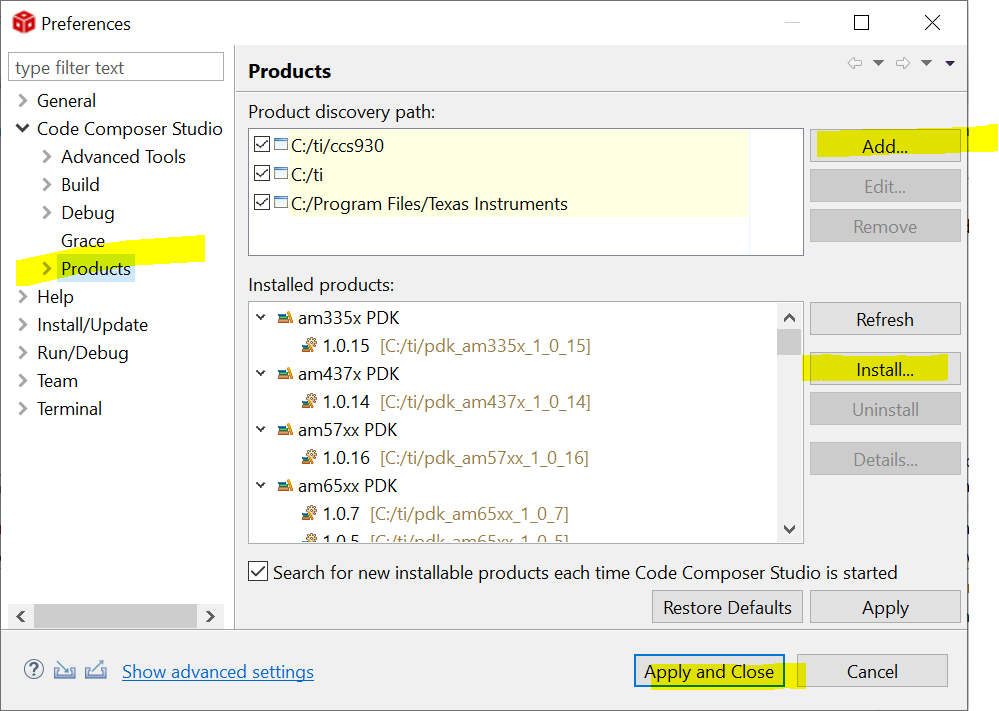
    1) In CCS --------->Window------->Preferences--------->Product to add the search path. Then you can find the SYSBIOS, IPC, .... "Register" I meant "Install".

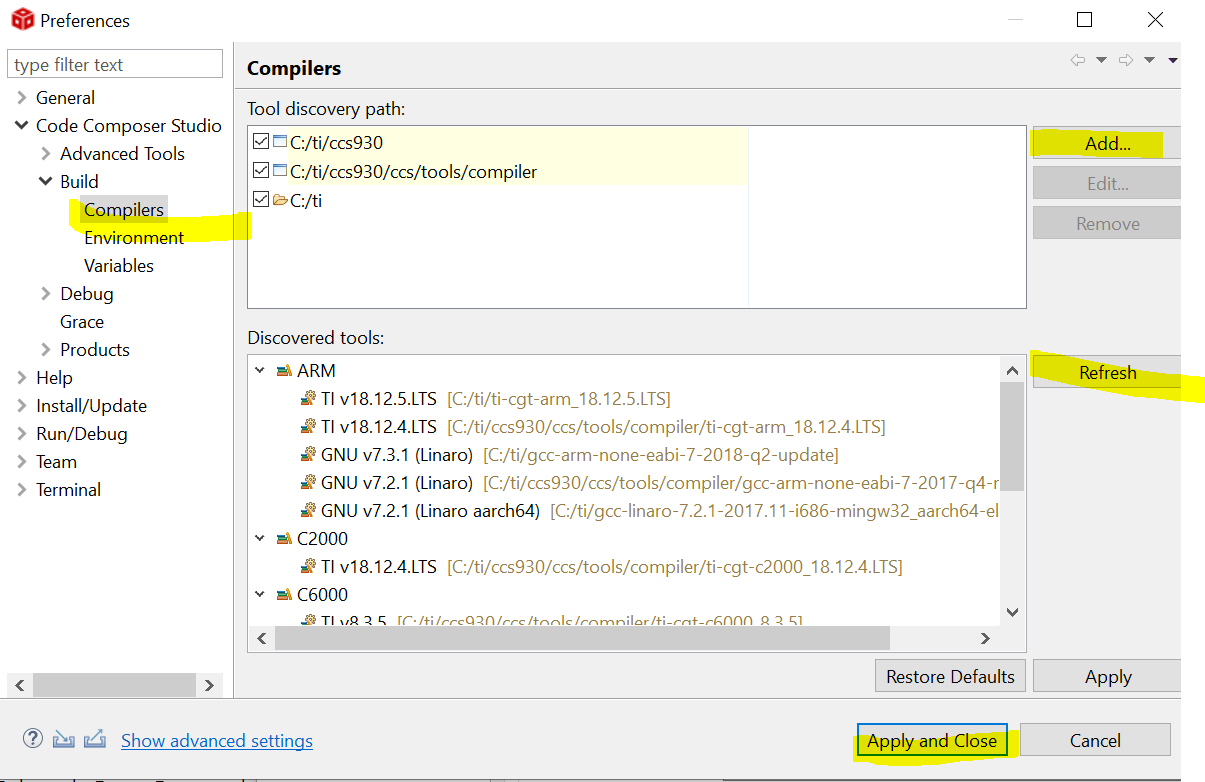
    Same thing for CGT 8.3.2 if not detected:

    Regards, Eric

  • Hi Eric(lding),

    Thanks. That helped!

    I can see the project folders in the created directory now!

    -Chandrasekhar DVS