This thread has been locked.

If you have a related question, please click the "Ask a related question" button in the top right corner. The newly created question will be automatically linked to this question.

USB speed issues

Other Parts Discussed in Thread: OMAP-L138, DA8XX

Hi all!

I'm working with OMAP-L138 eXperimenter Kit and I'm trying to boot from USB.
The kernel is the provided by ti-dvsdk_omapl138-evm_4_00_00_22.

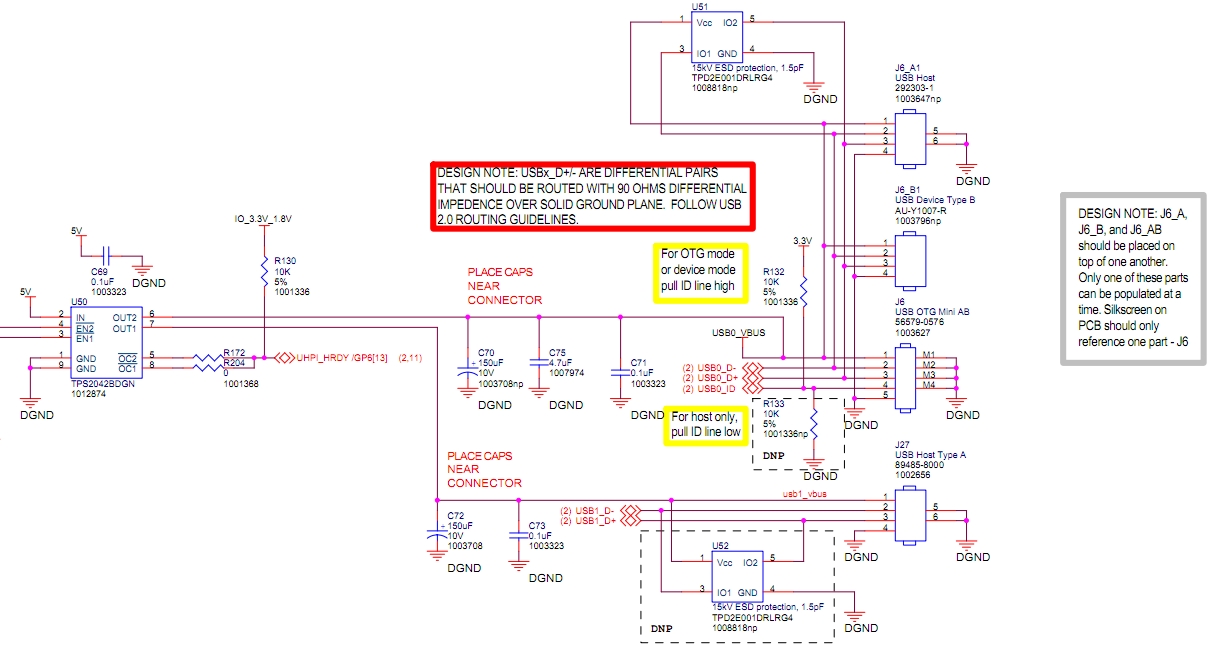
The board was modified to connect a memory stick on USB OTG port (J6).

When I boot it from TFTP and NFS things works great:
.
.
.
ohci_hcd: USB 1.1 'Open' Host Controller (OHCI) Driver
ohci ohci.0: DA8xx OHCI
ohci ohci.0: new USB bus registered, assigned bus number 2
ohci ohci.0: irq 59, io mem 0x01e25000
usb 1-1: new high speed USB device using musb_hdrc and address 2
usb usb2: New USB device found, idVendor=1d6b, idProduct=0001
usb usb2: New USB device strings: Mfr=3, Product=2, SerialNumber=1
usb usb2: Product: DA8xx OHCI
usb usb2: Manufacturer: Linux 2.6.33-rc4 ohci_hcd
usb usb2: SerialNumber: ohci.0
hub 2-0:1.0: USB hub found
hub 2-0:1.0: 1 port detected
Initializing USB Mass Storage driver...
usbcore: registered new interface driver usb-storage
USB Mass Storage support registered.
.
.
.

Linux starts ok and the stick is mounted automatically. Then I can access to the contains of the memory without problems.

But, when I try to load the kernel from USB (u-boot), and filesystem from NFS, I'm not able to mount the memory.
A different message is showed, and I can't access to the memory.


ohci_hcd: USB 1.1 'Open' Host Controller (OHCI) Driver
ohci ohci.0: DA8xx OHCI
ohci ohci.0: new USB bus registered, assigned bus number 2
ohci ohci.0: irq 59, io mem 0x01e25000
usb 1-1: new low speed USB device using musb_hdrc and address 2
usb usb2: New USB device found, idVendor=1d6b, idProduct=0001
usb usb2: New USB device strings: Mfr=3, Product=2, SerialNumber=1
usb usb2: Product: DA8xx OHCI
usb usb2: Manufacturer: Linux 2.6.33-rc4 ohci_hcd
usb usb2: SerialNumber: ohci.0
hub 2-0:1.0: USB hub found
hub 2-0:1.0: 1 port detected
Initializing USB Mass Storage driver...
usbcore: registered new interface driver usb-storage

USB Mass Storage support registered.

usb 1-1: new low speed USB device using musb_hdrc and address 6
usb 1-1: device descriptor read/64, error -71
usb 1-1: new low speed USB device using musb_hdrc and address 7
usb 1-1: device descriptor read/64, error -71
usb 1-1: new low speed USB device using musb_hdrc and address 8
usb 1-1: device not accepting address 8, error -71
usb 1-1: new low speed USB device using musb_hdrc and address 9
usb 1-1: device not accepting address 9, error -71
hub 1-0:1.0: unable to enumerate USB device on port 1

(continuously)

---------------------------

Can anyone point me in the right direction?
What I'm doing wrong?

Thanks in advance,
Marcelo

  • Marcelo,

    I think you have connected the stick to musb port for downloading uImage in uboot and same remain connected during Linux boot ?

    Can you provide the output of "cat /proc/driver/musb_hdrc" after bootup ?

    Regards,

    Ajay

  • Hi Ajay,

    Thanks for your response.

    I've tried some combinations of Linux boot:

    1. Load uImage (by TFTP) without the stick connected.

    The proc shows:

    Status: MHDRC, Mode=Host (Power=e0, DevCtl=19)
    OTG state: a_wait_bcon; inactive
    Options: ?dma?, host, debug=0 [eps=5]
    Root port status: 00000100
    DaVinci: ctrl=00 stat=1 phy=000
            rndis=00000 auto=0000 intsrc=00000000 intmsk=01ff1e1f
    CPPI: txcr=0 txsrc=0 txena=0; rxcr=0 rxsrc=0 rxena=0

    Then if I connect the stick, it is detected as high speed device and mounted automatically.

    2. Load uImage (by TFTP) with the stick connected.

    Stick is detected as high speed device and mounted automatically.

    The proc shows:

    root@evm:~# cat /proc/driver/musb_hdrc

    Status: MHDRC, Mode=Host (Power=f0, DevCtl=5d)
    OTG state: a_host; active
    Options: ?dma?, host, debug=0 [eps=5]
    Root port status: 00000503
    DaVinci: ctrl=00 stat=1 phy=000
            rndis=00030 auto=0000 intsrc=00000000 intmsk=01ff1e1f
    CPPI: txcr=0 txsrc=0 txena=0; rxcr=0 rxsrc=0 rxena=0

    3. Load uImage (by USB) and remove the stick before Linux boot

    root@simucoba:~# cat /proc/driver/musb_hdrc

    Status: MHDRC, Mode=Host (Power=e0, DevCtl=19)
    OTG state: a_wait_bcon; inactive
    Options: ?dma?, host, debug=0 [eps=5]
    Root port status: 00000100
    DaVinci: ctrl=00 stat=1 phy=000
            rndis=00000 auto=0000 intsrc=00000000 intmsk=01ff1e1f
    CPPI: txcr=0 txsrc=0 txena=0; rxcr=0 rxsrc=0 rxena=0

    If I connect the stick, it is detected as low speed device. The message "error -71" is showed continuously.
    The proc shows:

    Status: MHDRC, Mode=Host (Power=e0, DevCtl=3d)
    OTG state: a_host; active
    Options: ?dma?, host, debug=0 [eps=5]
    Root port status: 00000301
    DaVinci: ctrl=00 stat=1 phy=000
            rndis=00000 auto=0000 intsrc=00000000 intmsk=01ff1e1f
    CPPI: txcr=0 txsrc=0 txena=0; rxcr=0 rxsrc=0 rxena=0

    4. Load uImage (by USB) and remain the stick connected while Linux boot.

    Stick is detected as low speed device and the message "error -71" is showed continuously.

    The proc shows:

    Status: MHDRC, Mode=Host (Power=e0, DevCtl=3d)
    OTG state: a_host; active
    Options: ?dma?, host, debug=0 [eps=5]
    Root port status: 00000301
    DaVinci: ctrl=00 stat=1 phy=000
            rndis=00000 auto=0000 intsrc=00000000 intmsk=01ff1e1f
    CPPI: txcr=0 txsrc=0 txena=0; rxcr=0 rxsrc=0 rxena=0

    -------------------

    Seems like USB is not powered on.
    Maybe u-boot modifies the peripheral status before Linux boot?

    The U-boot version is: 2009.01 (Sep 17 2009)

    Thanks a lot.

    Marcelo

  • Marcelo,

    As per the DevCTL values Vbus is available.Looks like uboot is affecting some settings. what kind of board modification was done as you mentioned it in your post?

    Is there any additional software settings need to be done for the hardware changes? Can you share the changed schematics?

    Regards,

    Ajay

  • Ajay,

    I attach the USB part of the schematic of Baseboard (Logicpd OMAP-L138 experimenter kit).

    I replaced the "USB OTG mini AB" by "USB Host" connector. Then I changed the R132 resistor to R133, so this config allow work as host.

    As far as I know there are not aditional settings need to be done, and I discard a hardware issue: when I boot from TFTP and NFS, the file transfers between USB and Ethernet (NFS) works great.

    As you said, it can be like u-boot is doing something.

    Should I load a new version of u-boot?

    Thanks


    Marcelo

  • Marcelo,

    Thanks for proving schematics. The changes looks fine to me. I could see the musb module reset code in the driver init but looks like it's not taking effect. Can you please perform below two tests,

    1) Repeat the test with musb a module.

    2) Add below line of code in drivers/usb/musb/da8xx.c, at musb_platform_init() soon after controller reset command,

     /* Reset the controller */

     musb_writel(reg_base, DA8XX_USB_CTRL_REG, DA8XX_SOFT_RESET_MASK);

    + rev = musb_readl(reg_base, DA8XX_USB_CTRL_REG);     [Add this line only] 

    REgards,
    Ajay

  • Hi Ajay,

    I did some tests.

    1) Once compiled Linux with musb as module (<M> Inventra Highspeed Dual Role Controller (USB_MUSB_HDRC)) after Linux boots I load the module: insmod musb_hdrc.ko

    In both cases (TFTP and USB boot) when I connect the stick I don't receive any message.

    I'm not able to read the stick (It isn't mounted automatically and I don't find the device /dev/sda)

    2) Added 'read' and 'printk' functions in 'drivers/usb/musb/da8xx.c'. In both cases the result is similar:

    TFTP Boot:

    DA830 OTG revision 00000000, PHY 26bc2, control 00

    USB Boot:

    DA830 OTG revision 00000000, PHY 202c2, control 00

    -------------

    I don't know what does it means.

    Please let me know if you want to know about others registers.

    Thanks,
    Marcelo

  • Marcelo,

    I hope you have configured musb in host mode only. If you configure for OTG mode then gadget module also needs to be inserted to complete the initialization.

    After inserting the module you also need to start the session  by "echo F > /proc/driver/musn_hdrc".  Can you send the log messages after you insert the module.

    Regards,

    Ajay

  • Ajay,

    In this version of PSP (ti-dvsdk_omapl138-evm_4_00_00_22) 'USB Host' is the only option available ('Device Drivers' - 'USB Support' - 'Inventra Highspeed Dual Role Controller').

    The following are log messages:
    (TFTP and USB boot, the same for stick connected/disconnected)

    evm login: root
    root@evm:~# insmod /lib/modules/2.6.33-rc4/kernel/drivers/usb/musb/musb_hdrc.ko
    musb_hdrc: version 6.0, cppi4.1-dma, host, debug=0
    DA830 OTG revision 00000000, PHY 26bc2, control 00
    musb_hdrc: USB Host mode controller at fee00000 using DMA, IRQ 58
    musb_hdrc musb_hdrc: MUSB HDRC host driver
    musb_hdrc musb_hdrc: new USB bus registered, assigned bus number 2
    usb usb2: New USB device found, idVendor=1d6b, idProduct=0002
    usb usb2: New USB device strings: Mfr=3, Product=2, SerialNumber=1
    usb usb2: Product: MUSB HDRC host driver
    usb usb2: Manufacturer: Linux 2.6.33-rc4 musb-hcd
    usb usb2: SerialNumber: musb_hdrc
    hub 2-0:1.0: USB hub found
    hub 2-0:1.0: 1 port detected
    root@evm:~# da8xx_interrupt 468: VBUS error workaround (delay coming)
    da8xx_interrupt 468: VBUS error workaround (delay coming)
    da8xx_interrupt 468: VBUS error workaround (delay coming)
    da8xx_interrupt 468: VBUS error workaround (delay coming)
    root@evm:~# echo F > /proc/driver/musb_hdrc
    root@evm:~# da8xx_interrupt 468: VBUS error workaround (delay coming)

    Thanks,
    Marcelo

  • This is strange, the same stick use to work and now showing Vbus error. Vbus error means musb is not able to provide enough power to the stick. Can you please connect a slef powered hub and then connect stick to it?  or just for testing connect any other stick requiring lesser power.

    Additionally, The test I asked afetr adding READ statement can be done with builtin. I mean make musb as built in as just have that read command added. and see whats results.

    Ajay

  • Ajay,

    Please note that VBUS error message happens even when no stick is connected.
    I double checked the hardware connections and everything seems fine.

    About the test you asked after adding READ statement: musb was builtin with kernel but the behaviour is the same ('read/64, error -71') when I boot from USB.

    Thanks,
    Marcelo

  • Marcelo,

    do you get Vbus error in modules only or also when musb is builtin? How about in working case (uImage from TFTP) , do you vBus error there also ?

    REgards,
    Ajay

  • Ajay,

    I get Vbus error when musb is a module (booting from USB and TFTP). The stick is not recognized.


    Using builtin musb and booting from TFTP the stick works great! (no Vbus error).

    In case of USB boot, I get 'read/64, error -71' (no Vbus error).


    Very strange things ...

    Thanks,

    Marcelo

  • Hi,

    I'm still having problems at working with USB of OMAP-L138 Experimenter Kit.

    I'm wondering if somebody managed to boot Linux from USB(OTG) with this EVM, and then access to the stick.

    Only the following command has to be written in u-boot (rootfs could be NFS or other):
    ---------------------------------------------
    usb start
    fatload usb 0:1 0xC0700000 uImage
    bootm
    ---------------------------------------------

    It was tested in 4 boards and several sticks and the behaviour is the same:
    ---------------------------------------------
    usb 1-1: new low speed USB device using musb_hdrc and address 3
    usb 1-1: device descriptor read/64, error -71
    --------------------------------------------

    Seems like a bug in USB module. Can somebody check it?

    We're defining a custom board, so it's important for us to know as soon as posible if USB will be working.

    Any help will be greatly appreciated.

    Regards,
    Marcelo