This thread has been locked.

If you have a related question, please click the "Ask a related question" button in the top right corner. The newly created question will be automatically linked to this question.

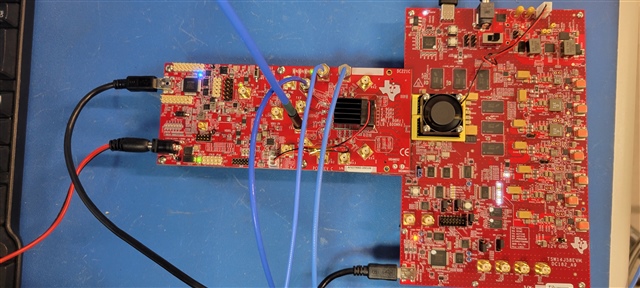
AFE7769DEVM: FPGA control

Part Number: AFE7769DEVM
Other Parts Discussed in Thread: TSW14J58EVM, AFE7769D

Currently I am struggling on the set up.

Here I have several questions.


Could the Latte software control the FPGA board(TSW14J58EVM) also?

When I open the Latte and HSDC together, USB connection lost.

It looks like the Latte could control the FPGA board but somehow FPGA is not correctly set up if I use Latte only.


Does the JTAG and Vivado are essential?

I thought JTAG is optional, and I did not use the JTAG connection. Could it be related with the FPGA set up issue of Latte?


I want to start testing TX first.

I am checking the TX port with SA and change settings.

I only could see the LO leakage for short period of time, and it disappeared.

So it means, AFE7769D could be set correctly, I guess there is no Baseband signal and it stopped.


Document sbasag4a page 174 shows the device can work with Fref down to 122.88Mhz.

I thought the AFE7769D could accept 122.88Mhz as a ref CLK but the Latte software config tab does not allow me to set.

The pull-down menu of config tab only shows 245.76MHz, 368.64MHz, 491.52Mhz

I think the config tab should includes the 122.88MHz on the pull-down menu.

When I start HSDC, I saw "Firmware version and dll version does not match" message. 

How could I solve the issue?

Thank you in advance for the help.

  • Hi Mr. Park,

    Thank you for your questions!

    When I open the Latte and HSDC together, USB connection lost.

    My first recommendation would be regarding the software: please use Latte instead of HSDC Pro, as this software is made specifically for the AFE7769D device and will properly demonstrate the connection between the FPGA and AFE.

    I thought JTAG is optional, and I did not use the JTAG connection. Could it be related with the FPGA set up issue of Latte?

    Can you please clarify? From my understanding, if you only use Latte (you do not need HSDC Pro) these issues should be resolved. JTAG is optional, to confirm.

    I want to start testing TX first.

    I am checking the TX port with SA and change settings.

    I only could see the LO leakage for short period of time, and it disappeared.

    So it means, AFE7769D could be set correctly, I guess there is no Baseband signal and it stopped.

    A few questions/points of feedback:

    1. Can you please specify the center frequency and bandwidth that you are using for your test?
    2. Enable TDD in the respective TX channel (TX1, TX2, TX3, TX4) in the RXFB-Test tab of Latte. Testing can be performed in the TX-Test tab, in the Send Tone section, by setting the signal and amplitude for the respective TX channel
    3. Can you please share a screenshot of the SA with regards to the last two points above?

    I thought the AFE7769D could accept 122.88Mhz as a ref CLK but the Latte software config tab does not allow me to set.

    TI recommends to utilize the highest REFCLK frequency, such as 491.52MHz for lowest (dBc) phase noise performance. However, Latte should be able to set the REFCLK frequency to 122.88MHz but you may need to try in the generated Excel file directly. Please see below for an example within the configuration file in the Top System Parameters tab.

    Best regards

    Simran 

  • Hi Simran,

    I modified excel file to use the 122.88Mhz ref CLK and loaded on the parameter page.

    But config page information is still not changed.  For now I just ignored the config page.

    I am beginner on transceiver area and I need more detailed and step-by-step support.

    I appreciate your kind support.

    I want to try TX test of Band 1 FDD mode with 20MHz LTE signal BW.

    2140Mhz as TX freq and I want to use JESD204B

    I touched only the parameter page and all the other pages are defaults.

    When I push the bring up button, I see several errors. Is it correct?

    Could you check my setting of below?

    If possible could you check my jumper setting also? I tried default setting of datasheet but I am not sure if it is correct.

  • Hi Simran,

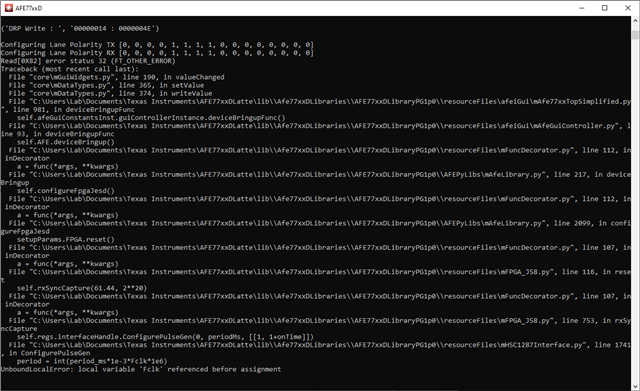
    I noticed. some error(FT_OTHER_ERROR) on very initial commends screen.

    Is this error should be fixed? How could I fix it?

    And also when I push button "Check Hardware Connection", it shows "FPGA Reset Not Detected". How could I fix this?

  • Hi Mr. Park,

    Thank you for your follow-up questions. May I ask which version of Latte you are using? You can find the version by clicking on Help at the top of the window and choosing About.

    Please see the following line items for feedback:

    I modified excel file to use the 122.88Mhz ref CLK and loaded on the parameter page.

    But config page information is still not changed.  For now I just ignored the config page.

    Please see the following for a new configuration file based on your above use case (with 122.88 MHz for the Fref): /cfs-file/__key/communityserver-discussions-components-files/220/Nextivity.xlsx

    When I push the bring up button, I see several errors.

    A few recommendations:

    1. One function to try in the Latte command window: myfpga.Reconnect()
    2. Close Latte, power off/on the FPGA and AFE, then re-open Latte.
    3. Before re-opening Latte, check the connections of the three cables connected to the FPGA, and check that the FPGA is properly snapped to the AFE.
    4. Jumpers look fine for JESD204B

    Please try the above and reach out if you have additional issues/questions you would like to highlight. Thank you!

    Best regards,

    Simran