This thread has been locked.

If you have a related question, please click the "Ask a related question" button in the top right corner. The newly created question will be automatically linked to this question.

AFE7769DEVM: AFE7769DEVM Software Bootup

Part Number: AFE7769DEVM
Other Parts Discussed in Thread: TSW14J58EVM, AFE7769D

Tool/software:

Hi, there:

        My setup includes AFE7769DEVM and TSW14J58EVM. I tried to follow the instructions in Quick Start Guide, But I encountered error   , I can't find "FTDI FT601 USB 3.0 Bridge Device" in my Device Manager

 , Could it be the root cause? I tried to update driver but could not make it. Please kindly advise. Thanks

  • Hi Josh,

    Thank you for reaching out regarding the challenges you are facing when connecting to the TSW14J58 FPGA EVM. Please try the following debug steps:

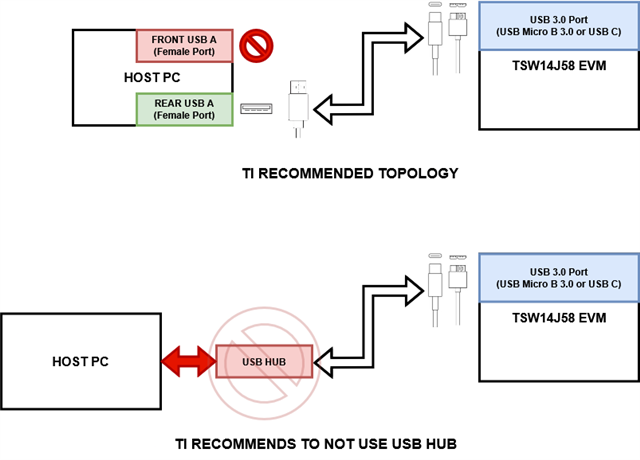
    1. Ensure that the male USB A connector of your USB A-to-USB C or USB A-to-USB Micro B 3.0 is plugged directly into the PC.
      1. Strictly do NOT use a USB hub when connecting to the FPGA. 
      2. If you are already connected directly to your PC tower USB ports, connect directly to the motherboard/rear I/O USB ports. Connecting to the front I/O may cause issues on some PCs.
    2. Check cable data transmission using an unrelated device,
      1. Ensure the cable itself is functional by connecting another known good device that has USB C or USB Micro B 3.0.
      2. Try to copy files between your host PC and the target device.
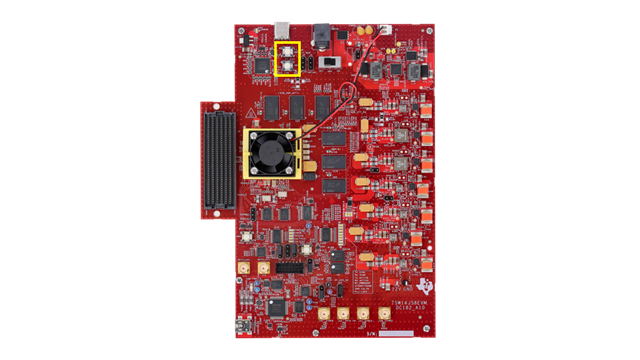
    3. Reset the USB FTDI using the two buttons provided next to the USB port on TSW14J58 EVM.
      1. Double click and hold the two white push buttons located nearest to the USB port on the EVM.
    4. Update Drivers
      1. Visit https://ftdichip.com/drivers/d3xx-drivers/ and download the driver pack - when you unzip the file, you should have a .cat, .inf, and .sys file.
      2. Navigate to device manager (you have done this already and have included screenshot - perform the exact same action).
      3. Since we do not know which device the USB 3.0 is displayed under (because the drivers may be incorrect) when you navigate to device manager, unplug and replug the USB cable connected to TSW14J58 FPGA EVM. This should cause a change in listed items under Device Manager -> Universal Serial Bus controllers. Since the only device you are disconnecting is the TSW14J58 EVM, we know the changed item must be updated. 
      4. Right click on the changed item -> Update Driver -> Browse my computer for drivers -> Browser -> Select the driver files you have downloaded (.cat, .inf, and .sys)
      5. Continue driver installation, reboot PC, and disconnect/reconnect the USB cable.

    Please let us know if the issue persists on following these steps.


    Best, 
    Karan Venaik. 

  • Hi, Karan:

            Thanks for your support. I followed your instructions and switch to another laptop with sufficient USB ports and installed the driver successfully. But I encountered a python issue as below . I tried to install python 2,7 but the issue remains. Please kindly advise

    Regards,

    Josh

  • Hello Josh,

    Thank you for trying out the debugging steps - I would like to follow up on,

    1. Do you see the TSW14J58 FPGA Capture Card EVM recognized under the Windows Device Manager, and in Latte's list of USB Handles?
    2. Do you also see the AFE7769D EVM recognized under the Windows Device Manager, and in Latte's list of USB Handles?
    3. Can you please post the full error log shown in your image above - I would like to understand at which point the path failure happens. 

    Best, 
    Karan Venaik. 

  • Hi, Karan:

            Thank for your support. The snapshot of my Device Manager is  , So I think both boards were driven correctly. The full error log is as below for your reference.

    #Error: No module named path

    # "", line 43, in

    # File "C:\TI\lib\Afe77xxDLibraries\__init__.py", line 1, in

    # import os

    # File "c:\python27\Lib\site-packages\PyInstaller\loader\pyimod03_importers.py", line 161, in load_module

    # File "c:\python27\Lib\site-packages\PyInstaller\loader\pyimod03_importers.py", line 395, in load_module

    # File "os.py", line 120, in

    # ImportError: No module named path

    #

    #

    #================ ERRORS:1, WARNINGS:0 ================#

    Regards,

    Josh

  • Hi Josh,

    Thank you for sharing the context - here are a few points based on what you have described, 

    1. The driver issue has been fixed and it seems the application can now communicate with the AFE7769D EVM - this is a positive.
    2. With regards to the Latte environment Python error code,
      1. You do NOT need to install Python separately; Latte is effectively "containerized" and performs setup of the software it requires to operate.
      2. I see the path "C:\TI\lib\Afe77xxDLibraries\__init__.py- did you per chance change the install directory of Latte?
      3. Please uninstall Latte in its entirety/completely, and ensure no Latte files are leftover. Then, redownload Latte and reinstall at the default directories it suggest (Just keep clicking "next" without changing anything).
      4. Once Latte is installed, power cycle your computer, and the two EVMs. Then reconnect the EVMs to USB after PC boot up. 

    Please let me know if #2 fixes the issue, and you can connect your EVM with Latte. 

    Best, 

    Karan Venaik. 

  • Hi, Karan:

            Thanks for your support. Maybe due to the different Region/Language Setting, the directory which stores project files will be pointed to an invalid path. After setting the path correctly, the utility is running now.

    Regards,

    Josh

  • Hello Josh, 

    Thank you for confirming that Latte is now working - can you please confirm on the following points,

    1. Can you bringup the AFE7769D device fully?
    2. Can you please describe the different Region/Language Settings change you have performed during initial bringup which caused Latte to be installed to a different folder path? If possible, please provide screencaptures of choices made during installation procedure that installed Latte to the "C:\TI\..." filepath. We would like to review this. 

    Best,

    Karan Venaik.

  • Hi, Karan:

            1.Unfortunately, I still encountered two errors after I click 'Run Device BringUP'. The full log is shown as below: The power supply I am using can only support 3.2A@5.5V, could it be the root cause?

            2. The region on the laptop is set to Taiwan and Traditional Chinese feature is installed. The path was pointed to a directory under One Driver, whose name contains two '?' characters. That's why I could not stay with the default configuration. I compared the setup in my own laptop (Interestingly I did not encounter the same issue with the same Region/Language setup), I manually input 'C:\Program Files\Texas Instruments\AFE77xxDLatte\' and the issue was gone.

    AFE77xxDLibraryPG1p0

    spi - USB Instrument created.

    resetDevice

    Kintex RegProgrammer - USB Instrument created.

    Kintex RegProgrammer - USB Instrument created.

    Kintex RegProgrammer - USB Instrument created.

    Misc-B RegProgrammer - USB Instrument created.

    Version : 0x104204b

    Connected to Capture Card

    Loaded Libraries

    Refreshed GUI

    Power Card - USB Instrument created.

    #================ ERRORS:0, WARNINGS:0 ================#

    #================ ERRORS:0, WARNINGS:0 ================#

    Refreshed GUI

    Device Initialization for ChipVersion: 1.0

    2T2R1F Number: 0

    Valid Configuration: True

    laneRateRx: 9830.4

    laneRateRx1: 9830.4

    laneRateFb: 9830.4

    laneRateTx0: 9830.4

    laneRateTx1: 9830.4

    2T2R1F Number: 1

    Valid Configuration: True

    laneRateRx: 9830.4

    laneRateRx1: 9830.4

    laneRateFb: 9830.4

    laneRateTx0: 9830.4

    laneRateTx1: 9830.4

    DONOT_OPEN_Afe77xxDPG1p0_FULL - Device registers reset.

    chipType: 0xa

    chipId: 0x77d

    chipVersion: 0x10

    LMK Clock Divider - Device registers reset.

    LMK Clock Divider - Device registers reset.

    REFCLOCK is used from LMK source, ensure board connections are ok to do the same

    LMK Configured.

    Fuse farm load autoload done successful

    No autload error

    Fuse farm load autoload done successful

    No autload error

    AFE Reset Done.

    pll1: True; LO Frequency: 2949.12

    FPGA Reset device not found

    FPGA Reset device not found

    Resetting FPGA.

    Version : 0x104204b

    Connected to Capture Card

    FPGA Configured.

    AFE MCU Wake up done.

    pll0: True; LO Frequency: 3500.0

    pll1: True; LO Frequency: 2949.12

    pll2: True; LO Frequency: 1900.0

    AFE all PLLs configured.

    AFE SerDes configured.

    AFE Digital Chains configured.

    AFE PAP configured.

    AFE DAC Analog Writes configured.

    AFE RX Analog Writes configured.

    AFE FB Analog Writes configured.

    AFE JESD configured.

    AFE GPIO configured.

    AFE TX IQMC-LOL Correction configuration Complete

    AFE DPD Block configuration

    AFE DPD Block configuration Complete

    AFE RX IQMC configuration Complete

    AFE RX AGC configuration Complete

    AFE CFR configuration Complete

    FPGA Tx sysref captured

    FPGA Rx Sync is achieved

    ###########Device DAC JESD-RX 0 Link Status###########

    CS State TX0: 0b00001010 . It is expected to be 0b00001010

    FS State TX0: 0b00000101 . It is expected to be 0b00000101

    Could get the link up for device RX: 0

    ###################################

    AFE Configuration Complete

    #================ ERRORS:2, WARNINGS:0 ================#

  • Hello Josh, 

    Thank you for providing a response - please find comments below, 

    1. Device & Latte Configuration
      1. Latte Initialization
        1. All Libraries were loaded correctly (Lines upto “Power Card – USB Instrument Created.”)
        2. FPGA FW is in JESD204B mode during initialization of Latte (0x104204b)
      2. Bringup Procedure
        1. Configuration is marked as valid.
        2. AFE is reset correctly.
        3. Chip ID is readback correctly – SPI is working.
        4. LMK and clock tree is reset and configured correctly.
        5. FPGA is connected and configured by Latte.
        6. AFE configuration/writes are performed.
        7. AFE <-> FPGA link is up online (‘Could get the link up for device RX:0’)
        8. AFE Configuration is performed fully.
      3. The error count of 2 (two) is likely due to missing reset cable from the TSW14J58 FPGA Capture Card EVM.
        1. Please disregard this error.
        2. Do NOT connect the reset cable.
        3. Since your setup is working currently, please leave it as it is.
    2. Power Supply
      1. Can you confirm if all power rails/barrel jacks are connected to a singular power supply? (5V5 @ 3A2)
      2. It is recommended to use two different power supplies/rails at 5V5 with ample current – issues may arise when bringing the device up/toggling channels/sending data/capturing data/other device functions.
      3. In the interest of speed, you can continue as is if you do not see issues. If you do see issues, please move to a supply with 2 unique rails with higher amperage limits as first debug.

    Best, 
    Karan Venaik.