Part Number: AWR1642BOOST
Hello,
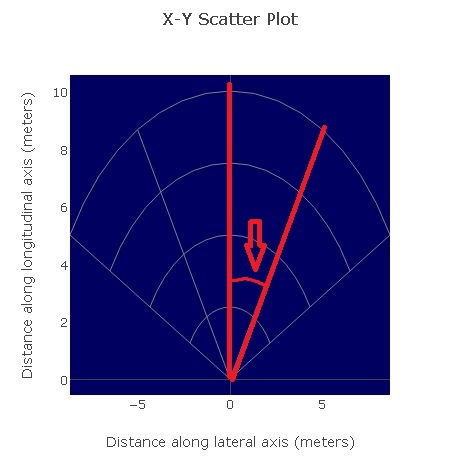
Please let me know the angle drawn in the following figure.
The angle information is used to evaluate AWR1642BOOST.
I guess the angle is 27.5 degree.
Best Regards,
Nomo
This thread has been locked.
If you have a related question, please click the "Ask a related question" button in the top right corner. The newly created question will be automatically linked to this question.
Part Number: AWR1642BOOST
Hello,
Please let me know the angle drawn in the following figure.
The angle information is used to evaluate AWR1642BOOST.
I guess the angle is 27.5 degree.
Best Regards,
Nomo
Hi Nomo-san,
The angle of each arc is pi/6 radians or 30 degrees. You can view the source code for the visualizer by pressing F12 (or as mentioned in this thread) and look in the file app/mmWave.js. The X-Y scatter plot angles are set in the following code.
} else {
var gridchoice = 'polar grid 2';
var rectgrid = gridchoice == 'rect grid';
templateObj.$.ti_widget_plot1.data = [
{type: 'scatter', mode: 'markers',
marker: {size:4, color: 'rgb(0,255,0)', showscale:false}
}
];
templateObj.$.ti_widget_plot1.layout.title = 'X-Y Scatter Plot';
delete templateObj.$.ti_widget_plot1.layout.margin;
templateObj.$.ti_widget_plot1.layout.plot_bgcolor = 'rgb(0,0,96)';
templateObj.$.ti_widget_plot1.layout.xaxis = {
title: 'Distance along lateral axis (meters)',
showgrid: rectgrid,
//zerolinecolor: 'rgb(128,128,128)',
autorange: false,
range: [-range_width, range_width]
};
templateObj.$.ti_widget_plot1.layout.yaxis = {
title: 'Distance along longitudinal axis (meters)',
showgrid: rectgrid,
autorange: false,
range: [0, range_depth]
};
var radii = [];
var angles = [];
if (gridchoice == 'polar grid 1') {
radii.push(range_depth);
angles.push( math.pi/6 + 0*math.pi*2/12 );
angles.push( math.pi/6 + 4*math.pi*2/12 );
} else if (gridchoice == 'polar grid 2') {
for (var i=1; i<=4; i++) {
radii.push(i*range_depth/4);
}
for (var i=0; i<5; i++, idx+=1) {
//if (i==2) continue; // skip the main vertical line
angles.push( math.pi/6 + i*math.pi*2/12 );
}
}
You can also download the Visualizer source from https://dev.ti.com/gallery. Click the download button under mmWave_demo_Visualizer and download the zip file for your platform.
Regards
-Nitin