This thread has been locked.

If you have a related question, please click the "Ask a related question" button in the top right corner. The newly created question will be automatically linked to this question.

IWR6843ISK: + MMWAVEICBOOST + DAC1000 + mmWave Studio

Part Number: IWR6843ISK

Hi,

I'm trying to get the IWR6843ISK running to try different ramp parameters to fit our application. I have all hardware connections running (2 USBs and Ethernet) and it works seemingly fine in mmwave studio. Post-processing the results however, nothing on the received signal doesn't really change except a little bit the noise. The sensor doesn't detect any targets, neither any defined radar reflectors. With the software it seems to go through all the correct motions. The result looks like the TX is actually not transmitting. 
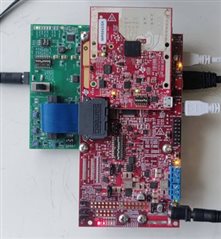
Hardware setup

With standard setting I go through all the (what I think) necessary motions:

Connection: BSS FW and MSS FW loaded for xWR68xx, all green, RF powered up

StaticConfig: nothing changed, all sets and RF init done

DataConfig: nothing changed, all sets done

SensorConfig: nothing changed, all sets done, DCA1000 armed, frame triggered and post processing started
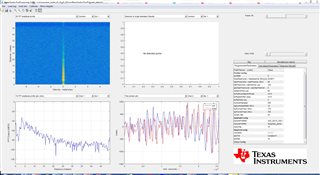
Processing result

Do you have any idea where I'm going wrong (any parameters to be changed, any DIP switches not OK)? The card works well with the Demo Visualizer.
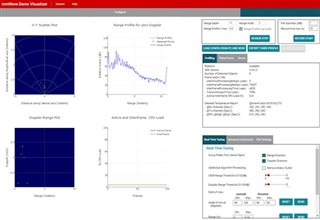
Demo Visualizer Result

Best regards,

Markus

  • Hi, Markus:

    Your ADC samples looks fine to me in your radar studio post processing results.  I am not sure which makes you think there is no transmit.  You can ignore the angle estimation results in radar studio because there is no antenna information provided to the radar studio.  The post processing in radar studio should be good for ADC data, range FFT, range-Doppler heatmap information. 

    Best,

    Zigang

  • By the way, the LED in your DCA1000 seems to indicate you are using a SD RAM for data capture.  In that case, I am not sure the data will be transferred back to PC for radar studio to process.   You may need to remove the SD RAM on your DCA1000 board.

    Best,

    Zigang

  • Hi Zigang,

    thank you for your answers. What I meant when I said that it seems like the TX might be off is that the results look exactly the same with nothing in front of the sensor or with a 100m2 radar reflector in front. Looks like noise floor only. Anyway, I removed the SD card and nothing changed. I noticed however that the adc_data.bin file doesn't update. In fact I forgot to connect to the DAC1000 via Ethernet, that was a stupid mistake, sorry for that. Now it is updating the adc_data.bin file but I get an error message when starting the post processing (incorrect number of samples):

    [17:13:07] [RadarAPI]:
    [17:13:10] [RadarAPI]: ar1.StartMatlabPostProc("C:\\ti\\mmwave_studio_02_01_01_00\\mmWaveStudio\\PostProc\\adc_data.bin")
    [17:13:10] [RadarAPI]: No of files Captured: 1, Total no of frames for each device : 8
    [17:13:10] [RadarAPI]: Error:
    [17:13:10]
    [17:13:10] ... MWMCR::EvaluateFunction error ...
    [17:13:10] 09-Jun-2021 17:13:10: Incorrect number of samples. We expect 262144. However, we got 110592.,1,
    [17:13:10] Error in => process_adc_data.m at line 79.
    [17:13:10]
    [17:13:10] ... Matlab M-code Stack Trace ...
    [17:13:10] at
    [17:13:10] file C:\Users\mmayer\AppData\Local\Temp\MMAYER\mcrCache8.5.1\Matlab0\Logging\log_status.m, name log_status, line 32.
    [17:13:10] at
    [17:13:10] file C:\Users\mmayer\AppData\Local\Temp\MMAYER\mcrCache8.5.1\Matlab0\Processing_functions\read_adc_data.m, name read_adc_data_16xx, line 622.
    [17:13:10] at
    [17:13:10] file C:\Users\mmayer\AppData\Local\Temp\MMAYER\mcrCache8.5.1\Matlab0\Processing_functions\read_adc_data.m, name read_adc_data, line 27.
    [17:13:10] at
    [17:13:10] file C:\Users\mmayer\AppData\Local\Temp\MMAYER\mcrCache8.5.1\Matlab0\MatlabPostPr\process_adc_data.m, name process_adc_data, line 79.
    [17:13:10]
    [17:13:10]
    [17:13:10] Trace:
    [17:13:10] at MathWorks.MATLAB.NET.Utility.MWMCR.EvaluateFunction(String functionName, Int32 numArgsOut, Int32 numArgsIn, MWArray[] argsIn)
    [17:13:10] at MathWorks.MATLAB.NET.Utility.MWMCR.EvaluateFunction(Int32 numArgsOut, String functionName, MWArray[] argsIn)
    [17:13:10] at MatlabPostProcGui.MatlabPostProcGUIClass.process_adc_data(MWArray adc_file_name, MWArray force_cont_stream_mode)
    [17:13:10] at AR1xController.frmAR1Main.iStartMtlabPostProc()

    Any ideas how I can fix that?

    Best regards,

    Markus 

  • Hi, Markus:

    I have never seen this problem before. You can increase the delay setting in DCA1000 setup step.  

    Can you also try to use the example LUA script for data capture?  The example LUA script is located at: 

    C:\ti\mmwave_studio_02_01_01_00\mmWaveStudio\Scripts\DataCaptureDemo_xWR.lua

    You can run it after reset and connection, the script will start from loading the firmware.   By the way, this script enables the test source, so you will always see a very clean peak.  

    Best,

    Zigang