This thread has been locked.

If you have a related question, please click the "Ask a related question" button in the top right corner. The newly created question will be automatically linked to this question.

AWR2944P: supported CCS example project

Part Number: AWR2944P


Tool/software:

Hi experts,

I couldn't import examples under mmwave_mcuplus_sdk_04_07_00_01\ti\demo\awr2x44P to CCS.

And I didn't find project supported for awr2x44P in radar_toolbox_3_00_00_05 neither.

I would like to know what CCS example projects are supported for awr2x44P (such as OOB, HEC demo). Thanks!


regards,

Anna

  • Hi TI experts,

    Is there any update?

    Thanks.

    regards,

    Anna

  • No there are no current projectspecs for the 2x44p. They are planning to be release in the next radar toolbox release. Here are the OOB projectspecs. Please ensure you have SDK 4.7.0.1 and are using CCS 12.x. Let me know if you have any other questions.

    https://e2e.ti.com/cfs-file/__key/communityserver-discussions-components-files/1023/awr2x44p_5F00_mmw_5F00_demo_5F00_m4DDM.projectspechttps://e2e.ti.com/cfs-file/__key/communityserver-discussions-components-files/1023/awr2x44p_5F00_mmw_5F00_demo_5F00_mssDDM.projectspechttps://e2e.ti.com/cfs-file/__key/communityserver-discussions-components-files/1023/awr2x44p_5F00_mmw_5F00_demo_5F00_dssDDM.projectspec

    Best,

    Gabriel

  • Hi Gabriel,

    Thanks you for provide me the projectspecs. I can sucessfully build the project into appimage. However, after I flash it to 2944PEVM, I think it doesn't work correctly.
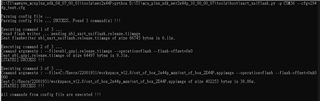
    It shows below info in the COM port, but I can't send the CLI command. And nothing else is output from the COM port. It looks like it is stucked after boot up.

    Here is how I flash the firmware:


    Please let me know how can I run the demo code on 2944PEVM correctly. Thanks.


    Regards,

    Anna

  • Hello,

    I apologize there were some previous bugs in those projectspec files. The following have been updated and should work fine.

    https://e2e.ti.com/cfs-file/__key/communityserver-discussions-components-files/1023/3858.awr2x44p_5F00_mmw_5F00_demo_5F00_m4DDM.projectspechttps://e2e.ti.com/cfs-file/__key/communityserver-discussions-components-files/1023/3858.awr2x44p_5F00_mmw_5F00_demo_5F00_mssDDM.projectspechttps://e2e.ti.com/cfs-file/__key/communityserver-discussions-components-files/1023/3858.awr2x44p_5F00_mmw_5F00_demo_5F00_dssDDM.projectspec

    Best,

    Gabriel

  • Hi TI experts,

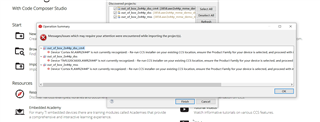
    I used those files by CCS20.1.0,but I found some errors like below。

    Regards,

    Xu

  • Please use CCS version 12.x, there are currently issues with CCS version 20.x.

    Best,

    Gabriel 

  • Hi Gabriel,

    I used CCS version 12.8.1,but there are issues like this.

    thanks !

  • Hello,

    There is a folder at this path 

    "C:\ti\mmwave_mcuplus_sdk_04_07_00_01\mmwave_mcuplus_sdk_04_07_00_01\tools\AWR2X44P_CSP"

    It contains items to add to your CCS version in order to make it compatible with 2x44p devices. You just have to navigate in your CCS file and place the files in the location provided. For example, there is a command file in the SDK at this path

    "C:\ti\mmwave_mcuplus_sdk_04_07_00_01\mmwave_mcuplus_sdk_04_07_00_01\tools\AWR2X44P_CSP\AWR2944P CSP\ccs_base\arm\include\awr2x44p_cm4.cmd"

    You are going to want to place this file at this location in your CCS version

    "C:\ti\ccs1281\ccs\ccs_base\arm\include\awr2x44p_cm4.cmd"

    Do this for all files present in AWR2X44P_CSP and that should solve your problem.

    Best,

    Gabriel

  • Hi expert,

    I tried it but the problem still exists.

    Thank you.

  • Hello,

    In order to fix that issue please follow the instructions on the error message. Access Help -> Check for Updates. This should resolve the error message.

    Best,

    Gabriel