This thread has been locked.

If you have a related question, please click the "Ask a related question" button in the top right corner. The newly created question will be automatically linked to this question.

AWR2944EVM: Exception: ./mss/mss_main.c after loading .appimage

Part Number: AWR2944EVM
Other Parts Discussed in Thread: UNIFLASH, AWR2944

Tool/software:

Recently I have been learning the SDK environment and I have build the source code for the AWR2944EVM though I didn't really change anything there yet. Now I tried to get the demo up and running with the online visualizer (and a custom .py script) but in both cases it doesn't work, as I get the following messages and all plots are dead:

mmwDemo:/>sensorStart
Debug: Init Calibration Status = 0xffe
Exception: ./mss/mss_main.c, line 2162.

I don't really understand where this is coming from, in my CCS session there seems to be nothing suspicious about this line, syntax etc. look good:

if (errCode < 0)
{
test_print("Error: ADCBuf config failed with error[%d]\n", errCode);
MmwDemo_debugAssert (0); //THIS IS LINE 2162
}

Previously I did connect to my AWR2944EVM with the debugger but upon flashing new images with uniflash I don't think that any debugging flags can be left. Speaking of Uniflash I have flashed these 2 images:

  • SBL image: "C:\ti\mmwave_mcuplus_sdk_04_07_00_01\mmwave_mcuplus_sdk_04_07_00_01\tools\awr294x\sbl_qspi.release.tiimage"
  • App image: "C:\ti\mmwave_mcuplus_sdk_04_07_00_01\mmwave_mcuplus_sdk_04_07_00_01\ti\demo\awr294x\mmw\awr2944_mmw_demoTDM.appimage"

All help with resolving this issue is appreciated!

Best,

Mark

EDIT: I have re-flashed the images to the AWR from an SDK backup, now it works as expected, but the questions remains as it is something that I should probably understand for future development.

  • Hello,

    Could you please share the configuration file you used?

    Also please do the same thing with the DDM demo and see if you have the same results.

    Best,

    Gabriel

  • Hi Gabriel,

    I assume you mean, the .cfg file sent by the demo to the device, here it is: /cfs-file/__key/communityserver-discussions-components-files/1023/profile_5F00_onlineDemo.cfg

    This issue was resolved after I have flashed images to the AWR from an SDK backup, i.e. such which were compiled/build without my intervention. 

    I will give it a go witht the DDM demo shortly and will post the results ASAP.

    Best,

    Mark

  • Ok, it is likely that some changes made caused this to crash. Let me know if the DDM demo runs normally.

    Best,

    Gabriel

  • Hello Gabriel,

    sorry for the late reply. Interestingly DDM demo runs just fine, though it was created during the same build as the TDM demo which isn't working. Though with that being said both demos from my backup folder work, so it probably is some annoying little mistake.

    But having you here I have another related question. 

    When I build my project in my CCS environment then it creates the .xer5f and .xe66 binaries, these are used for debugging. Moreover a single .appimage is created called out_of_box_2944_Debug.appinage. What does the "Debug" imply here?

    I assume that this debyg image is not intended for standalone operations, so after I implement some changes to the source code (, assuming they work ;)), how should I build my project so that it creates a ready stand alone .app image? Cause right now the only one being created is the debug one. 

    Best,

    Mark 

  • Hello,

    The "Debug" just means that not as much optimization is used on these builds, making it easier to step through code.

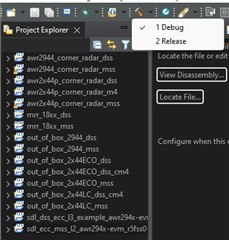
    To build in "Release" mode (include optimization of code) just click on the little arrow to the right of the build icon (the hammer). From there you can use the Release build. It also means that for that specific project it will continue building in release mode.

    Best,

    Gabriel