This thread has been locked.

If you have a related question, please click the "Ask a related question" button in the top right corner. The newly created question will be automatically linked to this question.

IWR1843BOOST: Can not connected with Demo Visualizer & mmWave Studio

Part Number: IWR1843BOOST
Other Parts Discussed in Thread: DCA1000EVM, , UNIFLASH

I am currently using the IWR1843BOOST together with the DCA1000EVM, and I would like to request technical support regarding an issue that started after flashing the board. 

Hardware / Software Environment
  • Hardware: IWR1843BOOST + DCA1000EVM
  • mmWave Studio: 02_01_01_00
  • UniFlash: 8.2.0
  • CCS: 8.3.1
  • mmWave SDK: 3.6

Issue Description
Until yesterday, I was able to use MATLAB and the mmWave Demo Visualizer without any special flash configuration. However, after I used UniFlash to upload/flash the image file ccsv8_xWR18xx.bin, both MATLAB and the mmWave Demo Visualizer have stopped detecting/loading the DATA PORT(COM4).
I tried multiple troubleshooting steps such as reconnecting the hardware, power cycling, and rebooting Windows, but the issue persists.
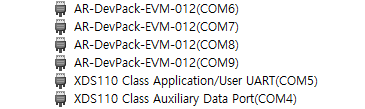
27387a20-1862-4d8d-b150-eb84cfc2e42b.png

In addition, when attempting to connect via mmWave Studio after this happened, the BSS FW version is detected as 0.0.0.0, and mmWave Studio becomes unresponsive while trying to download the MSS (the program appears to freeze).
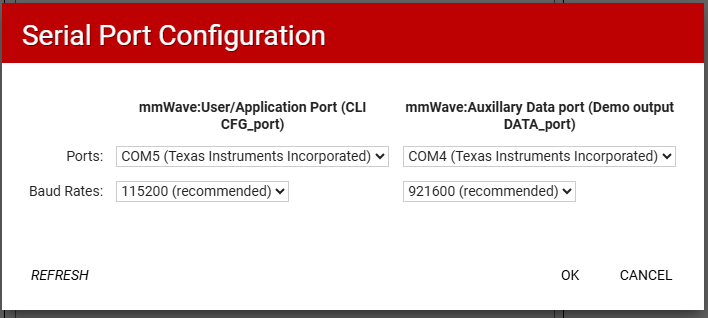
image.png

image.png

Support Requested
Could you please help with the following items?

1. Guidance on restoring the IWR1843BOOST to a factory/default state, including any factory default flash binary file (if available) and the recommended procedure to re-flash it.

2. Recommended troubleshooting steps or root-cause guidance for resolving the DATA PORT not being recognized after flashing.

If needed, I can provide additional information such as screenshots, device manager logs, serial port information, and the exact flashing steps I performed.
Thank you very much for your time and support.
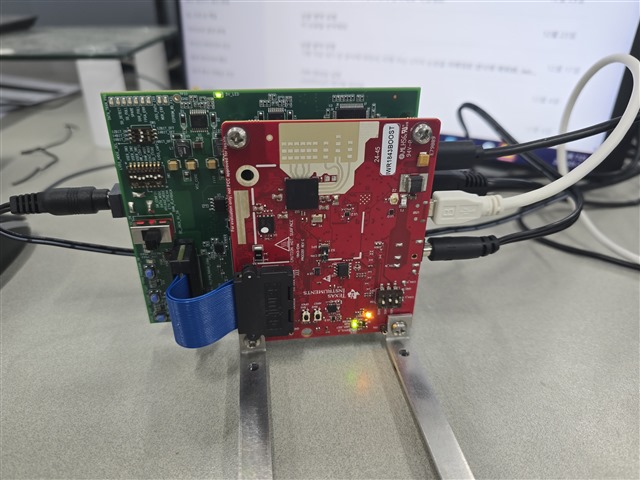
  • This is my connection between equipments:

    And below is the log that I flashed to IWR1843BOOST:

    If there need more information to solve the problem, then I'll provide that ASAP.

    Thank you.

  • Hello,

    The mmWave Demo Visualizer which is found in the web browser is intended to be used only with the SDK 3.6 Out of Box demo. For 1843 use the binary below and flash it via Uniflash.

    C:\ti\mmwave_sdk_03_06_02_00-LTS\packages\ti\demo\xwr18xx\mmw\xwr18xx_mmw_demo.bin

    DCA1000EVM is meant for transfer of raw ADC I/Q data, not processed data such as the point cloud found in the Out of Box demo. The DCA1000 is only needed for this purpose and in tandem with mmWaveStudio or MATLAB script that connects to it.

    If you are still having issues, you can erase the existing flash by clicking on the "Settings & Utilities" button within Uniflash and using the erase SFLASH button.

    Best Regards,

    Pedrhom

  • Hello, Pedrhom.
    Thank you for your help. With your guidance, I confirmed that the mmWave Demo Visualizer is now working properly.
    However, MATLAB still does not recognize the required COM ports, so I am having difficulty continuing with post-processing in MATLAB.
    Could you please advise on the following?
    1. Is there a separate or dedicated firmware/bin image specifically intended for MATLAB use? If so, where can I obtain it (e.g., SDK package location or download link)?
    2. If there is no MATLAB-specific bin/firmware, what is the recommended way to proceed if I want to use MATLAB for data processing going forward?
    Thank you again for your continued support.
    With sincere regards,
    Minseok
  • Hello Minseok,

    If you want to use MATLAB entirely for the DCA1000 ADC data capture process, Mathworks has an indepth guide on how to do so. Any questions on the material below will have to go to them though

    https://www.mathworks.com/help/radar/mmwaveradar-support-package.html?s_tid=CRUX_lftnav

    Best Regards,

    Pedrhom