


Part Number: IWR6843AOPEVM
Hi,
I am currently using the Overhead 3D People Tracking example on the IWR6843AoPEVM.
To enable static Point Cloud data, I added the following command to my configuration: staticRangeAngleCfg -1 1 1 1 (static process enable)
However, after issuing the sensorStart command, the sensor operation stops. Upon checking the CCS Debug logs, I encountered an error message.
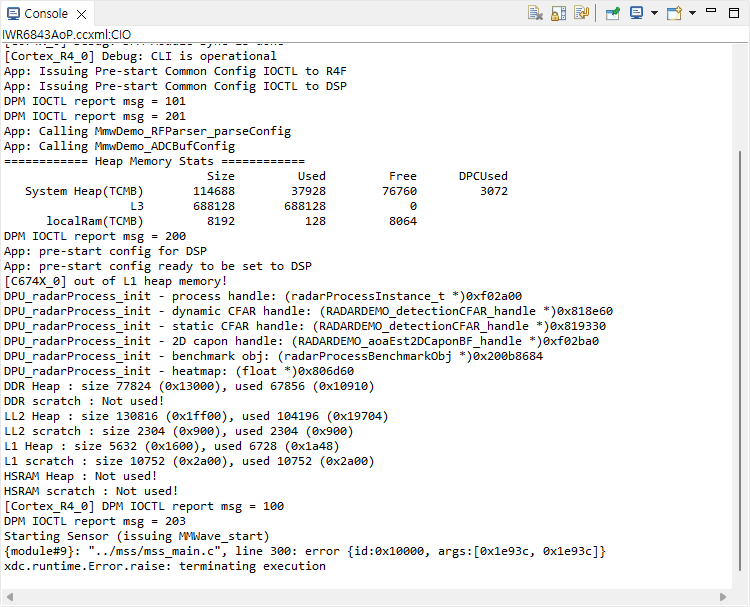
The relevant code at line 300 of mss_main.c is as follows:
static void Pcount3DDemo_EDMA_transferControllerErrorCallbackFxn(
    EDMA_Handle                         handle,
    EDMA_transferControllerErrorInfo_t *errorInfo)
{
    gMmwMssMCB.dataPathObj.EDMA_transferControllerErrorInfo = *errorInfo;
    Pcount3DDemo_debugAssert(0);  // Line 300
}
I tried increasing the frame period to 500ms using the frameCfg command.
However, the results were inconsistent: at times, the sensor operated for only 3 to 4 frames before halting with the same error, while at other times, it stopped immediately upon start under the exact same configuration.
I used the default pt_6843_3d_aop_overhead_3m_radial.cfg file and only modified the following two parameters: enabling the static process in staticRangeAngleCfg and adjusting the framePeriodicity in frameCfg.
The configuration used for the test is as follows.
% SDK Parameters
% See the SDK user's guide for more information
% "C:\ti\mmwave_sdk_[VER]\docs\mmwave_sdk_user_guide.pdf"
sensorStop
flushCfg
dfeDataOutputMode 1
channelCfg 15 7 0
adcCfg 2 1
adcbufCfg -1 0 1 1 1
lowPower 0 0

% Detection Layer Parameters
% See the Detection Layer Tuning Guide for more information
% "<RADAR_TOOLBOX_INSTALL_DIR>\source\ti\examples\People_Tracking\docs\IWR6843_People_Tracking_PDFs\3D_people_tracking_detection_layer_tuning_guide.pdf"
profileCfg 0 61.2 60.00 17.00 50 328965 0 55.27 1 64 2000.00 2 1 36
chirpCfg 0 0 0 0 0 0 0 1
chirpCfg 1 1 0 0 0 0 0 2
chirpCfg 2 2 0 0 0 0 0 4
frameCfg 0 2 224 0 500.00 1 0
dynamicRACfarCfg -1 10 1 1 1 8 8 6 4 4.00 6.00 0.50 1 1
staticRACfarCfg -1 4 4 2 2 8 16 4 6 6.00 13.00 0.50 0 0
dynamicRangeAngleCfg -1 7.000 0.0010 2 0
dynamic2DAngleCfg -1 5 1 1 1.00 15.00 2
staticRangeAngleCfg -1 1 1 1
antGeometry0 -1 -1 0 0 -3 -3 -2 -2 -1 -1 0 0
antGeometry1 -1 0 -1 0 -3 -2 -3 -2 -3 -2 -3 -2
antPhaseRot 1 -1 1 -1 1 -1 1 -1 1 -1 1 -1
fovCfg -1 64.0 64.0
compRangeBiasAndRxChanPhase 0 1 0 1 0 1 0 1 0 1 0 1 0 1 0 1 0 1 0 1 0 1 0 1 0

% Tracker Layer Parameters
% See the Tracking Layer Tuning Guide for more information
% "C:\ti\radar_toolbox_[VER]\source\ti\examples\People_Tracking\docs\IWR6843_People_Tracking_PDFs\3D_people_tracking_tracker_layer_tuning_guide.pdf"
staticBoundaryBox -3 3 -3 3 -0.5 3
boundaryBox -4 4 -4 4 -0.5 3
sensorPosition 2.9 0 90
gatingParam 3 2 2 3 4
stateParam 3 3 6 20 3 1000
allocationParam 20 20 0.05 20 1.5 20
maxAcceleration 1 0.1 1
trackingCfg 1 4 800 20 37 33 120 1
presenceBoundaryBox -4 4 -4 4 0.5 2.5
sensorStart
Could you please provide a solution to resolve this issue and successfully enable static detection in this lab?
Thank you.
