This thread has been locked.

If you have a related question, please click the "Ask a related question" button in the top right corner. The newly created question will be automatically linked to this question.

IWRL6432WMOD: Issue with evaluation board

Part Number: IWRL6432WMOD
Other Parts Discussed in Thread: IWRL6432, UNIFLASH

Hello,

We recently purchased a BP-IWRL6432WMOD evaluation board to test the IWRL6432 radar, but unfortunately I haven’t been able to get it working.

I have tried using both the visualizer included with mmWaveuDFP-01_00_09_01 and the one from MMWAVE_L_SDK_05_05_04_02. I also installed the FTDI driver provided and carefully followed the setup instructions.

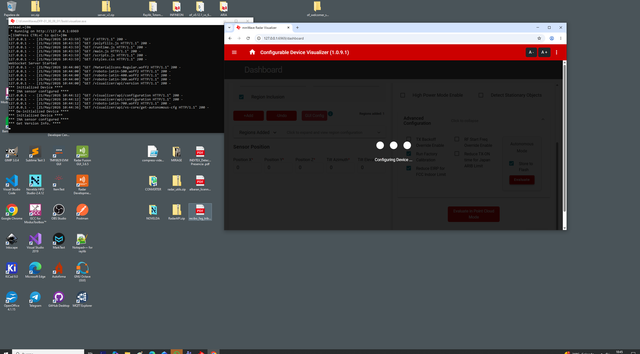
However, after pressing “Evaluate”, the process always gets stuck at the same point. The console shows:

“Get Version Info.”

and then the application hangs indefinitely.

I have tested this on two different computers with the same result.

Could you please help me identify what might be causing this issue?

Thank you.


  • Hello Jose,

    Sorry for the confusion, you can download and flash the .appimage attached in my last response in this E2E.
    Afterwards, the visualizer present in mmWaveuDFP-01_00_09_01 should work as expected.

    The binary present in mmWaveuDFP-01_00_09_01 will be updated in the next release.

    Thanks and Regards,
    Saransh Gautam

  • Hello,

    I flashed the image you provided using UniFlash, and according to the tool, the flashing process completed successfully.

    However, I am still experiencing the same issue. The visualizer gets stuck at the exact same point:

    *** Get Version Info. ****

    and does not continue any further.

    Thank you.

  • Hello Jose,

    You would have connected the board to your PC via the XDS110 USB port present on board while flashing.

    To run the .appimage on board and do evaluation, you need to:
    1. Change the SOP 0 switch setting to Functional Mode.
    2. Connect the board to PC via the FTDI USB port.

    I think you are getting that error on visualizer because of Step 2 mentioned above.

    You can see the Demo Setup in section 2.3.1 of BP-IWRL6432WMOD User's Guide.

    Thanks and Regards,
    Saransh Gautam

  • Hello

    Im using the ports as you say and also toggle the SOP 0 switch.

    If you dont use ftdi port, you get a previous error "Failed to fetch version info from the device. Retry after resetting the device."


  • Hello Jose,

    I understand. Can you please confirm that you are using the correct setting on S1 switch as well?


    You can keep the S3 switch settings as both OFF.

    Thanks and Regards,
    Saransh Gautam

  • Yes. those are correct, following the pdf

  • Hi Jose,

    Could you provide a screenshot of the error you are facing and your setup with switch settings and USB connections clearly? Could you also confirm which FTDI drivers you have installed?
    Regards,

    Mihit Sharma

  • As i said, i installed the provided ftid driver replacing the dll as its on the product manual.


    Also as i said this is the error, and as i said yes i plug usb on ftdi port....


  • Hi Jose!

    I had similar issues like you... For me the solution was to re-flash the fw again with what Saransh provided in the other forum threade2e.ti.com/.../iwrl6432wmod-evk-board-uniflash-firmware-download-stopping-issue

    It is important that you flash that fw and not the fw in the uDFP folder you installed. 
    The image in the uDFP folder is not authenticated and won't work.

    The other possible issue if the flash is correct is the installation. Honestly, For me the manual DLL change just simply broke the visualizer. On my machine (WIN11) I had to uninstall uDFP and reinstall it cleanly and also revert the DLL change. After that without the manual DLL change the visualizer works perfectly. Once again you could manually click the FTDI driver installer in the uDFP folder to overwrite any corrupted installation in windows.

    Best,
    Peter

  • Hi Peter,

    Thanks for your reply. Yes, I’m sure I burned the image from that post, and UniFlash also reports that the image was loaded successfully.

    After reading your comments about the FTDI, I installed the uDFP on a fresh computer, hoping that would solve the issue, but unfortunately I’m still getting the same problem.

    I also noticed that the presence LED occasionally lights up green, which makes me think that the firmware is actually running correctly, but there seems to be some issue in the communication layer with the host.

    To be honest, it’s a bit frustrating to run into all these problems with a development board that is supposed to provide a quick and easy way to evaluate and test the component.


  • Hi Jose,

    My apologies for the inconvenience caused. 

    Could you confirm whether the Presence Detect Functionality of the module is working as intended? You can check this by doing the following:

    Please connect the Board to your PC through the FTDI USB Connector. Without configuring the device (Just Out of Box), bring your hand very close to the module antenna (<1m) and observe the Presence Detect LED getting illuminated. Once you take your hand away, the LED should not get illuminated.

    If this is happening, the module and BP-IWRL6432WMOD board is functioning properly and we need to get the visualizer working.

    Could you also provide the following information, it would help me in assisting you better:

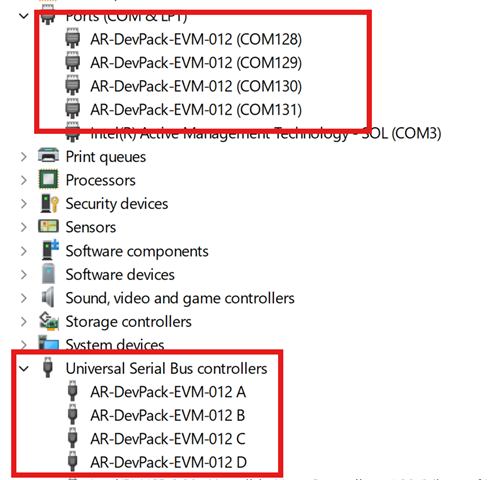
    • Could you provide a snapshot of the Device Manager with the USB controllers and Ports expanded as given below?


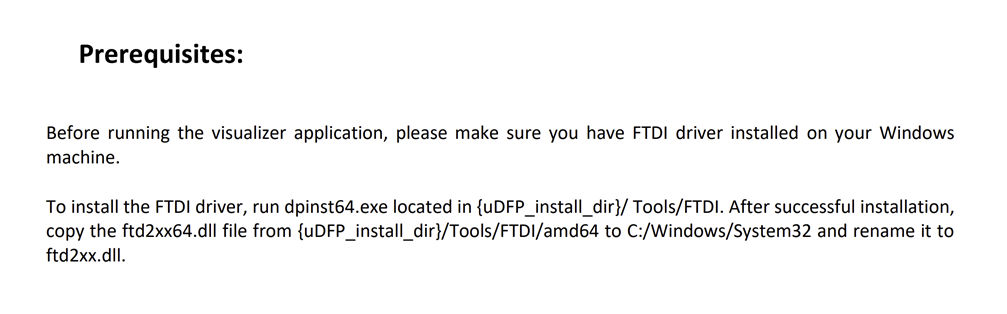
    • Have you tried installing the FTDI drivers as given in the Visualizer User Guide? Attaching the snapshot below:

    Regards,

    Mihit Sharma

  • Hi

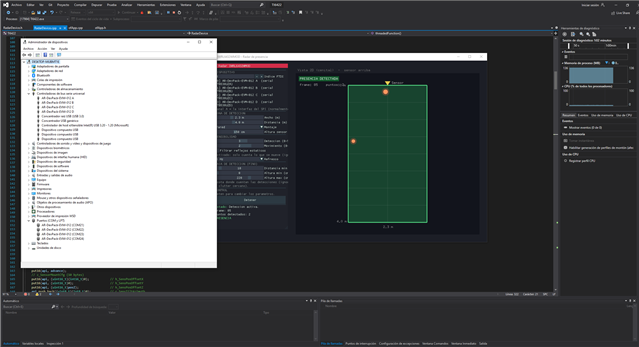
    As i said, yes presence works as presence led light up, also as i said i installed ftid drivers, replace dll.... etc etc etc.


    In fact i was able to make a fast app that can interact with the module.... however the visualizer dont work.


    With this we can assume board is flashed, drivers are ok.... etc etc. But visualizer dont


  • Hi Jose,

    It seems that the module is working fine but we need to identify the visualizer/driver related issue. Please give me some time to check internally and get back to you.

    Regards,

    Mihit Sharma

  • Ok, no problem. Note that i also got an IWRL6432FSP  and i got same problem when trying to use the visualizer (MMWAVE_L_SDK_05_05_04_02), got stuck at exact same point and same message.

    For this one i did a python script to be able to test the sensor, and it works without any problem.... but not the visualizer

  • Hi Jose,

    We are unable to reproduce the issue. Do you have an alternate EVM to try this?

    I have sent you a friend request to connect with you and understand this issue better.

    Regards,

    Mihit Sharma