This thread has been locked.

If you have a related question, please click the "Ask a related question" button in the top right corner. The newly created question will be automatically linked to this question.

AWR1642BOOST: Time domain plot in Matlab PostProc is different to what I generate externally in Python

Part Number: AWR1642BOOST
Other Parts Discussed in Thread: AWR1642

Hi,

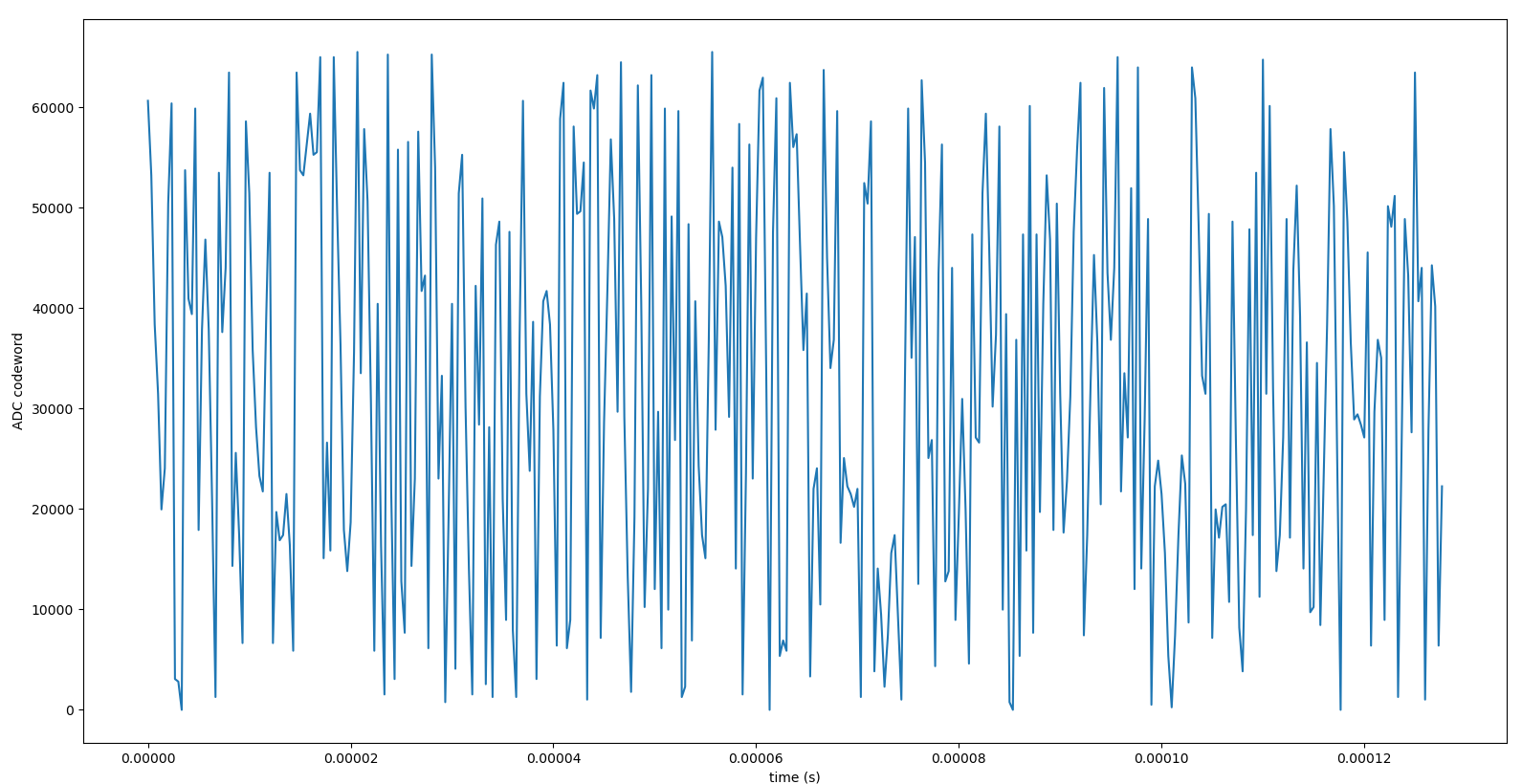
I captured a short *.bin raw ADC file and post processed it using Matlab runtime engine (for 1 TX 1 RX configuration using 2 lanes during capture). I am able to see the time domain plots as expected. I then tried to post-process the same *.bin file using a Python script but there are significant differences between the Matlab plot and what I am getting. I have included a snapshot of the first chirp of the first frame of my data in Figures below. Figure 1 is the output of Matlab PostProc and Figure 2 is the real component output for the same chirp and frame (I left the imaginary component for now for verification purposes) My expectation was to get the same real plot displayed on Matlab runtime (i.e. the blue trace indicated as 'real' on Matlab time domain plot shown in Figure1)

Following are additional notes on this exploration for your reference:

1 - I have confirmed the *.bin file size and is is exactly as I expect based on my antenna, ADC, frame and chirp settings.I also counter every single byte processed in my Python code to make sure I am processing all the data in the bin file.

2 - I have plotted the 16-bit values without performing any two's complement operations on it. So what you see in figure 2 is what is read from the bin file and arranged as described in swra581b.pdf . I checked mutiple times the format of the data arrangement in the bin file using this pdf, and all seems to be in order.

3 - Given the y-axis scale difference between time domain plot in Figure 1 and 2, there seems to be an operation I may be missing. I could not find any reference on how 16-bit I and Q values read from the *.bin file should be interpreted for post-processing purposes. All I know is they are in two's complement format and can be displayed directly as time series.

4 - The sample time instances I get in my Python code and what Matlab displays are the same. This indicates the processed number of 16-bit samples per frame per chirp match. (both time axes extend to about 0.12 ms, which is inline with my calculations using the ADC sample time and the number of ADC samples.)

I am wondering what I am missing here. Your guidance on this will be appreciated.

Regards,

Cagri

Figure 1: Matlab Post Proc Time Domain Plot


Figure 2: Time Domain Plot generated in Python for the same *.bin file as above


  • Hi,

    Please review our mmWave FAQ

    Please see

    Q6. What is data format of raw ADC data when we capture from DCA1000EVM or TSW1400?


    This document provides short matlab examples to read the raw data


    thank you

    Cesar

  • Hi Cesar,

    I forgot to mention I am working with DCA1000.

    I read the relevant sections of the document you mentioned and in particular section 9.2 where the MATLAB example for DCA1000 with x16xx is explained. My process is almost the same as that code with the following observations:

    1 - I read one byte at a time from the *.bin file and concatenate every pair of bytes to create a 16-bit word that corresponds to an I or a Q value. I treat the first byte in the file as the MSB(yte) of the first sample and the next one as the LSB(yte) of the same sample. I do not perform any bit shifts or rotations to the concatenated 16-bit word.

    2 - To keep things simple, I performed a data capture with 1TX and 1RX antenna (with 16-bit ADC words) This makes parsing of the *.bin file easier to help me debug code bug issues.

    3 - One thing I am not sure at the moment is because the stored data in the *.bin file is in two's complement, whether I should convert it to decimal to convert the 16-bit ADC values to see the positive and the negative range. I already performed this operation but the result looks similar with the y-axis range within[-30000, 30000]. The way I performed this conversion is as follows:

    - If the MSb(it) of the 16-bit sample is '1' I perform a bit flip of that 16-bit word and add '1' to the result to get the magnitude. I then multiply that magnitude with -1 to make it a negative number.

    - If the MSb of the 16-bit word is '0', I leave the 16-bit sample as is and treat it as a positive number.

    4 - I was planning to test the scenario where the *.bin file may have stored the 16-bit samples such that the first byte in the file is actually the LSB(yte) of the first captured sample and the next byte is the MSB(yte) of the same sample. I have not seen any documentation that this is the case and the MATLAB code does not have any provision for this processing but I thought of trying it just in case there is a discrepancy between the documentation and the version of the tools I am using. I am not sure if this will change the picture though.

    5 - I used complex 1x format over 2 lanes for the example I shared earlier. Therefore, I am using Figure 11 in the swra581b document you shared. My understanding is that figure describes exactly what I should see in a Matlab post processed and stored *.bin file. Could you confirm that my understanding is correct? I also performed a quick verification by making a binary comparison of the *.bin file BEFORE and AFTER the Matlab post processing and confirmed that the content is actually different (due to zero padding and gap and header removal operations performed by the Matlab post-processing)

    6 - I also checked the switch settings on the DCA1000 and I paid particular attention to SW2.x configuration. I made sure of the following:

    - SW2.1 is positioned at Pin1 to keep DCA1000 in capture mode

    - SW2.2 is in Pin15 position to make sure Ethernet streaming is activated

    - SW2.3 is in Pin14 position to make sure 2 lane LVDS data is captured on my AWR1642

    - SW2.4 is in pin4 position to make sure LVDS data is captured as is.

    - SW2.5 is in SW_CONFIG position (which I presume makes the SW2.1,2,3,4 setting above irrelevant as the software settings will override these)

    - SW2.6 is in pin11 position (as default)

    - SW2.7,8 are not used.

    Let me note that SW1 is also configured to enable 16-bit LVDS mode.

    If there is any pointers given the above, that will be very useful. At the moment, I am not sure what seems to be the problem here but I will keep on exploring while I wait for further suggestions.

    Regards,

    Cagri

  • Hi,

    After a painfully slow exploration over the last two days, I had a breakthrough with this issue earlier today.

    I discovered (through trial and error) that the bytes of a 16-bit sample in the MATLAB generated *.bin file are provided LSB(yte) first followed by MSB(yte) next. In my original code I was doing exactly the opposite. In addition, one needs to perform the sign conversion of the two's complement 16-bit value to get the actual ADC codeword.

    With these fixes, my corrected plot (for the real samples only) in python now looks as follows. I am also sharing the MATLAB post process plot for the same sample set. The y-axis scale also matches perfectly. These results probably could not look any better :)

    Regards,

    Cagri