This thread has been locked.

If you have a related question, please click the "Ask a related question" button in the top right corner. The newly created question will be automatically linked to this question.

CCS/CCSTUDIO: Passing in arguments when building project from command line

Part Number: CCSTUDIO


Tool/software: Code Composer Studio

Hi,

I am trying to build a project from the command line.  The following is the command I am currently using to build the project:

eclipsec -noSplash -data "C:\ccs" -application com.ti.ccstudio.apps.projectBuild -ccs.projects hello_CC2640R2_LAUNCHXL_tirtos_ccs -ccs.configuration Debug

This command works fine and I am able to successfully build the project.  In addition to this, I would like to pass an argument when it gets built, because I would like to store the version of the code within the program.  I see from the documentation that the build command seems to have the ability to do this.  The specific argument is ccs.args <file>, but I cannot find any information on this.  So my questions are:

1.) What is the form of the file that contains the additional arguments?

2.) How do I access these arguments from the code?

Thank you,

Carter

  • Hello Carter,

    ccs.args is used to pass in a text file that has additional projectBuild arguments. It is useful in cases where you have a lot of projectBuild arguments and you can just add them all to a text file.

    Carter Pearson said:
    1.) What is the form of the file that contains the additional arguments?

    It is simply a text file with additional arguments.

    Example of contents of a text file called 'projectbuild_args.txt'

    -ccs.projects led_ex1_blinky  -ccs.configuration CPU1_RAM

    Then you can use that text file with the ccs.args arguments:

    > eclipsec -noSplash -data C:\ti\workspaces\910 -application com.ti.ccstudio.apps.projectBuild -ccs.args C:\Temp\projectbuild_args.txt

    That command will pull in all the additional commands in the projectbuild_args.txt file

    Carter Pearson said:
    2.) How do I access these arguments from the code?

    You would not. I assume that ccs.args is not what you need.

    Back to your original need:

    Carter Pearson said:
    In addition to this, I would like to pass an argument when it gets built, because I would like to store the version of the code within the program. 

    I'm a little unclear what you are trying to do. Are you trying to pass arguments to main? Or additional build options to the compiler?

    Thanks

    ki

  • Hi Ki,

    Thank you for the quick response.  Is there any way to pass in a build-time argument that can be accessed by the code?  The situation we are facing is that we interface with a number of other components in our system, and we want to be able to send the version of the MCU code to these other components.  Currently we have this implemented by hard-coding the version number.  However, we would like to interface this with our automated build system, so that the version number can be auto-incremented and no one can forget to change the version number.  So instead of having the version being hard-coded, it would be passed in as an argument at build time.  Please let me know if this does not clarify things enough.

    Thanks,

    Carter

  • Thanks,

    I think I get it now.

    What comes to mind is to use the --define option, during the build, to set the value of a custom macro used in your code that represents the version number. Now the trick is that the projectBuild command doesn't allow additional compiler options passed in. Hence maybe you can have that additional option specified in an options file that is always used by the project. Then, before the project build, your build system can automatically update that options file to auto-increment the value. Will something like this work?

    ki

  • Hi Ki,

    When you say "options file", do you mean a text file which stores the version number, and when the code initializes it reads in the stored version number?

    Thanks,

    Carter

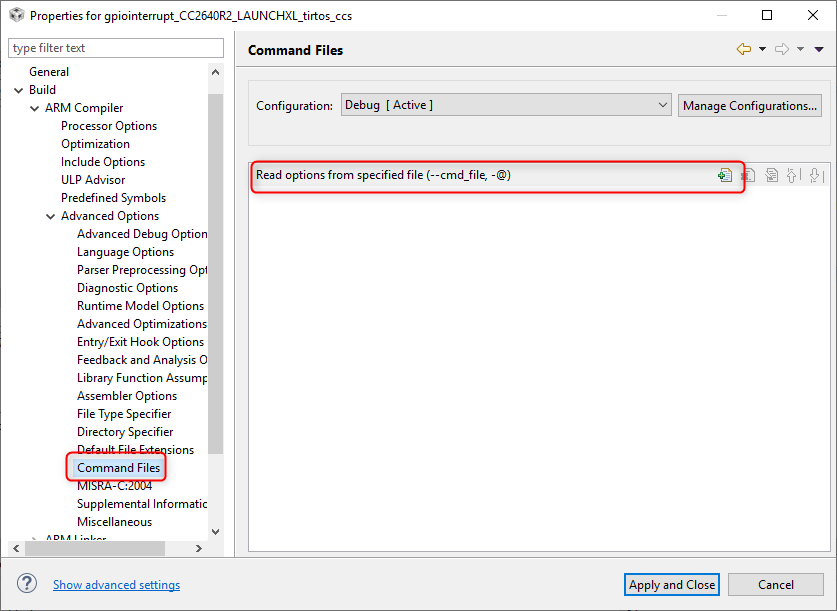
  • Actually, the correct term is a "compiler command file". It is a text file that can have additional compiler options to pass to the compiler. I tend to call it an "options file" to avoid confusion with the more commonly known "linker command file" (which can have additional linker options to pass to the linker). This command file can be specified in the compiler options via:

    So you can have a command file that contains something like:

    --define=MCU_SW_VERSION=<version number>

    and that macro would get expanded where you used it in your code.

    That command file can be auto-generated by your build system to have the correct value for the version.

    ki

  • Ki said:
    Now the trick is that the projectBuild command doesn't allow additional compiler options passed in. Hence maybe you can have that additional option specified in an options file that is always used by the project.

    Another possible option is to set an environment variable, and reference the environment variable in a predefined macro in the compiler options in the project. See how do I pass a #DEFINE via command line for an example.

  • Hi Ki,

    Thank you, this was all very helpful.  One last question before I mark my issue as resolved; when I use the define command, is it possible to set the variable to a string?  For example if I do

    --define=MCU_SW_VERSION="0.0.1"

    It seems to disregard the quotation marks and just replace my definition with 0.0.1.  I tried many different iterations, such as <"0.0.1">, '0.0.1', ""0.0.1"", etc.  However nothing seems to work and I cannot find any information on it online.

    Thanks,

    Carter

  • Carter Pearson said:
    is it possible to set the variable to a string? 

    Yes, you can do something along the lines of:

    https://stackoverflow.com/questions/5459868/concatenate-int-to-string-using-c-preprocessor

    #define STR_HELPER(x) #x
    #define STR(x) STR_HELPER(x)

    #define MCU_SW_VERSION_STR STR(MCU_SW_VERSION)

  • Hi Ki,

    Thank you! I have marked the issue as resolved.  One thing I notice when using the command file is that the defined symbol does not update after every time I build.  It only updates after I clean the project and then build.  This should be fine for my purpose, but just making sure that this is the expected behaviour.

    Thanks,

    Carter

  • Carter Pearson said:
      One thing I notice when using the command file is that the defined symbol does not update after every time I build.  It only updates after I clean the project and then build.

    You raise a good point. The project manager blindly passes the command file to the compiler, without checking for any changes in the file. Hence an incremental build would not pick up the change. If the only thing that changed since the last build is the command file, an incremental build would not do anything. Hence the need for a "rebuild" or a clean&build. 

    In short, the behavior you observed is expected.

    Thanks

    ki

  • Carter Pearson said:
    One thing I notice when using the command file is that the defined symbol does not update after every time I build.  It only updates after I clean the project and then build.

    Rather than the build system updating the command file, could the build system create an include file with the define. E.g. create a mcu_version.h with the contents:

    #define MCU_SW_VERSION "0.0.1"

    The standard incremental build should then then re-compile any project source file which #includes mcu_version.h after a change to mcu_version.h.