Tool/software: Code Composer Studio
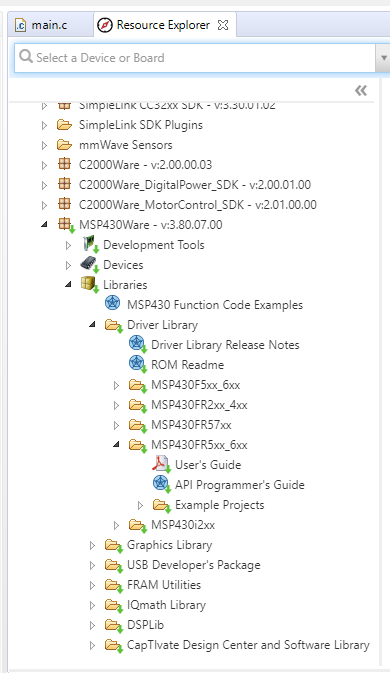
After a clean, fresh install of CCS 9.3 desktop on Windows 10, and after downloading MSP430Ware, it shows in Resource Explorer that MSP430Ware is installed.CCS is installed in C:\ti\ccs930, and MSP430Ware in C:\ti\msp430ware_3_80_07_00.
However, MSP430 DriverLab option is not available when creating new CCS project, or when adding new sources to existing CCS project.
Specifically,
By choosing "File - New - CCS Project" and specifying MSP430 as target, the "MSP430 DriverLab" option doesn't show up under "Project templates and examples", as described in MSP430 DriverLib User Guide, page 21-22 (DOCNUM-2.91.11.01).
And, in "Project Explorer", by right clicking an active project and choose "Source - Apply Project Template", the "MSP430 DriverLab" option doesn't show up, as described in MSP430 DriverLib User Guide, page 23-24.
When going to "Window - Preference - Code Composer Studio - Products", MSP430Ware doesn't show up as installed, despite the correct product discovery paths are selected.
In "Window - Preference - Code Composer Studio - Products - RTSC", the MSP430Ware file path is added to "Products and Repositories". But there is no option available in the "Target" and "Platform" selections.
I'm able to import the example MSP430Ware projects from Resource Explorer, as new CCS projects. Or manually copy the MSP430 DriverLab include files to existing projects. But these are not the desired methods.
Why? Because I'm collaborating on team projects which uses MSP430 DriverLab. The ways of including files are different.
Here's how it's done in the MSP430Ware example projects:
#include "driverlib.h"
...
Here's how it's done in the project I'm working on:
#include "driverlib/MSP430F5xx_6xx/usci_b_spi.h"
#include "../../../../ti/MS430ware/msp430ware_3_80_04_05/iqmathlib/include/IQmathLib.h"
...
If I copy the source code into a template MSP430Ware project, or manually copy the library files into existing projects, the include paths and #include statements will be different.
This creates too many troubles for version control. The other team members need to change and exactly replicate my include paths and project settings.
The less troublesome way is for me to get MSP430 DriverLab working in CCS project setting.