This thread has been locked.

If you have a related question, please click the "Ask a related question" button in the top right corner. The newly created question will be automatically linked to this question.

Can't create new CCS project in the Code Composer Studio v4.2.2.00033

Other Parts Discussed in Thread: MSP430G2231

Hi,

I am using a mac laptop running Windows 7 as a secondary OS. I recently installed both CCS v4.2.2.00033 and IAR on Win7, and try to create a project for MSP430 lanuchpad. What I did was File->New->CCS Project->'some project name'->next(with both debug and release selected)->next(twice)->(choose the MSP430G2231, which is the one I am using)->Finish, then the CCS pops up a dialog (Project cannot be created Reason: Internal Error, the details said: java.lang.NullPointerException). I don't understand what seems to cause this problem. Looking forward ur reply. Thx!

Best,

Hao

  • Hi Hao,

    Is this the first project you are trying to create (or import into) with this workspace? If not, you can try using a new workspace and see if that helps.

    Otherwise providing the full error logs can be helpful "Help->Support Activities" and make sure "Eclipse Log" is enabled before generating a zip.

    Thanks

    ki


  • Hi,

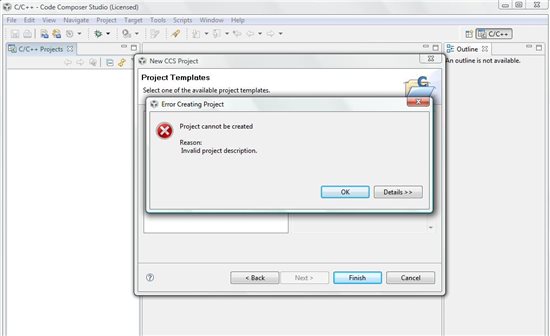
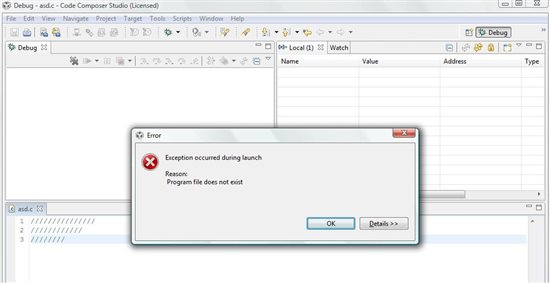
    I have a new launchpad and i have downloaded CCS. I installed it but I can not create a project and always have this error. I have Windows Vista. I tried to create the project on the same Workspace and i know its wrong but when I want to write a code then I have another error which is 

     I tried to create the project on the same Workspace and i know its wrong but when I want to write a code then I have another error which is


    and in the Console is : '"C:\Users\Alex\AppData\Roaming\Help\cliconf.chm"' is not recognized as an internal or external command,

    operable program or batch file.


    Thank you in advance.