This thread has been locked.

If you have a related question, please click the "Ask a related question" button in the top right corner. The newly created question will be automatically linked to this question.

Installing "Eclipse Docker Tooling"


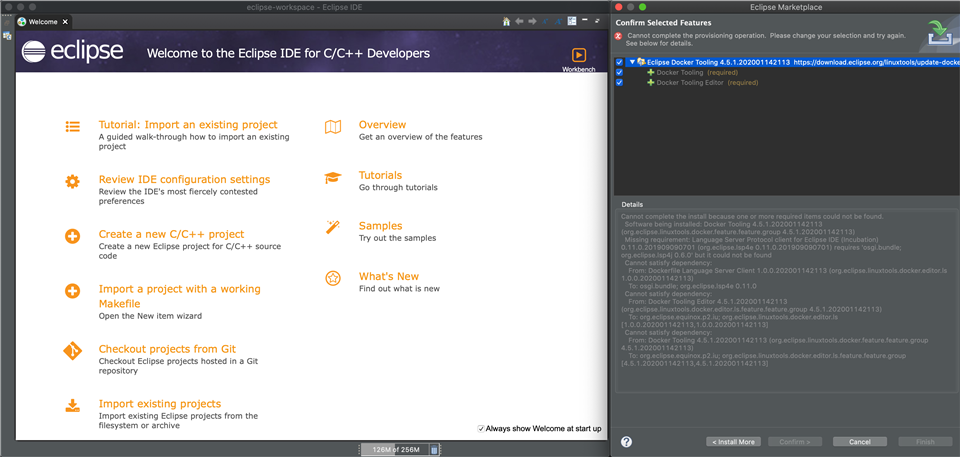
I'm trying to install Eclipse Docker Tooling to allow for building in docker containers. It installed fine in eclipse and works great, but when I try to install it into Code Composer Studio Version: 10.3.1.00003 from the marketplace, it says it's missing a dependency: 'osgi.bundle; org.eclipse.tm4e.registry 0.1.0'

I'm assuming this is something that comes in regular eclipse but not Code composer studio. If anyone knows a workaround to install this into Code Composer Studio I'd be very interested.

Full Error:

Cannot complete the install because one or more required items could not be found.
Software being installed: Docker Tooling 4.5.1.202001142113 (org.eclipse.linuxtools.docker.feature.feature.group 4.5.1.202001142113)
Missing requirement: Dockerfile Language Server Client 1.0.0.202001142113 (org.eclipse.linuxtools.docker.editor.ls 1.0.0.202001142113) requires 'osgi.bundle; org.eclipse.tm4e.registry 0.1.0' but it could not be found
Cannot satisfy dependency:
From: Docker Tooling Editor 4.5.1.202001142113 (org.eclipse.linuxtools.docker.editor.ls.feature.feature.group 4.5.1.202001142113)
To: org.eclipse.equinox.p2.iu; org.eclipse.linuxtools.docker.editor.ls [1.0.0.202001142113,1.0.0.202001142113]
Cannot satisfy dependency:
From: Docker Tooling 4.5.1.202001142113 (org.eclipse.linuxtools.docker.feature.feature.group 4.5.1.202001142113)
To: org.eclipse.equinox.p2.iu; org.eclipse.linuxtools.docker.editor.ls.feature.feature.group [4.5.1.202001142113,4.5.1.202001142113]

  • Frederick,

    Yes the Eclipse that we have bundled in Code Composer Studio is a bit stripped down.   I will see if I can come up with a set of instructions to get what you need.

    It starts off with needing osgi.bundle and org.eclipse.tm4e.  I got tm4e installed and then it wanted MyLn, which I installed and now it needs something else.  This may take a while to figure out.

    Regards,

    John

  • I just tried installing the Docker tools into a stock Eclipse/CDT installation that uses the same version of Eclipse as CCS and that fails with the same error.  So it looks like the require items are not present on stock Eclipse/CDT either.

    I managed to get past that by adding a bunch of Eclipse update sites.  I was then able to install the docker tools from marketplace.  I am not sure how to run them but the installation seemed to go ok.

    I will see if I can apply the same steps to CCS.

    Regards,

    John

  • Thanks so much for digging into this. These status updates are giving me hope.

  • Frederick,

    Ok that seemed to work.

    I added a bunch of update sites to my CCS preferences based on what I could see in the stock eclipse install.  If this is not visible I also exported them to a file that should be possible to import into your CCS.

    <?xml version="1.0" encoding="UTF-8"?>
    <bookmarks>
       <site url="https://download.eclipse.org/releases/2019-12" selected="true" name="ADD: 2019-12"/>
       <site url="https://download.eclipse.org/tools/cdt/releases/9.10" selected="false" name="ADD: CDT"/>
       <site url="https://download.eclipse.org/releases/latest" selected="true" name="ADD: Latest Eclipse Release"/>
       <site url="https://download.eclipse.org/linuxtools/update" selected="true" name="ADD: Linux Tools"/>
       <site url="https://download.eclipse.org/linuxtools/update-docker-4.5.1/" selected="true" name="ADD: Linux Tools Docker p2 Repository"/>
       <site url="https://download.eclipse.org/linuxtools/update-docker" selected="true" name="ADD: Linux Tools Docker Tooling"/>
       <site url="https://download.eclipse.org/eclipse/updates/4.14" selected="true" name="ADD: The Eclilpse Project Updates"/>
    </bookmarks>
    

    After adding those I was then able to open the Eclipse Marketplace from the Help menu.  Search for Docker and then install the Docker tools.

    This takes a little while to download as it goes to those other sites to find the missing pieces.

    At the end it will prompt you to restart CCS.

    I have not used these tools so I am not sure how to tell if they are working or not but hopefully this does the trick for you.

    Regards,

    John

  • Thanks John for all this work. The xml file made it super easy to get it installed. However, I don't think it's working.
    There are four views that get added when installed in eclipse:

    But I don't see them in Code Composer Studio:

    I took a look in the log file, and I think I found some more missing dependencies:

    0003.log.txt

    How are you finding the links that you need to add?

    Thanks again.

  • To get the links that I added I just downloaded Eclipse for C/C++ that was using Eclipse 4.14 (to match CCS) and then looked at the list of update sites.  I added those to CCS.  For me I don't have the docker views listed in either Eclipse or CCS.  But that could be as I don't have Docker itself installed.

    org.osgi.framework.BundleException: Could not resolve module: org.eclipse.cdt.dsf.gdb.ui [255]
    Unresolved requirement: Require-Bundle: org.eclipse.tm.terminal.control; bundle-version="4.0.0"
    -> Bundle-SymbolicName: org.eclipse.tm.terminal.control; bundle-version="5.1.0.202103012351"; singleton:="true"
    org.eclipse.tm.terminal.control [610]

    For this error we could try enabling a capability in CCS that is off by default.  In the preferences you can try enabling "CDT GDB Debugging" to see if that will get rid of that error:

    Unresolved requirement: Require-Capability: osgi.ee; filter:="(&(osgi.ee=JavaSE)(version=11))"

    This one worries me a bit more.  I believe this means that osgi.ee requires your Java version to be 11 or higher.  CCS is bundled with an older version as that is still supported in Eclipse 4.14.  We are switching in CCSv11 as we are upgrading to a newer Eclipse that requires it.

    Let me see if I see the same in my eclipse log.  If so I will see if I can drop in a newer JDK to get past it.

    Regards,

    John

  • So looking through the logs a number the items that were updated have a hard dependency on a newer version of Java.

    I took the JRE that we are going to be using with CCSv11 and I dropped it into my CCSv10.3.1 installation and this cleared up the majority of the errors and I am able to open the Terminal View again and I see the Docker plugins:

    I am on mac so my procedure would be a bit different as you have to actually open the .app and replace the JRE.  You can download Open JDK 11 here: https://adoptopenjdk.net/

    Then replace the JRE folder in your CCS with the one from that site.

    That did the trick for me but keep in mind that we are in untested waters here.

    Regards,

    John

  • Ok, that got the views available!

    I ran into a jersey InjectionManager issue, but that seemed to be resolved by installing everything in the "Docker Client Dependencies" group:

    And lastly I needed to install  "C/C++ Docker Container Launch Support" to get the Container settings to show up in my build menu.

    It's now successfully building in my Docker container.

    Thanks so much for all of your assistance.

  • That is great that it is working.

    Regards,

    John