This thread has been locked.

If you have a related question, please click the "Ask a related question" button in the top right corner. The newly created question will be automatically linked to this question.

SERIAL PORT configuration in Gui Composer through XDS110 class

Hello,

I am using the "ti-widget-optionsmenu" in Gui Composer, to build an IHM to control a mmWaveSensor.

The goal is to stream USB-UART datas coming from the sensor.

1- When using the "ti-widget-optionsmenu" from a blank page in Gui Composer, I get the following window :

2- When checking the "ti-widget-optionsmenu" coming from "mmWave_demo_Visualizer", I get :
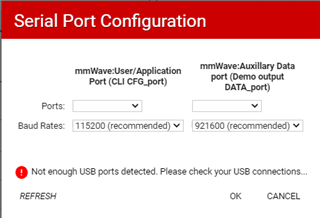
It seems that, in this second case, the COM ports are streamed through a XDS110 Class.

And I think it is exactly what I would like to do.

My question is : how to get this configuration ? how to communicate with COM ports through XDS110 ?

Many thanks in advance for your help.

Bruno

  • Hello Bruno,

    I suspect that the difference is just that the text was modified in the mmWave Demo Visualizer. I will confirm that and get back to you when I have an answer.

    Thanks

    ki

  • Hello Ki,

    Finally, I found the reply to my question.

    It's a matter of programming the gist of "index.gui" in html. I added the following lines, using the "ti-transport-usb" widget :

    <ti-transport-usb id="CLI_CFG_port" usb default-baud-rate="115200" description="mmWave:User/Application Port (CLI CFG_port)" class="_TI_">
    <ti-model-streaming id="CFG_port" protocol="cr" class="_TI_"></ti-model-streaming>
    </ti-transport-usb>

    <ti-transport-usb id="DEMO_OUTPUT_DATA_port" usb default-baud-rate="921600" description="mmWave:Auxillary Data port (Demo output DATA_port)" class="_TI_">
    <ti-model-streaming id="DATA_port" protocol="raw" class="_TI_"></ti-model-streaming>
    </ti-transport-usb>

    And that's solve the problem : the programming of the gist takes precedence over the configuration of the "property" menu. It seems that the "property" menu of Gui Composer do not support all the possible target configurations.