This thread has been locked.

If you have a related question, please click the "Ask a related question" button in the top right corner. The newly created question will be automatically linked to this question.

CCSV4 - stop automatic load of output file after Build Active Project?


Hello,

I've looked unsuccessfully for a way to bypass loading the output file, after it finishes "Build Active Project".  Is there a way to stop that?

Regards,

Robert

  • Hi Robert,

    Instead of doing a "Debug Active Project", just right-click on your project and select "Build Project". This will build the project without launching a debug session and loading the project.

    Thanks

    ki

  • Robert,

    By default, selecting "Build Active Project" should only build the project. The "Debug Active Project" button/menu item, on the other hand, will perform a series of actions. In addition to building your project, it will connect to target (based on your target configuration file), load program and run to main. The actions are customizable by going into Debug Properties for your project. If you want more control over these actions, you can manually launch the debugger instead of "debug active project".

    Please check page 39 of the CCSv4 Tips and Tricks presentation.

  • Hello,

    I can't find anywhere in Debug Properties, to disable "Build Active Project" from loading the program afterwards?   Maybe I've just overlooked it..  But I could right click on the project and select Build Project, as Ki-Soo had suggested.

    Preferred would be able to hit a single function key, for fast rebuild (without reload).  F7 is standard for rebuilding projects, across most SW IDE's.  Up to V3, CCS used to have that capability.  But for some unknown reason, the designers of CCS V4 thought it would be better to require customers to  do a convoluted Ctrl-Shift-P for "Build Active Project" (and no apparent key sequence at all for "Buid Project" ).

    Thanks,

    Robert

  • Robert said:
    But for some unknown reason, the designers of CCS V4 thought it would be better to require customers to  do a convoluted Ctrl-Shift-P for "Build Active Project"

    This is because we are now an Eclipse based IDE and and that is the Eclipse default behavior.

    You can change the default to something else (like what is was in CCSv3) by going to "Windows->Preferences->General->Keys".

    ki

  • Can you supply a little more instruction on how to change that?  I tried to enter F7 for Build Active Project, but it wouldn't accept it.

    Thanks,

    Robert

  • Robert said:

    I can't find anywhere in Debug Properties, to disable "Build Active Project" from loading the program afterwards?   Maybe I've just overlooked it..  But I could right click on the project and select Build Project, as Ki-Soo had suggested.

    The Debug Properties lets you customize things like auto connect to target when debugger is launched, auto-run to main etc., but the debugger will always be launched with "Debug Active Project". If you want to just build and not launch a debug session at all, then choosing "Build Project" as suggested by Ki-Soo is what you need.

  • Robert said:
    Can you supply a little more instruction on how to change that?  I tried to enter F7 for Build Active Project, but it wouldn't accept it.

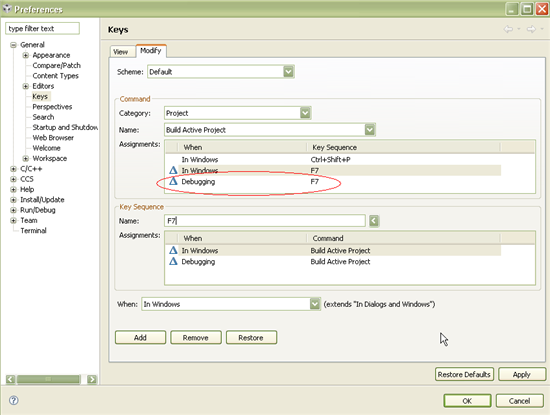
    In the 'View" tab, find the command you wish to edit (Build Active Project).  Then select "Edit". It will take you to the "Modify" tab for that command. Under the "Key Sequence" field, delete the existing entry for "Name" field and then press then "F7". It add "F7" in the field. Then press the "Add" button. Then hit "Apply" and you are done.

    Hope this helps,

    ki

  • Ok, that worked.  But F7 will only build the project if I'm not connected to the target.  If connected, F7 does nothing.  If connected to the target, though, I can still "Build Active Project" by selecting it in the Project menu.  But that will automatically reload the output file every time.

    The ultimate goal here would be to hit F7, and rebuild the project without loading, whether connected to the target or not.  If connected to the target, I can do the "Build Project" selected, but from what I can see, there is no way to assign a quick function key to that?

    Thanks,

    Robert

  • Add another entry for that command where the "When" field is set to Debugging.

  • While active debug session is running, there is an option to automatically reload a program file if it changes. The default setting is to ask the user whether they would like to reload the program. My guess is that you checked "do not ask me again" when this dialog appeared in the past. You can control this behaviour by going to Window->Preferences then expand CCS and click on Debug category . there should be an option called "Reload program automatically if the program file changes". Select Never radio box or Prompt depending on what you would like to happen. 


    martin