


Other Parts Discussed in Thread: EK-TM4C123GXL, SYSBIOS
Hi,
I am trying the new CCS 11.0.0.00012 on Windows 10 Pro 19042.1288 (and macOS 11.6.1).
When I try to import the empty TI RTOS example project for the EK-TM4C123GXL launchpad board from Resource Explporer I get a message saying "The package needs to be installed locally to import...". So I click on Install and I am presented with a screen showing the following:
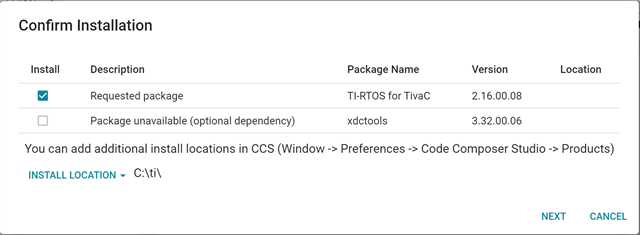
It has selected version 2.16.00.08 of TI RTOS for TivaC, and informs me that xdctools 3.32.00.06 is unavailable. So I click NEXT and install the selected version of TI RTOS.
When that completes I can import the Empty project into CCS by clicking Import. I get a Summary screen as shown below
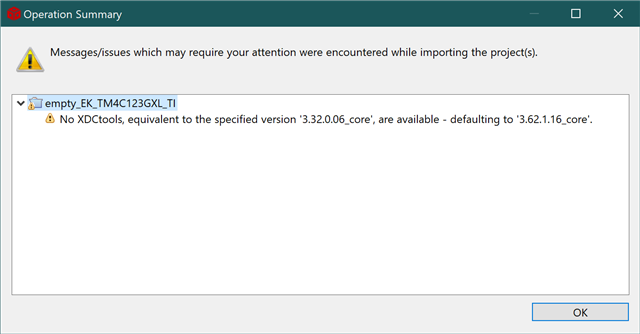
It says there are no XDCtools of the required version. If I now build the project it fails with an error:
xdc.cfg.Program : The package 'ti.sysbios.knl' is not compatible with XDCtools used in this build. Please either use XDCtools compatible with that package, or update the product containing that package, or rebuild the package with XDCtools 3.50 or later.
So it appears I am stuck with nonfunctional example programs. I need XDCtools 3.32 which are not available, or I need to rebuild the TI RTOS using the new tools.
It seems to me that TI should be the ones rebuilding TI RTOS using the new tools so that the examples they provide can actually be installed and run.
So will TI be providing updated working examples, or is there some other way around this issue?


