This thread has been locked.

If you have a related question, please click the "Ask a related question" button in the top right corner. The newly created question will be automatically linked to this question.

TMS320F280049C:CCS code error

Part Number: TMS320F280049C
Other Parts Discussed in Thread: C2000WARE

Dear Ti team

Hi, I wonder why the following code error occurred.

Code error: Product digital_power_c2000ware_sdk_software_package v3.0.1.00 is not currently installed and no compatible version is available. Please install this product or a compatible version.
Build stopped..

I downloaded the c2000 digital power 3.0.1 version. However, error messages continue to occur. I wonder how it can be solved.

I would be very grateful if you could help me. Thank you.

  • Additionally, the CCS version I am currently using is 9.3.

  • Hello Ju Young,

    Did you install the package from Resource Explorer or did you download and install it yourself? 

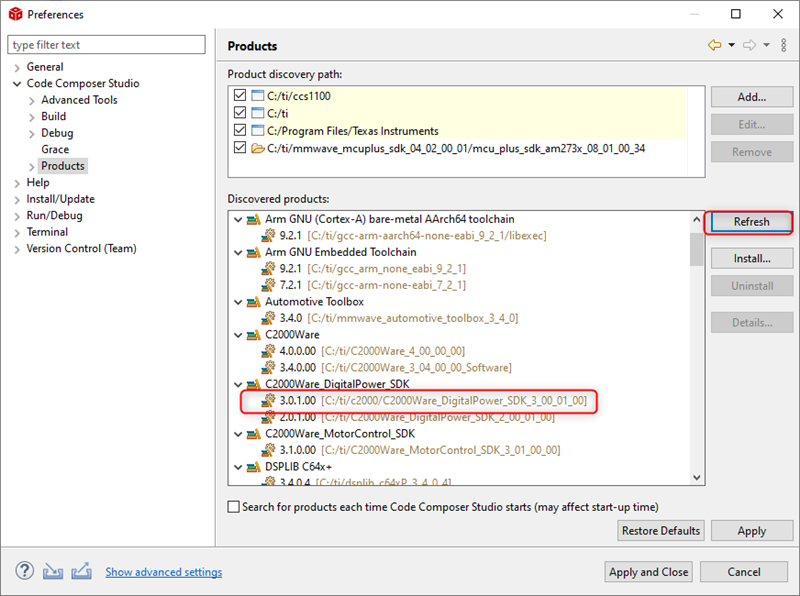
    If you downloaded and installed it yourself, you may need to have CCS "discover" the package. Check the "Product" preferences and see if the SDK appears in the Discovered Products list. If not, try pressing the "Refresh" button to have CCS check for newly installed products:

    During the refresh process, a dialog may appear with a list of newly discovered packages. If the SDK is not inthat list, then simply let the refresh process continue until it is complete. The SDK may have been already auto-discovered.

    If you installed the SDK in a custom location, then you may need to specify that location in the "Product Discover Path" before refreshing.

    Thanks

    ki