This thread has been locked.

If you have a related question, please click the "Ask a related question" button in the top right corner. The newly created question will be automatically linked to this question.

Empty ccsCompiler.opt string results in ">> ERROR: no source files, nothing to do"

Other Parts Discussed in Thread: SPRC234

I am trying to get a CCS4 project to build, without success. Other team members working from the same SVN source code repository do not encounter the same problem, suggesting to me it's something about my CCS or tool chain installation.

The build fails, with the first error being (anonymised and abbreviated):

'Building file: xxxDspcfg.s??'

'Invoking: Compiler'

'Flags: -mv64+ -g -O2 --define=LOG_TIMESTAMPS_ENABLED xxxx.......

--include_path="C:/Program Files/Texas Instruments/ccsv4/tools/compiler/C6000 Code Generation Tools 6.1.19/include"

--include_path="C:/Program Files/Texas Instruments/sprc234/03.00.10.02/6455/6455_default_package/default_package/csl_c6455/inc"

--include_path="C:/Program Files/Texas Instruments/sprc234/03.00.10.02/6455/6455_default_package/default_package/csl_c64xplus_intc/inc"

--include_path="S:/dsp/xxxDsp/Release - SMT362"

--include_path="C:/Program Files/Texas Instruments/bios_5_41_10_36/packages/ti/bios/include"

--include_path="S:/dsp/xxxWfmDsp/src" ........

--verbose_diagnostics --diag_warning=225

--preproc_with_compile

--preproc_dependency="xxxDspcfg.pp"'

"C:/Program Files/Texas Instruments/ccsv4/tools/compiler/C6000 Code Generation Tools 6.1.19/bin/cl6x" -@"xxxDspcfg_ccsCompiler.opt"

>> ERROR: no source files, nothing to do

'Finished building: xxxDspcfg.s??'

' '

and similar for xxxDspcfg_c.c. This results in errors like:

<Linking>

"D:\DOCUME~1\tjj\LOCALS~1\Temp\052603", line 14: error: cannot find file

"./xxxDspcfg_c.obj"

"./xxxDspcfg_c.obj"

Comparing my intermediate files with those from a working build suggests that xxxDspcfg_c_ccsCompiler.opt is not being generated correctly, specifically successful builds have the cfg_c_ccsCompiler.opt file ending:

--preproc_with_compile

--preproc_dependency="xxxDspcfg_c.pp"

"xxxDspcfg_c.c"

whereas mine have:

--preproc_with_compile

--preproc_dependency="xxxDspcfg_c.pp"

""

i.e. with an empty string definition.

But I can't see any difference in my installation and don't understand well enough how the build goes from TFC & TCI files to these intermediate files to work out what is going wrong.

Do you have any suggestions what I should check?

Tim

[ CCS Version: 4.2.3.00004 ]

  • Hi Tim,

    It almost seems like there might be a syntax error in the build options/path.

    For example should

    --preproc_dependency="xxxDspcfg.pp"'

    be

    --preproc_dependency="xxxDspcfg.pp"

    without the apostrophe.  Ie something like a typo or extra character could cause this.  What would enable us to help you is if you could possibly send a listing of all your build and linker options that you are using.   That would likely help us to help solve your issue.

    Cheers,

    Lisa                          

  • Hi Lisa,

    Thanks for the suggestion - I agree it does look rather suspicious.  However, I think that apostrophe is OK as it ends / closes the list of text strings passed as flags, e.g. flags --blah --blah, or flags “--blah” “--blah”

    Other suggestions gratefully received!

    Tim

  • Hi Tim,

    Of course, I will do my best to help with further suggestions.  However, in order to have an idea of what is going on/what to suggest, it would be good for us to have further information.  Would it be possible for you to send the full listing of linker and build options as requested?

    Best Regards,

    Lisa

  • Lisa,

    Sorry, I don't know exactly what you want, so...

    Here's the console output from a failed build up to the point of the first error:

    **** Build of configuration Release - SMT362 for project xxxDsp ****
    
    C:\Program Files\Texas Instruments\ccsv4\utils\gmake\gmake -k all 
    'Building file: ../xxxDsp.tcf'
    'Invoking: TConf Script Compiler'
    "C:/Program Files/Texas Instruments/xdctools_3_20_08_88/tconf" -b -Dconfig.importPath="C:/Program Files/Texas Instruments/bios_5_41_10_36/packages;" "../xxxDsp.tcf"
    'Finished building: ../xxxDsp.tcf'
    ' '
    'Building file: xxxDspcfg.s??'
    'Invoking: Compiler'
    'Flags: -mv64+ -g -O2 --define=LOG_TIMESTAMPS_ENABLED --define=SMT362_BUILD --define=NASSERT --include_path="C:/Program Files/Texas Instruments/ccsv4/tools/compiler/C6000 Code Generation Tools 6.1.19/include" --include_path="C:/Program Files/Texas Instruments/sprc234/03.00.10.02/6455/6455_default_package/default_package/csl_c6455/inc" --include_path="C:/Program Files/Texas Instruments/sprc234/03.00.10.02/6455/6455_default_package/default_package/csl_c64xplus_intc/inc" --include_path="S:/dsp/yyy/xxxDsp/Release - SMT362" --include_path="C:/Program Files/Texas Instruments/bios_5_41_10_36/packages/ti/bios/include" --include_path="S:/dsp/yyy/xxxDsp/src" --include_path="S:/dsp/yyy/xxxDsp/src/BoardSupport" --verbose_diagnostics --diag_warning=225 --preproc_with_compile --preproc_dependency="xxxDspcfg.pp"'
    "C:/Program Files/Texas Instruments/ccsv4/tools/compiler/C6000 Code Generation Tools 6.1.19/bin/cl6x" -@"xxxDspcfg_ccsCompiler.opt"
    >> ERROR: no source files, nothing to do
    'Finished building: xxxDspcfg.s??'

     and here's the file I suspect has been misformed:

    -mv64+ 
    -g 
    -O2 
    --define=LOG_TIMESTAMPS_ENABLED --define=SMT362_BUILD --define=NASSERT --include_path="C:/Program Files/Texas Instruments/ccsv4/tools/compiler/C6000 Code Generation Tools 6.1.19/include" --include_path="C:/Program Files/Texas Instruments/sprc234/03.00.10.02/6455/6455_default_package/default_package/csl_c6455/inc" --include_path="C:/Program Files/Texas Instruments/sprc234/03.00.10.02/6455/6455_default_package/default_package/csl_c64xplus_intc/inc" --include_path="S:/dsp/yyy/xxxDsp/Release - SMT362" --include_path="C:/Program Files/Texas Instruments/bios_5_41_10_36/packages/ti/bios/include" --include_path="S:/dsp/yyy/xxxDsp/src" --include_path="S:/dsp/yyy/xxxDsp/src/BoardSupport"  
    --verbose_diagnostics 
    --diag_warning=225 
    --preproc_with_compile 
    --preproc_dependency="xxxDspcfg_c.pp" 
    "" 
    
    --diag_warning=225 
    --preproc_with_compile 
    --preproc_dependency="xxxDspcfg_c.pp" 
    "xxxDspcfg_c.c" 

     and this is what I think it should look like  (see last line):

    -mv64+ 
    -g 
    -O2 
    --define=LOG_TIMESTAMPS_ENABLED --define=SMT362_BUILD --define=NASSERT --include_path="C:/Program Files/Texas Instruments/ccsv4/tools/compiler/C6000 Code Generation Tools 6.1.19/include" --include_path="C:/Program Files/Texas Instruments/sprc234/03.00.10.02/6455/6455_default_package/default_package/csl_c6455/inc" --include_path="C:/Program Files/Texas Instruments/sprc234/03.00.10.02/6455/6455_default_package/default_package/csl_c64xplus_intc/inc" --include_path="S:/dsp/yyy/xxxDsp/Release - SMT362" --include_path="C:/Program Files/Texas Instruments/bios_5_41_10_36/packages/ti/bios/include" --include_path="S:/dsp/yyy/xxxDsp/src" --include_path="S:/dsp/yyy/xxxDsp/src/BoardSupport"  
    --diag_warning=225 
    --preproc_with_compile 
    --preproc_dependency="xxxDspcfg_c.pp" 
    "xxxDspcfg_c.c" 
    

    Does that give you what you want?  Or is there another specific file that would be more useful?

    Tim

    PS.  I did have a look at http://processors.wiki.ti.com/index.php/Preprocess_Complex_Source_Code_for_Bug_Submissions but there is not enough detail for me to follow it, i.e. do I create a new project to do this?  If so, what do I set all the other parameters / options to?  And if it's a modification to the problematic project, where do I apply the "-ppo" option?  Do I replace another option with -ppo or add it somewhere? etc etc.  Maybe an 'Idiots Guide' tab is needed?  Maybe it's more applicable to single source file issues?


  • Oops, wrong!  I'd not edited the 'faulty' file correctly and left in the corrected text as well - sorry.  This is what it should have been:

    -mv64+ 
    -g 
    -O2 
    --define=LOG_TIMESTAMPS_ENABLED --define=SMT362_BUILD --define=NASSERT --include_path="C:/Program Files/Texas Instruments/ccsv4/tools/compiler/C6000 Code Generation Tools 6.1.19/include" --include_path="C:/Program Files/Texas Instruments/sprc234/03.00.10.02/6455/6455_default_package/default_package/csl_c6455/inc" --include_path="C:/Program Files/Texas Instruments/sprc234/03.00.10.02/6455/6455_default_package/default_package/csl_c64xplus_intc/inc" --include_path="S:/dsp/yyy/xxxDsp/Release - SMT362" --include_path="C:/Program Files/Texas Instruments/bios_5_41_10_36/packages/ti/bios/include" --include_path="S:/dsp/yyy/xxxDsp/src" --include_path="S:/dsp/yyy/xxxDsp/src/BoardSupport"  
    --verbose_diagnostics 
    --diag_warning=225 
    --preproc_with_compile 
    --preproc_dependency="xxxDspcfg_c.pp" 
    "" 
    

    Apologetically,   Tim.


  • Hi Tim,

    ok I will get a colleague to help me go over the files you sent.  I am newly ramping up here.

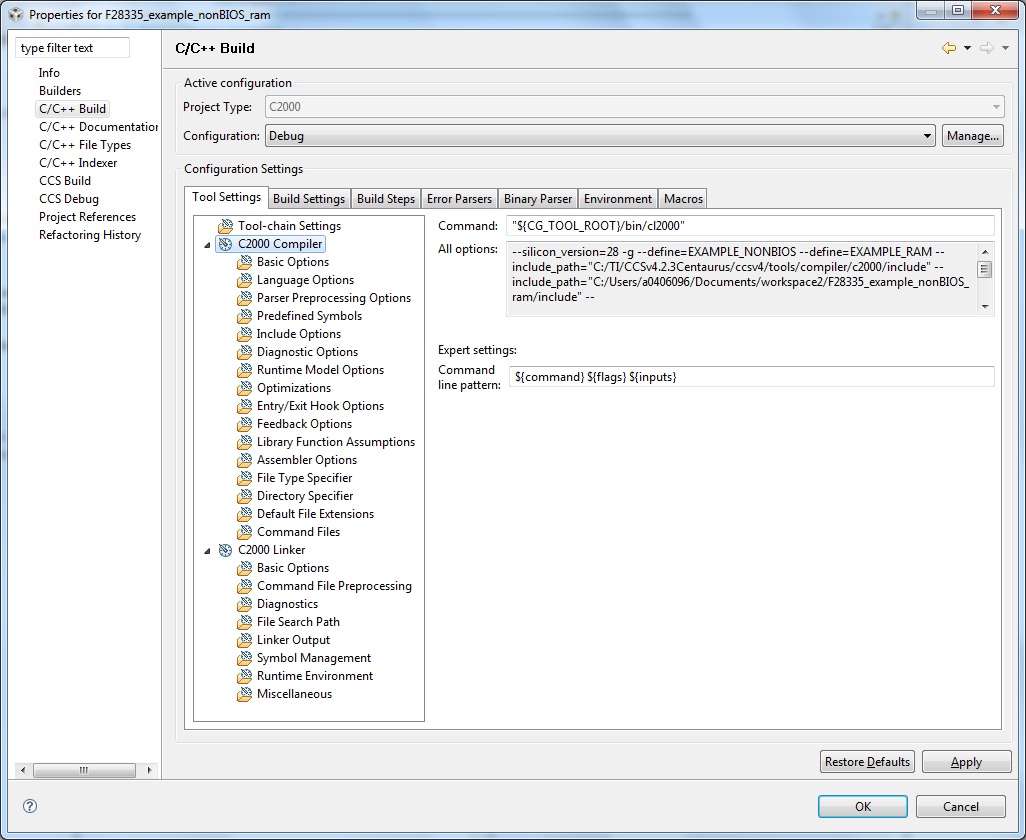
    Also what I meant by build and linker settings are the ones you use in CCS.

    I have attached an example screen shot.  The properites are usually found by right-clicking on the project -> properties.  

    Please send these if you can. 

    Best Regards,

    Lisa

  • Hi Tim,

    another thing to check.  Is this a shared project?  Ie did you import the project and when you did, did you select 'copy project into workspace'?  If so, what you can try is importing the project again without this option. 

    The error you see could also mean a macro is not being found, or can also occur if a linked file is trying to add file and these can not be found.

    Please keep me updated.

    Best Regards,
    Lisa

  • Lisa,

    In response to "30 Jun 2011 11:50 AM" I think I've sent all the params, albeit in text form as opposed to a screen shot.  What other params do you suspect I have not sent?

    In response to "06-30-2011 12:09 PM", yes it is a shared project, and I am aware of not ticking the 'copy into workspace' box. 

    6 people in the team are using the same SVN codebase.  3 are working fine (2 On Windows 7 and one XP) but 3 get the same set of errors.  One of the people getting errors is not chasing it.  Another person gets the errors, but if he changes Workspace to the same Workspace (i.e. closes CCS4, relaunches it) and Rebuilds then the build is error free.  This work around does not work for me.  I have installed CCS4 3 times now.  Once on an XP machine onto D:.  This was uninstalled and reinstalled on C: in case the drive letter was an issue.  Then a fresh install on another XP machine straight onto C: - clean, vanilla install.  No joy!

    One piece of evidence that I don't know what to do with is that the 3 working setups are on machines that developed the project, i.e. started with a CCS3 codebase and ported it to CCS4, whereas the 3 problematic setup loaded the 'nominally working' codebase straight into CCS4.  It's as though the process of working on the project changes something that we are not aware of and not included in the SVN repository.  What other CCS4 files other than the TCF and TCI files are needed for repeatable builds?  What environment variables are needed?

    Many thanks for your time looking into this.

    Tim

  • In the process of trying to track down a build problem, I've noticed that console output does not quite match what I would expect from the makefile:

    makefile:

    # All Target

    all: xxxDsp.out


    # Tool invocations

    xxxDsp.out: $(OBJS) $(CMD_SRCS) $(GEN_CMDS)

    @echo 'Building target: $@'

    @echo 'Invoking: Linker'

    Console:

    **** Build of configuration Release - SMT362 for project xxxDsp ****

    C:\Program Files\Texas Instruments\ccsv4\utils\gmake\gmake -k all

    'Building file: ../xxxDsp.tcf'

    'Invoking: TConf Script Compiler'


    i.e. "Building file" cf. "Building target", and "Invoking: TConf Script Compiler" cf. "Invoking: Linker".

    This makes me feel that I'm either looking at the wrong makefile (or another is being used) or there is some string substitution going on that I can't see.

    Does anyone know why the makefile and console output don't align?

    Tim

  • Whilst chasing this issue I've bumped into something else I don't understand and have raised a separate query as I don't think it's the cause of the issues raised in this query, but I guess it may have some relevance - see here.

  • I've just discovered that opening a command shell DOS window after a failed CCS rebuild and running the makefile there works!

    That surely suggests a CCS bug rather than a setup / installation issue, doesn't it? 

    Tim

  • Hi Tim,

    what directory did you run the DOS shell/command from?

    I am new to the team here so will liekly need a bit of support from a couple colleagues over the next few days.    It really seems like on the non-development machines there is a link to a link that is not being brought in.  

    Unfortunately we are hitting a couple holidays over here but I will continue on with this and run it by the team here. 

    I have attached a screen shot of the settings I meant.   Also please check dependancies, referenced paths, include roots etc.  

    Best Regards,
    Lisa

  • Lisa,

    Thanks for staying with me on this.  Although the DOS window gives me a work-around, I loose an awful lot of the benefits of the IDE, so I still really need to sort this out.

    I ran the makefile from the directory CCS put it, i.e. couple levels down from the Workspace.  (Working and non-working setups have same directory structure, as far as we are aware!)

    As for the 'settings' you have asked for, I have copied the Commend and Options from the windows you suggested:

    C6000 Compiler:

    Command: "${CG_TOOL_ROOT}/bin/cl6x"

    All options:

    -mv64+ -g -O2
    --define=LOG_TIMESTAMPS_ENABLED
    --define=SMT362_BUILD
    --define=NASSERT
    --include_path="C:/Program Files/Texas Instruments/ccsv4/tools/compiler/C6000 Code Generation Tools 6.1.19/include"
    --include_path="C:/Program Files/Texas Instruments/sprc234/03.00.10.02/6455/6455_default_package/default_package/csl_c6455/inc"
    --include_path="C:/Program Files/Texas Instruments/sprc234/03.00.10.02/6455/6455_default_package/default_package/csl_c64xplus_intc/inc"
    --include_path="S:/dsp/trunk2403/XxxDsp/Release - SMT362"
    --include_path="C:/Program Files/Texas Instruments/bios_5_41_10_36/packages/ti/bios/include"
    --include_path="S:/dsp/trunk2403/XxxDsp/src"
    --include_path="S:/dsp/trunk2403/XxxDsp/src/BoardSupport"
    --include_path="S:/dsp/trunk2403/XxxDsp/Release - SMT362"
    --include_path="C:/Program Files/Texas Instruments/bios_5_41_10_36/packages/ti/rtdx/include/c6000"
    --verbose_diagnostics
    --diag_warning=225

    Command line pattern:  ${command} ${flags} ${inputs}

    C6000 linker:

    Command:  "${CG_TOOL_ROOT}/bin/cl6x"

    All options:

    -z -m"EnhcdrMpOfdmWfmDsp.map"
     --verbose_diagnostics
     --warn_sections

    -i"C:/Program Files/Texas Instruments/ccsv4/tools/compiler/C6000 Code Generation Tools 6.1.19/lib"

    -i"C:/Program Files/Texas Instruments/ccsv4/tools/compiler/C6000 Code Generation Tools 6.1.19/include"

    -i"C:/Program Files/Texas Instruments/sprc234/03.00.10.02/6455/6455_default_package/default_package/csl_c6455/inc"

    -i"C:/Program Files/Texas Instruments/sprc234/03.00.10.02/6455/6455_default_package/default_package/csl_c6455/lib"

    -i"C:/Program Files/Texas Instruments/bios_5_41_10_36/packages/ti/bios/lib"

    -i"C:/Program Files/Texas Instruments/bios_5_41_10_36/packages/ti/rtdx/lib/c6000"
     --reread_libs
     --rom_model

    Command line pattern:  ${command} ${flags} ${output_flag} ${output} ${inputs}

    I understand more of the build process now, but keep coming back to the empty string in the .opt file.

    Tim

  • Hi again Tim,

    can we just confirm whether you are manually calling make or using the CCS command line tool?  It is a bit odd actually that it would work from the command line but not from the tool.

    Best Regards,

    Lisa

  • LIsa,

    I run "Rebuild project" in CCS4 which creates the intermediate files and builds most of the components and then fails to link.  I then open a separate Command Prompt (DOS shell) window, change directory to where the makefile has been created and type "make all".  The build is successful and the .out is created.

    Yes, "odd" is just one of the words I've used!

    Tim

  • Hi Tim,

    it is possible the issue is with the CCS project manager. 

    Would you be able to send us your project?  (This is something we could certainly do in a private conversation as opposed to general post in order to keep full confidentiality)

    If the above is not possible or you wish to try this yourself anyhow, could you please try using the command line tool?  Basically in order to know whether you get the same error or whether it works if you use our command line tool instead of "make all" in the proceedure you describe above.

    Thanks and regards,
    Lisa

  • Lisa,

    There is just about zero chance of me being able to send the project.  However, writing those words has made me realise that maybe we should turn this around.  Maybe first I should be trying to compile a TI project.  Are there any 'complete' CCS4 demo projects targeting the 6455? i.e. sources, headers, TCF & TCI.  Ideally I would unzip a fully formed directory structure, point the Workspace at it and press the Rebuild button.  Anything like that exist?  It's not that I'm not prepared to put some effort into resolving this, it's just that I know that the less I have to do to get it to work the less likely I am to mask what is really going on.

    As for your second point, what is the "command line tool"?  This opens up a whole new domain on which I know nothing.  Is it straightforward to specify what to type into what window?  A quick look through the CCS4 menus and Help left me none the wiser.

    Tim

  • Hi Tim,

    Code Composer Studio includes a command line tool, described here.   If we can not give it a try I would ask that you please see what happens when using the command line tool.

    http://processors.wiki.ti.com/index.php/Projects_-_Command_Line_Build/Create

    Regarding the demo project.   I can check for examples for you.   Have you seen the chip support library we have:

    http://focus.ti.com/docs/toolsw/folders/print/sprc234.html

    Cheers,
    Lisa

  • Hi Tim,

    just thought I'd check if there is any update here.


    Have you been able to try with the command line?

    Have you tried with a simple example available directly in CCS when you create a new project?

    Best Regards,

    Lisa