This thread has been locked.

If you have a related question, please click the "Ask a related question" button in the top right corner. The newly created question will be automatically linked to this question.

CCS V4 Step Over and Disassembly View doesn't work on W7

Other Parts Discussed in Thread: CONTROLSUITE, TMDSDOCK28035

I recently installed CCS 4.2.3.00004 on two systems. XP: all seems to work.
W7: Disassembly view doesn't display actual instructions but all as .word.
Also STEP_OVER in debugger doesn't work - and execution never gets' interrupted (until hitting HALT).
I would believe that this has common root as the debugger doesn't recognize the instructions and doesn't know where to place break-point for Step Over.

The target is the Development Stick USB Piccolo F28069 and it doesn't seem there are any connection or communication issues.

 Any ideas?

Thanks,
Martin

  • Hi Martin,

    I am going to try and look into this for you, if I can then I will attempt to reproduce it.   Is the only difference that in the one case it is Windows 7?  Ie, same project, settings, CCS Version, breakpoint.  I would just like to confirm.

    Have you tried updating CCS?

    Are you using the 64 bit version?

    Best Regards,

    Lisa


  • Hi Martin,

    I wanted to check whether you have made any progress or are able to provide the bits of further information/confirmation I requested?

    Best Regards,

    Lisa

  • Hi Lisa,

    Let me first answer the questions: W7-64 bit, CCS fully up-to-date (at the time of the lost and my last try).
    All of the settings and project files were exact copy from the XP system. Several attempts of "build clean", recreating of the project and fresh import with same results.

    I spent too much time skiing to be able to play around but I will try again :-)

    Thanks - Martin

  • Hi Martin,

    I have a Win 7 64 bit system and from what I understand this is not something we have seen.

    Are you still having the issue?  Is there any further information you can provide (on or offline) to help me see if I can make an attempt to reproduce this? 

    Best Regards,

    Lisa

  • Are there any solutions yet? I have the same problem on the Windows XP platform. Is this platform related?


    Thanks Sean

  • Hi Sean, Hi Martin,

    I need more information in order to try and reproduce and track down what is happening.

    Sean - what part are you programming?  What version of CCS?  Does the problem occur for all projects for you? Etc.

    Interesting the same thing is seen in XP.

    Best Regards,

    Lisa

  • Hi Lisa


    I installed ccStdio 3.3 from the kit CDrom. Hardware is the USB Docking station and 2808 dimm board from TI purchased from TI website.

    I downloaded the free CCS4 from your website.

    I am using Windows XP.

    I am seeing no assembly language mnemonics only OPCODES in the debugger only. I do see the C line of code.


    Thanks Sean


  • Hello Sean,

    Yours seems to possibly be a different issue then, however futher details would still help.

    Would you be able to send a screenshot?   Can you please confirm the CCS version you are using/downloaded?  Do you see this in more then one project?

    Best Regards,
    Lisa

  •  

    Version 4.2.3.00004

    All the developers have this problem.

     The debuger just says word where the text should be. See attachment


    Thanks Sean2843.debug.pdf

  •  

    Version 4.2.3.00004

    All the developers have this problem.

     The debuger just says word where the text should be. See attachment


    Thanks Sean2843.debug.pdf

  • Hi Lisa,

    I just got another W7 PC in order to re-create the issue in more documented way and I plan to start CCS installation as soon as I am free.
    Please let me know what specifically I should report regarding the installation details. Any log or XML configuration files I should capture and send your way?

    Sean: It feels good that I am not the only one seeing this ;-)

    Thanks,
    Martin

  • Yes, we have three other developers reporting this same issue on W7 and XP. One is saying it went bad after a Windows update and then it prompted him if he wanted to update his ti tools, he said no - but it updated to his tools anyway. After this update they claim the problem appeared.

    We have another developer who has no problem and he is using the same version that I am reporting as having problems.


  • Hi Martin and Sean,

    Thanks for the patience and willingness to look into this with us. 

    Things that would help us troubleshoot and try to reproduce and track down the issue are things such as

    - .out file if possible

    - screen shots

    - settings and steps used

    - symptoms ... eg only with this board or only with this project, could it be confirmed the issue started with an update?, etc.

    - confirm CCS version and installed updates/features

    - Sean -> is it possible to tell if something is different or what might be different in the cases of working vs non-working?

    It is interesting that you are both using a Piccolo board it appears and that the issues seems Windows platform independant.

    I look forward to the further information.

    Best Regards,

    Lisa

  • 8468.28toggle.pdf


    Hi Lisa


    I have enclosed a screen shot.As you see the third column displays "word"

    I am using the Ti example downloaded from your example code website called gpio_toggle.

    I am running your CCS4 and your software. This is a new install.

    Thanks Sean

  • Lisa


    Here are the versions from the working and non working machines


    1072.Working.pdf4810.Notworking.pdf

  • Sean,

    Could you please try the troubleshooting suggestions under the "General IDE" and "Debugger" sections of this page:
    http://processors.wiki.ti.com/index.php/Troubleshooting_CCS, basically cleaning the workspace or trying a new workspace, and deleting target cache files and launches?
    Then try the same gpio_toggle example.

    If this does not help, could you try downloading the DVD image of CCS 4.2.3 and installing to a different folder than your current installation and see if the issue is still reproducible? The download is available here: http://processors.wiki.ti.com/index.php/Download_CCS. This will help us understand if the issues were introduced by the update from an earlier version to 4.2.3 or not.

  • Hi Sean,

    one thing I did notice you should try is the working computers seem to have a newer version of the code generation tools.

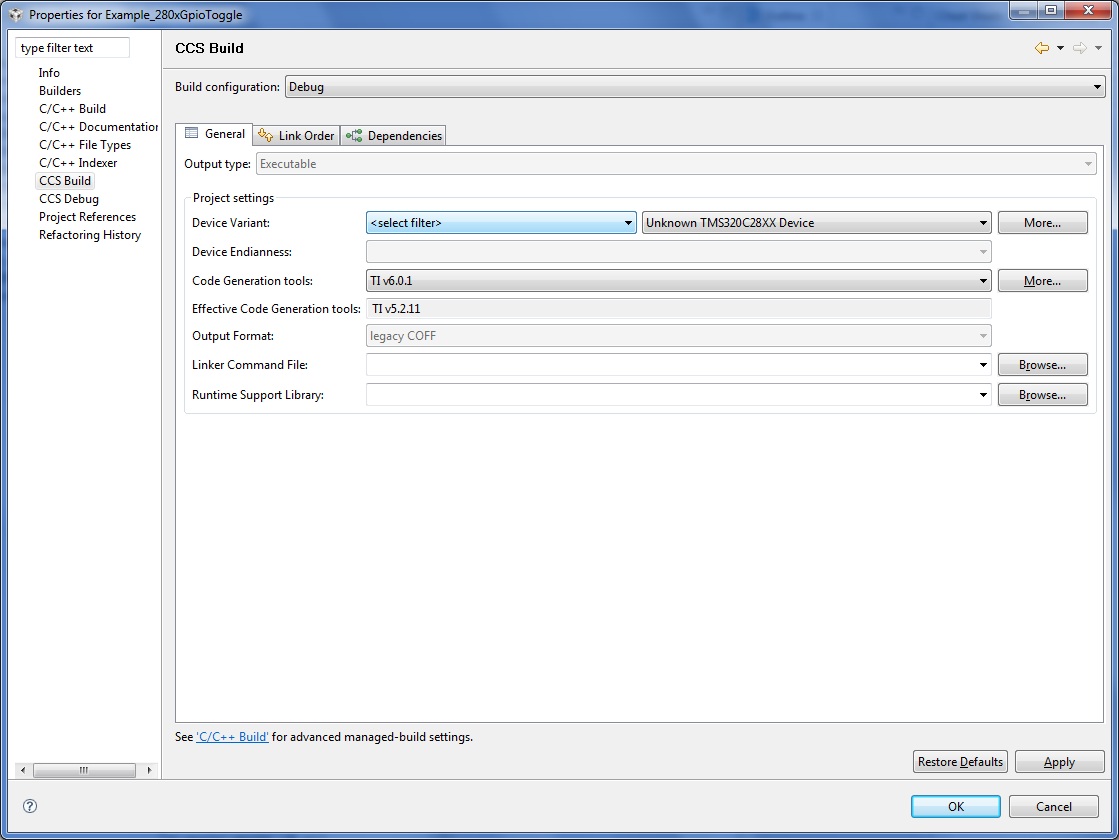
    Please try using the latest version of the code generation tools (you may need to do an update Help -> Software updates -> find and install).

    First however go to Project -> Properties -> CCS Build and see if you have and can select C200 Code Generation Tools 6.0.1

    I have attached an image for you.

    Let us know.

    Cheers,
    Lisa

  • Hi Sean and Martin,

    a quick update.   I tried to reproduct this with a 2808 DK and the exact same example.   CCS 4.2.3.  I tried two different emulators and two different code generation tool versions and I did not see the same behaviour.  

    Here everything worked as expected.

    Could I possibly ask for the .out file?   It would be good to see what was actually generated.

    Best Regards,
    Lisa

  • I cant attach a zip or an out file

    Thank

  • Hi Sean,

    either will do.   The important thing for us to look at for now is the .out but that plus project is also ok.  Feel free to zip the files up.

    If you wish or need you have the choice to send it to me offline by sending me a message through the forum here.

    Cheers,

    Lisa

  • Hi Sean,

    I'm getting invalid archive.  Could you please try again?

    Thanks!

    Lisa

  • Hello Lisa,

    In the meantime I installed the "Latest production image" 4.2.300004 on another W7/64-bit system which haven't seen CCS installation yet.
    I copied over my sample project, run Project - Clean and new build and the debug / step issue didn't manifest itself.
    Then I tried updating CCS from the web to the latest code generation tools and it still works.

    This makes it more puzzling as I have another system where I installed the same version, did also the most recent updates and build clean / rebuild many times and the failure is still there. I am in both cases running with administrative privileges on a 64-bit W7 though the CCS itself might be installed in different directory as well as the project resides on different path in each case.

    I will spend some more time on the system exhibiting the failure and try to provide files you asked from Sean. (The failing system is at my house).

    Thanks,
    Martin

  • 5822.Servo_28069_out.zip


    Hi Lisa,

    I briefly checked the issue on my system where the disassembly/step_over is failing earlier today. The behavior is still the same.
    Attached is the .OUT file. (I did the project-clean and fresh build.

    I plan to spend some time to re-create the problem on a minimal project (or straight TI example) in order to be able to share the entire project without too much extra mud: My project is referencing too many files to be practical for this debugging.

    I hope the .OUT file may help.

    Thanks,
    Martin

  • Hello Martin and Sean,

    I was able to load and and have a look at both of your .out files here.  In the case of the 2808 I even tried on two different DK types. 

    Unfortunately I do not see the .word issue here.   We are beginning to wonder if something got corrupted or broken due to an update.

    At any rate as one of last things I can try I am going to see if I can get some development feedback on your thread.  I will post any feedback or updates as soon as I have them.

    Best Regards,

    Lisa

  • Hello again gentlemen,

    I forgot to ask.  Are either of you relocating object code at runtime?   The start address I am seeing in the .out is not what I see in the screen shot.  At least in your case Martin.

    Cheers,
    Lisa

  • Hi Lisa,

    First of all: Thank you for your support. When I was posting to a forum I didn't know that someone will take an ownership and will keep driving the troubleshooting with so much focus and perseverance! Thanks!

    Now back to the technical stuff:
    a) At this point of development I am still in SRAM and is do not relocate the code within the address space.

    b) I made several experiments on my W7_64bit system.
    1.  ccs 4.2.4.00032 update seemed to appear live in the past few days so I updated the installation, cleaned and rebuilt the project with no improvement.
    2.  My installation was in c:\apps\TI\... folder and I was concerned about possibility that there could be a bug and the debugger might be looking for some files in a more default path. So I installed another instance of CCS Version: 4.2.3.00004 in the 
     "c:\Program Files (x86)\Texas Instruments\ccsv4" path. - No improvement.
    3. Upgraded to Code Generation tools update 5.2.11 - No improvement.
    4. Updated to CCS 4.2.4.00032 - No improvement.
    In all cases I did "Clean" and run new Build.

    To simplify debugging I created a trivial project which consists of very limited amount of files and only flashes the LED on the F28069 ControlSTICK.
    I am attaching archive which should contain all source files needed to reproduce the bug. The project wasn't cleaned so it should have all binaries and similar.
    Included is also BMP screen shot showing the debug window. Worth mentioning might also be the fact that since the debugger doesn't understand instructions the Step_Over function fails as well as the debug does.

    The archive supplied is compiled with the latest CCS 4.2.4.00032 version

    1602.debug_test_4_2_4_00032_20110718_0640.zip

    but I can provide similar with the previous versions as described above.

    Please let me know if there is anything I may help with.
    Thanks,
    Martin

  • Hi Martin,  Hi Sean,

    ok so after a bit of help from development and further digging we may have an idea of what the issue is.

    Basically a change was made to the C28x TPI to use a different library.  But we’ve lately seen cases where some newer versions of Windows are not including the runtime libraries for the particular version of Visual Studio codegen is using.  Starting with 5.0.439.0 these libraries have been added.

     If you would please try the following.  Unzip the libraries in the attached zip (and drop the .rename from their file names).  Put them into the ccsv4\emulation\tpi directory of the installation in question. 

    Please let me know if this fixes the problem or not.

    Best Regards,

    Lisa

    3704.msvc71libs.zip

  • Hi Lisa,

    Thank you for the details. I will try to get to the failing system ASAP to verify.
    In the meantime I looked for the DLL's on my two systems which are performing well.
    The CCSV4 parh with these (or similar) DLLs is slightly different:
    ...\ccsv4\emulation\analysis\bin\msvci70.dll 54,784 03/01/2011 09:13
    ...\ccsv4\emulation\analysis\bin\msvcp70.dll 487,424 03/01/2011 09:13
    ...\ccsv4\emulation\analysis\bin\msvcr70.dll 339,968 03/01/2011 09:13
    This applies to both the XP and W7 machines which perform well. The versions are msvc?70 but the machines contain versions msvc?71, msvc?80 or msvc?90 in various paths as different SW packages litter the system. (Over 30 instances!) I do not know which are actually registered or whether the location path is the only relevant thing but I will experiment and let you know.

    Thanks!
    Martin

  • Hello Lisa!

    As far as I am concerned the issue is RESOLVED (with a work-around). As a matter of fact the msvc?71.dll files are found and fix the problem when in the path you suggested
    ...\ccsv4\emulation\tpi as well as in the path where the msvc?70.dll files reside (...\ccsv4\emulation\analysis\bin\). Either seems to work!

    I am glad I made the 15 miles round trip during my lunch break today to test this fix :-)
    Apparently on my (failing) system there were no other apps requiring (and installing) this library version what - in contrast - made the same CCSV4 work on other systems which had these dll's loaded by other SW packages.

    Thanks! :-)
    Martin

  • Lisa

    That solved the problem. I did have to do a new install and then add the files.


    Thanks Sean


  • Martin Vana said:

    I recently installed CCS 4.2.3.00004 on two systems. XP: all seems to work.
    W7: Disassembly view doesn't display actual instructions but all as .word.
    Also STEP_OVER in debugger doesn't work - and execution never gets' interrupted (until hitting HALT).
    I would believe that this has common root as the debugger doesn't recognize the instructions and doesn't know where to place break-point for Step Over.

    The target is the Development Stick USB Piccolo F28069 and it doesn't seem there are any connection or communication issues.

     Any ideas?

    Thanks,
    Martin

    I experience exactly same problems as described by Martin, but on Windows XP: no assembly instructions in disassembly window and step_over debugger function does not work.

    There were no ms dll files in the C:\Program Files\Texas Instruments\ccsv4\emulation\tpi folder and I copied the ones suggested by this post: msvcp71.dll and msvcr71.dll but that did not work.

    What are these dlls for CCS 4.2.3.00004 running on Windows XP Pro SP3?

    Thanks,

    Slavica

  • Slavica,

    I was just informed that those particular dlls would not have been required on Windows XP, as the OS should have already included them. So even though it is the same base problem in that the disassembly isn't working, it may not be related to those missing dlls.

    Did the disassembly ever work on this PC, or has it always had this problem?
    Can you verify if the problem is specific to this machine (if you have access or have previously installed CCS on another machine)?
    Have you tried a clean installation of CCS (uninstall and reinstall) to see if something may have corrupted the installation?

  • I do not know if disassembly ever worked, but know that Step-Over did work until some either CCS or Windows update. Unfortunately, do not know exact timing when this happened.

    Currently this is the only XP machine with this problem.

    Yes, I did clean installation - uninstalled everything and then installed CCS v4.2.3.00004 and Code Generation Tools v5.2.11. Did not help.

    Thx.

  • Hi Slavica,

    You might try to put duplicate of the DLLs in the path:
    ...\ccsv4\emulation\analysis\bin\
    This is where the DLLs were on my system.

    Good luck / stretno!
    Martin

  • Hi Martin,

    There are msvci70, msvcp70 and msvcr70 dlls in ...\ccsv4\emulation\analysis\bin on my system. The DLLs posted here are with 71 in their names and they are not compatible with my system.

    I am hoping that CCS developers could figure this out because they must know what's called to get proper display of assembly code and what's called to properly execute step-over debugger function. My machine is XP Pro SP3. If there is any other info needed, please let me know.

    Thanks Martin. (hvala!)

    Slavica

  • Slavica:

    I suspect that this may be the problem. The DLLs should have corresponding version with the code calling them. And I think that the version required is the ...71
    Why wouldn't you copy the msvc?71.dll files there *also* and see if this does the trick?

    Martin

  • It does do the trick - assembly code is shown and step-over debugger function works! (It did not occur to me that both 70 and 71 versions should exist together...)

    The fix is - have msvcr71.dll and msvcp71.dll in both ...\ccsv4\emulation\analysis\bin and ...\ccsv4\emulation\tpi folders.

    Note: there are also msvcr70.dll and msvcp70.dll (and msvci70.dll) in ...\ccsv4\emulation\analysis\bin and they have to be there otherwise CCS will not start.

    I am running XP Pro SP3 and do not know if it applies to Windows 7.

    Thank you, Martin, a lot for all your help!

    Slavica


  • Congratulations!
    You may consider clicking "Verify the Answer" button and we can consider this resolved.

    I am happy I was able to help. Happy coding!

    Martin

  • I do not see the button "Verify the Answer". I am running IE 8. (All I can do is "Reply" or "New Post")...

  • Slavica Golijanin said:

    It does do the trick - assembly code is shown and step-over debugger function works! (It did not occur to me that both 70 and 71 versions should exist together...)

    The fix is - have msvcr71.dll and msvcp71.dll in both ...\ccsv4\emulation\analysis\bin and ...\ccsv4\emulation\tpi folders.


    I'm glad that fix works.  I've documented the default setup, where step over works.  Others who may experience step over problems can either try the fix mentioned above or compare their installation to this one.

    Step Over and Assembly Step Over work for me with a default installation.  I have msvcp70.dll and msvcr70.dll in only C:\Program Files\Texas Instruments\ccsv4\emulation\analysis\bin\  I am using Code Composer Studio Version: 4.2.4.00033 on Microsoft Windows XP Professional Version 2002 Service Pack 3.  This was a fresh installation of Code Composer Studio (not an upgrade).  I am running the example project from here C:\TI\controlSUITE\development_kits\TemplateProjects\FlashingLeds-F28035_v1.0 on the F28035 Piccolo Experimenter's Kit,TMDSDOCK28035.

    There are the files located in this folder:
    C:\Program Files\Texas Instruments\ccsv4\emulation\analysis\bin\

    560trace_receiver_setup.xml
    AETOperationServer.dll
    AETProperties.dll
    AETPropertyHelper.dll
    ArmDecoder.dll
    ArmDeviceConfigManager.dll
    bin2tdf.exe
    c6xinstr.dll
    c55xinstr.dll
    c55xpinstr.dll
    CT2xapi.dll
    CT6xapi.dll
    ct470api.dll
    cTools2000.dll
    ctools.dll
    ctools_xmtr.dll
    cToolsIF.dll
    ctoolsndbg.dll
    CToolsTraceScripting.dll
    ctoolsTraceScripting.jar
    DDriver.dll
    DecoderUnits.txt
    default_fns.xml
    DeviceDataBaseUtility.dll
    DeviceIdentifier.dll
    DrishtiDataSource.dll
    DrishtiFileChannelDriver.dll
    DrishtiRcvr.dll
    DspDeviceConfigManager.dll
    DtcDataSource.dll
    DtcRcvr.dll
    DtcRcvr_PinMap.dat
    EtbDataSource.dll
    ETBRcvr.dll
    ETBTDRcvr.dll
    etm_xmtr.dll
    EtmHistTI.dll
    Etmv3HistTI.dll
    freeze21.dll
    hdr2pinmap.xml
    ice21.dll
    icebox21.dll
    IceCD.dll
    icestorm21.dll
    icestormService21.dll
    ICETargetAdapter.dll
    iceutil21.dll
    libbz2.dll
    libdb42.dll
    libexpat.dll
    libexpatw.dll
    mfc70.dll
    mfc70u.dll
    msvci70.dll
    msvcp70.dll
    msvcr70.dll
    OCPDecoderUnit.dll
    pathinfo.ini
    ProgDataSrcCoff.dll
    Receiver_CFEOpts.xml
    SCDecoderUnit.dll
    SetDecoder.dll
    SetupAdapter4.dll
    SigSourceFile.dll
    SMSETConverter.exe
    startupcfg.xml
    StmCPTracerDecoder.dll
    StmDecoder.dll
    StmDecoderUnitClockProfiler.dll
    StmDecoderUnitDefault.dll
    StmDecoderUnitLoadLatency.dll
    StmDecoderUnitPowerProfiler.dll
    StmDecodeUnitPreprocessor.dll
    StmDecodeUnitSoftwareMessage.dll
    StmDeviceConfigManager.dll
    td.exe
    TIDisas.dll
    tiofrtd.dll
    tiofrtd_gnu.dll
    tiofrtd_tial.dll
    trace_client_config.txt
    trace_server_config.xml
    TraceCntrl.exe
    TraceCntrl_DefaultSettings.xml
    TraceCntrl_DefaultSettings_ETB.xml
    TraceCntrl_DefaultSettings_STM.xml
    TraceCompMgr.exe
    TraceDecode.dll
    TraceDisplay.exe
    TraceFactory.dll
    TraceJNI.dll
    TraceMDI.dll
    TraceServer.exe
    TraceTI.dll
    TraceTst.dll
    TraceWin.dll
    trgtconnectivity.xml
    TsunamiRcvr.dll
    xds560trace.jar

    These are the files located in this folder:
    C:\Program Files\Texas Instruments\ccsv4\emulation\tpi\

    tpiarm_x.dll
    tpidrp.dll
    tpietb.dll
    tpihwa.dll
    TPIMSP430.dll
    tpitrace.dll
    dasm_cla.dll
    dasm_default.dll
    dasm_pru.dll
    dasm_vcop.exe
    disassemble_ank.dll
    disassemble_c6x.dll
    disassemble_t16.dll
    step_t16.dll
    tpi28xx.dll
    tpi.dll
    tpi.ini
    tpi_cs_dap.dll
    tpi_dap_pc.dll
    tpi_icepick.dll
    tpi_ihwa.dll
    tpiarm.dll

    Attached are screenshots showing what is described above.

    3513.screenshots-2011-11-04.zip