A related question is a question created from another question. When the related question is created, it will be automatically linked to the original question.
If you have a related question, please click the "Ask a related question" button in the top right corner. The newly created question will be automatically linked to this question.
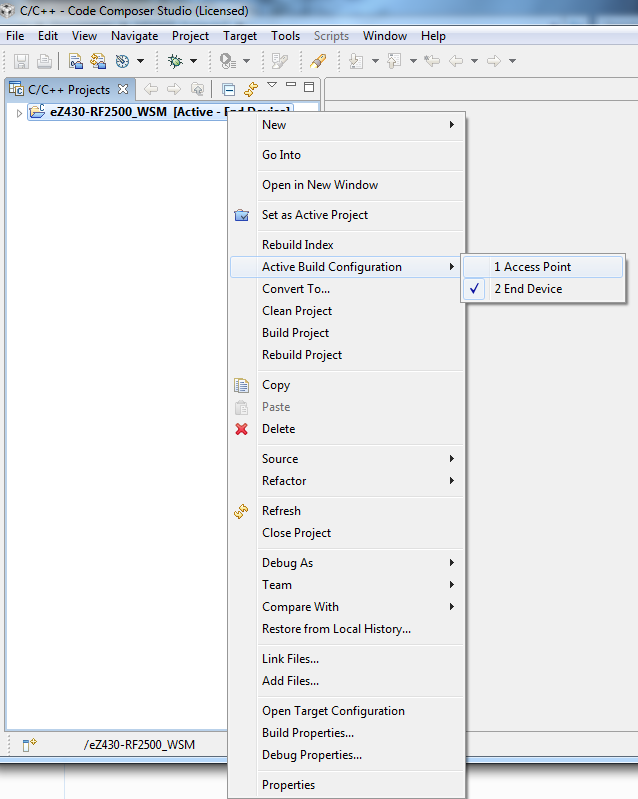
Open Zip, copy directory from zip to wherever you keep your projects. Open CCS (I'm using the version stated), File->Import->Existing Projects into Workspace->Select the folder and the "eZ430-RF2500_WSM" project is selectable. checkmark the project (should already be checked), hit Finish.
- what active build configuration have you been trying? Do they all give you errors? I found, for example the 915MHz platinum configuration builds fine for me (exact same steps) however the 915MHz version does not build properly for me.
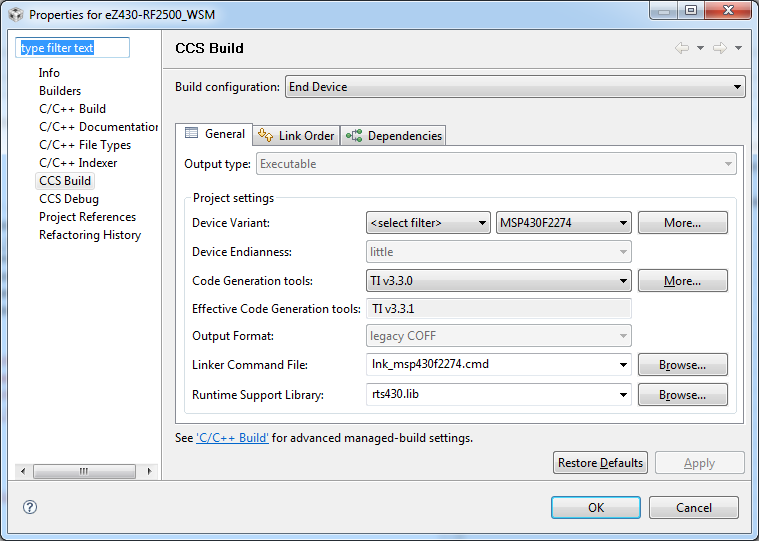
- can you go into the build settings (Project->Properties-> CCS Build and tell me what MSP430 code generation tools version is set?
I did. I will do so again and create a completely fresh workspace for it. Following previous steps I posted above (as are in the README.txt) gives the same trouble. Don't see where you're getting a 915mhz plat or non-plat config from, as I'm only given two options in the provided project. (Also to note, if you reimport this project it will cause the indexer to break.)
Oh... please respond with something that is at least relevant. Austin was merely talking about the link working. The link has always worked, it's the contents that are broken. Lisa... atleast try the steps with the link as provided... the apparent 915MHz (CC430 or Chronos project, eh?) isn't even related to an RF2500 (2.4GHz, btw). The README.txt in the zip will probably help you a little, as the linked files are not being linked... And you cannot manually link them if copying the project into your workspace (you then have to copy the Code folder into your workspace folder as well). And even after manually adding the link and importing the project without copying it into your workspace the builds for both configs fail on the mrfi_f1f2.c file. Is an example program really needing this clutter? I think you've overcomplicated it... go back to KISS.
I'm quite past even caring about this example, but perhaps you would like to have it working for other potential customers given that it is the ez430-RF2500's main (only) example program. (http://focus.ti.com/docs/toolsw/folders/print/ez430-rf2500.html)
What did you originally setup your CCS workspace location to? Was it the <INSTALL_DIR>\Embedded\CCS or something else?
If you opened the .project file with an ASCII editor, you will see an environment variable called eZ430_WSM_ROOT which is used to provide a means of portability to find the locations of the linked resources in the project. The macros.ini file in the <INSTALL_DIR>\Embedded\CCS\eZ430-RF2500_WSM directory assigns this variable to =..\Code which is where all this stuff is located.
Setting your workspace to the above directory, <INSTALL_DIR>\Embedded\CCS and performing the import as what was mentioned before should result in a successful build out of the box. It does for me as I performed these specific steps.
Ok, now that I've done that it still failed. So I manually created the linked resource (eZ430_WSM_ROOT) that is still missing and it builds with just 1 warning: "This project contains unresolved buildable linked resources. It might not build as expected."
Now you just need to get those instructions in the README, or make an easier to use example.
1) Unzipped slac139 into c:\download directory (my choice, you can use something else) which resulted in the following c:\download\eZ430-RF2500 Wireless Sensor Monitor\ 2) Invoked CCS 3) Set CCS workspace to c:\projects\workspace (again my choice, but you can use what you want). 4) Menu Project->Import Existing CCS/CCE Eclipse Project 5) Browse to C:\download\eZ430-RF2500 Wireless Sensor Monitor\Embedded\CCS 6) Discovered projects checked "eZ430-RF2500_WSM" 7) Deselect "Copy projects into workspace" 8) Finish 9) Highlight project in C/C++ Projects window pane 10) Rebuild
Built successfully with 0 errors and 0 warnings
Are these the steps you have used, or were there any differences?
Followed your steps exactly. I was just selecting "eZ430-RF2500 Wireless Sensor Monitor" as the import folder to search from, actually importing from the \Embedded\CCS folder fixes the linking issue.
Though there is still the warning:
Severity and Description Path Resource Location Creation Time Id This project contains unresolved buildable linked resources. It might not build as expected. eZ430-RF2500_WSM project 1313035611786 0
yes you were completely correct I mixed up the project with another one I was also testing out for a very similar type error (chronos project). So my appologies but I am happy to hear that you seem to have figured it out and were able to proceed.
Regarding some of the remaining messages you are getting. One thought I had was to go to the CCS Build Settings and try using the latest Code Generation Tool version. I have been seeing some code generation tool version issues with some of these labs and examples that are posted as some start to get a bit out of date or as one or two updates go by.
Brandon - thanks for the help and input as well here.
"file:/C:/gohak/MSP430%20Application%20Note/SLAA378/eZ430-RF2500%20Wireless%20Sensor%20Monitor/Embedded/CCS/Code/Configuration/smpl_config_ED.dat - (does not exist)"