This thread has been locked.

If you have a related question, please click the "Ask a related question" button in the top right corner. The newly created question will be automatically linked to this question.

LP-CC2651R3SIPA: Syscfg GUI Does Not Show "Core Kernel" as Shown In Examples

Part Number: LP-CC2651R3SIPA
Other Parts Discussed in Thread: SYSCONFIG

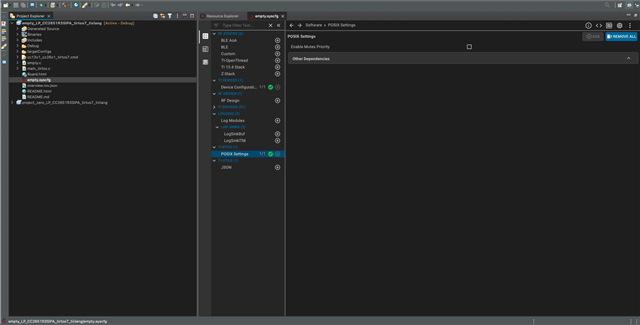
I opened the empty project example for my launchpad board included with Simplelink 7.10.0.98. When I open Syscfg and look under "TI RTOS" in the Software tab all I see is "Posix Settings" and nothing about "Core Kernel" which was described in many Ti-RTOS user guide examples. My expectation is to see the "Core Kernel" entry under "TI RTOS" where I can add my task hook. I'm new to Ti-RTOS and RTOS in general although I am familiar with the concepts. The task I am trying to accomplish is to add a Task to run and read an I2C peripheral. The environment / tools I am using are:

CCS 12.3.0.5

Simplelink 7.10.0.98

Ti-RTOS7

SysConfig 1.15.0

Mac OSx 11.7.4

Please advise if more information is needed and thanks in advance for the support

  • Attached is a screenshot of Sysconfig for empty project

  • Hi Casey,

    For you I would recommend to use our I2C Temperature sensor example located in examples/rtos/LP_CC2651RSIPA/Drivers.

    This project does the following: 

    1. Opens and initializes an I2C driver object.

    2. Determines which TMP sensor is available. Sensors are described in the sensors data structure at the top of the source.

    3. Uses the I2C driver in blocking mode to get data from the TMP sensor.

    4. Extracts the temperature (in Celsius) and prints the value via the UART.

    5. The task sleeps for 1 second.

    You can either use it in combination with our BP-BASSENSORSMKII BoosterPack or adapt it to your requirements. 

    To start with TIRTOS i would recommend to read our User manual.

    Regards,

    Alex

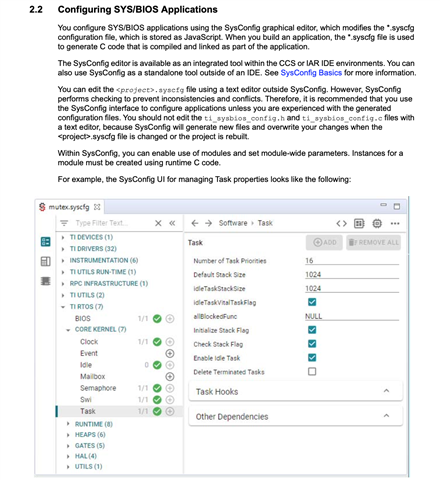
  • Hi Alex, thanks for the prompt response. While I am trying to connect to an I2C device my main problem is that in Sysconfig under the "TI RTOS" category there is no entry for "Core Kernel" which was shown in an example I was following. I did open the i2ctmp example and also did not see the "Core Kernel" entry under the "TI RTOS" category - the only entry was "POSIX Settings". I have read through most of the manual for TI-RTOS Kernel v7.x which is where I found the inconsistency between my setup and the examples. The document number is SPRUIX7 and section 2.2 demonstrates the behavior I would expect. I've attached a screenshot for reference. 

  • Hi Casey ,

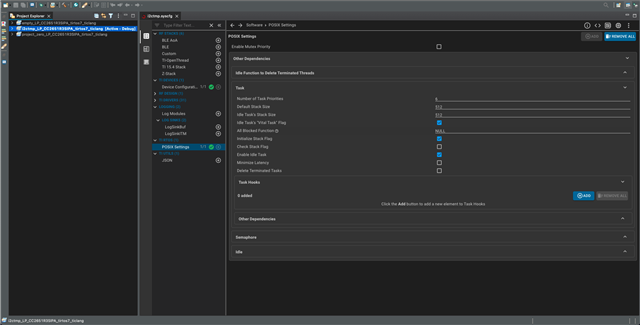
    Can you press on the "other dependency" bar within Posix settings. The features shown in the recent images will show up there.

    Regards,

    Alex

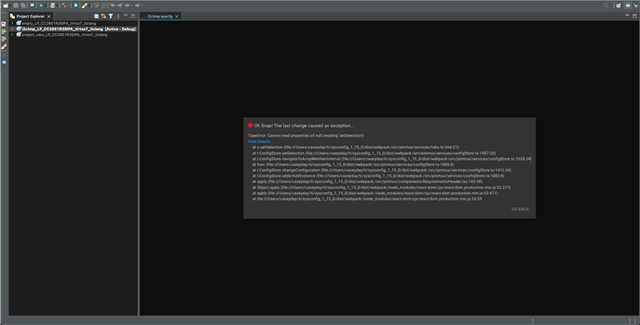
  • Thanks Alex, selecting "Other Dependency" does show options to add tasks, idle, etc... However when "Add Task Hook" (more specifically the "ADD" button in the "Task Hooks" section) is selected Code Composer throws an exception as shown in the screenshot. This behavior occurs in any of the three examples that are shown in the Project Explorer in the screenshot and none of the examples show "Core Kernel" in the "TI RTOS" section. 

  • Also, selecting "Go Back" in the selection box just returns to Sysconfig and there are no prompts to add a task or changes that are made in Sysconfig. It returns to the same state it was in before selecting "Add" in the "Task Hooks" section

  • Hi Casey,

    Can you please explain me what you want to do here. If you just want to create a new task there is a very nice SLA 

    POSIX Project Zero (ti.com)

    explainng ho to create a thread. In our SLA we there are also some explanations that should match your setup.

    Regards, 

    Alex